ToolMage
Sign in

Best 1 Generation AI tools for 3D

Popular Generation AI tools in 3D include Archsynth, helping you work more efficiently.

Archsynth
Paid

Archsynth

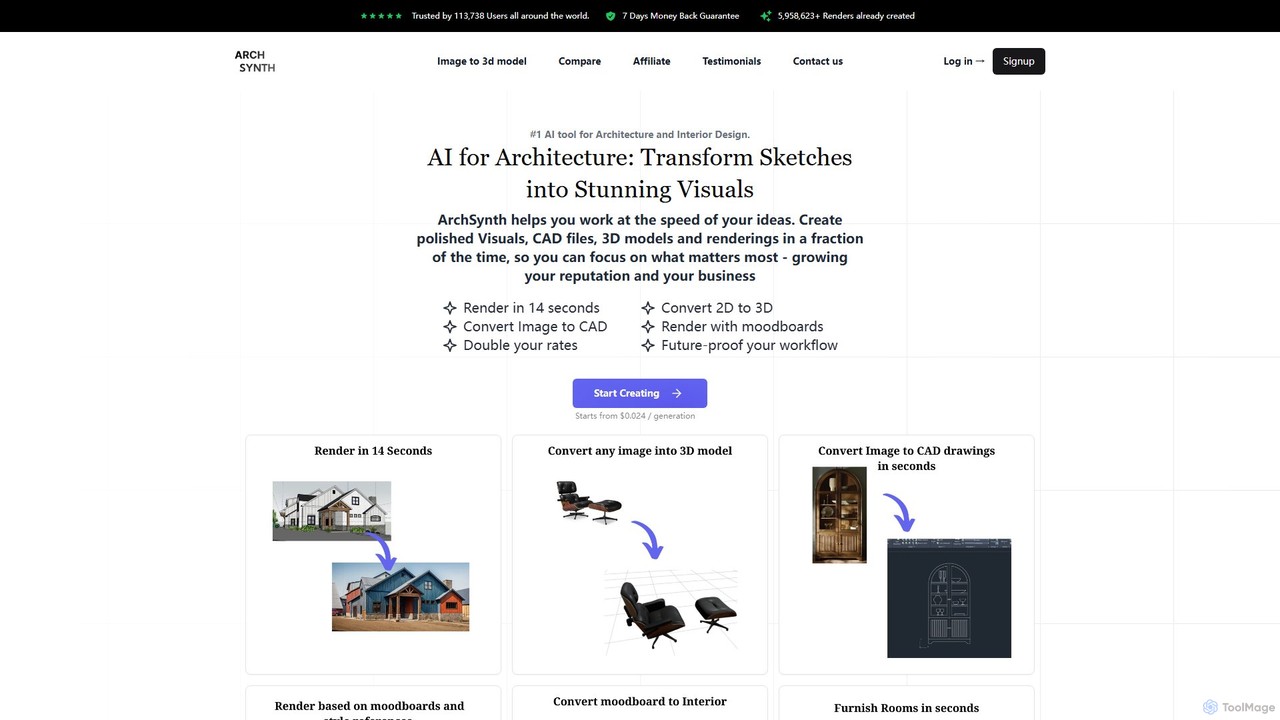
Archsynth is an all-in-one AI platform for architects and interior designers, transforming sketches, images, and text into stunning renders, 3D models, and CAD files in seconds. It streamlines the design workflow with features like AI remodeling, virtual staging, and landscape design, boosting productivity and creativity.

Generation
Visits 114KFavorites 106Likes 108

About Generation

3D Generation tools are AI-powered platforms that automatically create three-dimensional models, textures, or environments from various inputs like text descriptions, 2D images, or existing 3D data. Leveraging advanced deep learning algorithms, these tools significantly accelerate the creation of complex 3D assets, making sophisticated 3D content accessible to a wider range of users. They are invaluable for rapid prototyping, design iteration, and populating virtual worlds with diverse objects and scenes.

Core Features

  • Text-to-3D Model Generation: Converts natural language descriptions into detailed 3D objects.
  • Image-to-3D Model Generation: Transforms 2D images or sketches into volumetric 3D representations.
  • Procedural Texture & Material Creation: Automatically generates realistic textures and material properties for 3D assets.
  • 3D Scene & Environment Construction: Builds entire virtual scenes or landscapes based on prompts or reference data.
  • Asset Variation & Customization: Generates multiple iterations or customizes existing 3D models with specific attributes.

Applicable Scenarios

These tools are widely adopted in industries requiring high volumes of 3D content or rapid design cycles. Game developers use them to quickly prototype assets and environments, while product designers leverage them for exploring numerous design variations. Architectural visualization specialists can generate realistic furniture and landscape elements, significantly speeding up project delivery.

How to Choose

When selecting a 3D Generation tool, consider the types of inputs it supports (text, image, scan) and its output compatibility (e.g., OBJ, FBX, GLTF). Evaluate the quality and realism of the generated assets, as well as the level of control and customization offered. Ease of integration with your existing 3D software workflow and the pricing model are also crucial factors for effective adoption.

Featured tool rankings

Generation use cases

1

Rapid Game Asset Prototyping

Game developers and 3D artists can use AI 3D generation tools to quickly create a wide array of game assets, such as props, environmental elements, or even basic character models, directly from text descriptions or concept art. This significantly accelerates the initial prototyping phase, allowing for faster iteration and exploration of game world designs, potentially reducing asset creation time by up to 70%.

2

Product Design Iteration & Visualization

Industrial designers and product engineers can leverage these tools to generate multiple 3D design variations for new products based on initial sketches or specifications. By inputting design parameters, they can rapidly visualize different forms, textures, and material applications, streamlining the conceptualization phase and enabling more comprehensive design exploration before committing to physical prototypes.

3

Architectural & Interior Visualization

Architects, interior designers, and visualization specialists can generate realistic 3D models of furniture, decorative elements, plants, or entire outdoor landscapes for their architectural renderings and virtual walkthroughs. This eliminates the need for extensive manual modeling or searching for pre-made assets, enhancing the realism and richness of presentations while saving considerable time.

4

Marketing & Advertising Content Creation

Digital marketers and advertising agencies can utilize 3D generation tools to create unique and engaging 3D graphics or short animated sequences for campaigns, social media, and product showcases. Without requiring advanced 3D modeling expertise, they can quickly produce visually compelling content that stands out, helping to capture audience attention and convey product features in an immersive way.

5

VFX & Animation Background Element Creation

VFX artists and animators can employ these tools to quickly populate complex scenes with background elements, crowd assets, or intricate environmental details for film, TV, and animation projects. This allows them to focus their manual efforts on hero assets and key animations, while the AI handles the generation of supporting elements, adding depth and realism efficiently.

6

E-commerce Virtual Product Showcases

E-commerce businesses can generate high-quality 3D models of their products directly from 2D photographs. These 3D models can then be used for interactive product viewers on websites, augmented reality (AR) applications for virtual try-ons, or even for creating virtual showrooms. This enhances the online shopping experience, reduces the need for expensive product photography, and boosts customer engagement.

Generation FAQ

What are AI 3D Generation tools?

AI 3D Generation tools are advanced software applications that use artificial intelligence, particularly deep learning, to automatically create three-dimensional models, textures, and environments. Unlike traditional manual modeling, these tools can generate complex 3D assets from simple inputs like text descriptions, 2D images, or even audio, significantly accelerating content creation and making 3D design more accessible.

How do I choose the right 3D Generation tool for my projects?

When selecting a 3D Generation tool, consider several factors: the types of inputs it supports (e.g., text, image, scan), the quality and realism of its output, and its compatibility with your existing 3D software (e.g., Blender, Unity, Unreal Engine). Also, evaluate the level of customization offered, the learning curve, and the pricing model to ensure it aligns with your project requirements and budget.

What's the difference between AI 3D Generation and traditional 3D modeling software?

Traditional 3D modeling software requires manual manipulation of vertices, edges, and faces by a skilled artist to construct 3D objects. AI 3D Generation, conversely, automates this process, creating models based on algorithms and input data. While traditional modeling offers precise control for bespoke assets, AI generation excels at rapid prototyping, generating variations, and making 3D creation accessible to non-experts.

What types of inputs can AI 3D Generation tools use?

AI 3D Generation tools are versatile and can accept various forms of input. Common inputs include natural language text descriptions (text-to-3D), 2D images or photographs (image-to-3D), sketches, and even existing 3D models which the AI can then modify or generate variations from. Some advanced tools can also utilize point clouds or 3D scan data.

Do I need advanced 3D modeling skills to use these generation tools?

Generally, no. Many AI 3D Generation tools are designed with user-friendliness in mind, aiming to democratize 3D content creation. While a basic understanding of 3D concepts can be beneficial for refining prompts or interpreting outputs, the core generation process is handled by the AI, allowing users without extensive modeling expertise to create impressive 3D assets.