NVIDIA Build
NVIDIA Build is a comprehensive platform for developers and enterprises to discover, customize, and deploy production-ready generative AI …
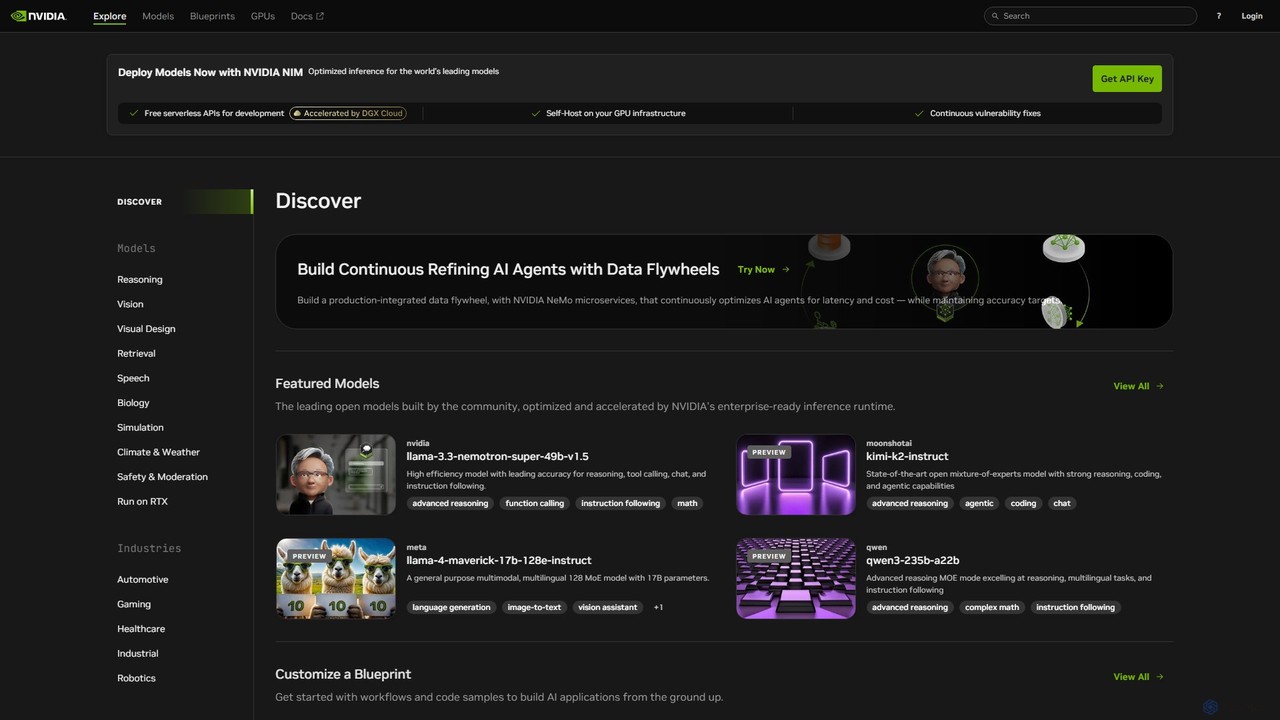
NVIDIA Build is a comprehensive platform for developers and enterprises to discover, customize, and deploy production-ready generative AI models. It features a vast catalog of optimized models, NVIDIA NIM microservices for high-performance inference, and application blueprints to accelerate development.
About Model Library
An AI Model Library is a centralized platform that provides access to a diverse collection of pre-trained artificial intelligence models. These platforms act as repositories, allowing users to discover, evaluate, and integrate models for various tasks like natural language processing, computer vision, and audio analysis. The primary value of a Model Library is to accelerate development and reduce costs by eliminating the need to train complex models from scratch. They provide a foundation for developers and researchers to build upon, enabling rapid prototyping and deployment of AI-powered features.
Core Features
- Extensive Model Catalog: Offers a wide variety of pre-trained models for different tasks, domains, and frameworks (e.g., TensorFlow, PyTorch).
- Search and Filtering: Advanced tools to find models based on task, popularity, license, or technical specifications.
- In-browser Inference APIs: Provides interactive widgets or endpoints to test a model's performance with custom inputs directly on the platform.
- Version Control and Documentation: Includes detailed model cards, usage examples, and version history to ensure transparency and reproducibility.
- Integration Support: Offers code snippets, SDKs, and APIs to simplify the process of deploying models into applications.
Use Cases
Model Libraries are primarily used by software developers, data scientists, and AI researchers. They are essential for teams that need to quickly prototype new features, such as adding text summarization to an app or image recognition to a service. Startups and enterprises also leverage these libraries to integrate advanced AI capabilities without the significant investment required for in-house model development.
How to Choose
When selecting a Model Library, consider the breadth and quality of its model collection for your specific needs. Evaluate the clarity of its documentation, the ease of use of its testing and integration tools, and the supported frameworks. Also, review the licensing terms for each model to ensure compliance for commercial use, and consider the platform's community support and activity level for troubleshooting and collaboration.

Model LibraryUse Cases
Rapid Prototyping of an App Feature
A mobile app developer needs to add a text summarization feature to their news application. Instead of spending months developing and training a proprietary model, they turn to an AI Model Library. Using the search filters, they quickly find several high-performing summarization models. They use the in-browser inference tool to test each model with sample news articles, comparing output quality and speed. Within a few hours, they select the best model and use the provided API and code snippets to integrate it into their app's backend, launching the new feature in days instead of months.
Selecting a Model for Academic Research
A university researcher is studying bias in language models. They need a baseline model to compare against their own experimental models. They access a Model Library to browse various foundational language models like BERT or GPT variants. The model cards provide crucial information on training data, architecture, and known limitations. They download a few models and their associated datasets to run benchmark tests, saving significant time and computational resources that would have been spent pre-training a baseline model from scratch.
Fine-Tuning a Model for a Niche Domain
A legal tech startup wants to build a chatbot that understands legal terminology. Training a large language model from scratch is prohibitively expensive. Instead, their data science team selects a powerful, general-purpose language model from a Model Library. They download the pre-trained model and then fine-tune it on their proprietary dataset of legal documents and Q&A pairs. This process adapts the general model to the specific nuances of legal language, resulting in a highly accurate, domain-specific chatbot at a fraction of the cost and time of building from scratch.
Integrating Voice Transcription into a Product
A company that develops meeting software wants to add an automatic transcription feature. Their engineering team explores a Model Library to find a suitable speech-to-text model. They filter models by language support, accuracy benchmarks, and latency. After testing a few promising options via their API endpoints, they choose a model that offers the best balance of speed and accuracy for their use case. Using the library's SDK, they integrate the transcription service into their software, delivering a high-value feature to customers without needing in-house speech recognition expertise.
Comparing Image Generation Models for Creative Projects
A graphic designer is exploring AI for creating unique marketing assets. They use a Model Library that hosts various text-to-image models like Stable Diffusion, Midjourney, and DALL-E variants. The platform allows them to input the same text prompt into multiple models simultaneously and compare the outputs side-by-side. This helps them understand the unique artistic style and strengths of each model. They can quickly identify which model best aligns with their brand's aesthetic, saving hours of testing on separate platforms and streamlining their creative workflow.
Automating Customer Support Ticket Categorization
A customer service manager wants to automatically categorize incoming support tickets to route them to the correct team. Their company lacks a dedicated data science team. The manager uses a Model Library to find a pre-trained text classification model. They test it using the platform's interface by pasting in examples of their support tickets. Seeing positive results, they work with a developer to use the model's API. Now, every new ticket is automatically sent to the API, which returns a category (e.g., 'Billing', 'Technical Issue'), improving response times and team efficiency without a major technical investment.