
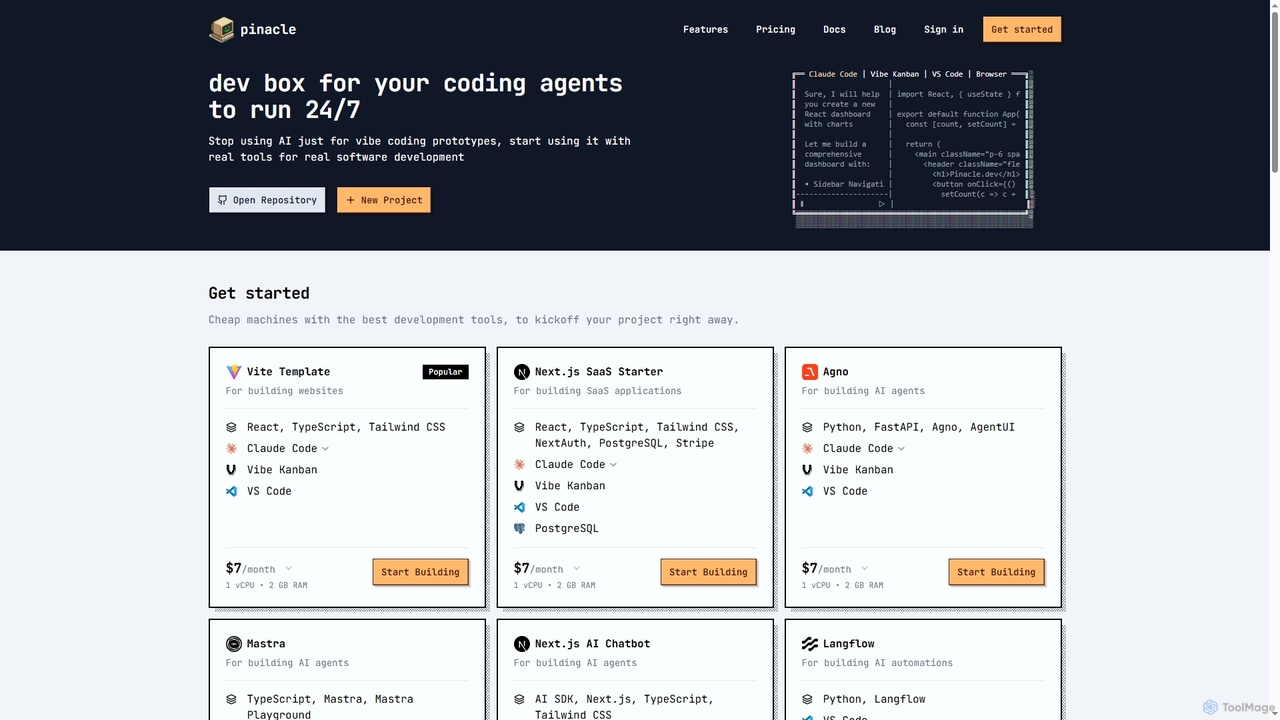
Pinacle
Pinacle provides instant, browser-based cloud development environments (VMs) designed for real software development and 24/7 AI agent operations. …
Pinacle provides instant, browser-based cloud development environments (VMs) designed for real software development and 24/7 AI agent operations. It offers pre-configured stacks, root access, and integrates popular tools like VS Code, enabling developers to build, test, and deploy projects without local setup complexities.
About Code Collaboration
Code Collaboration tools are AI-powered platforms designed to streamline and enhance the process of multiple developers working together on a shared codebase. These tools leverage advanced algorithms to facilitate real-time code editing, intelligent version control, and automated code review, significantly improving development efficiency and code quality. They provide a centralized environment where teams can co-create, review, and manage software projects with greater transparency and fewer conflicts.
Core Features
- Intelligent Version Control: Automatically tracks changes, manages branches, and helps resolve merge conflicts using AI suggestions.
- Real-time Collaborative Editing: Enables multiple developers to simultaneously edit the same code file, seeing changes instantly.
- Automated Code Review: AI analyzes code for bugs, style inconsistencies, and security vulnerabilities, providing instant feedback and suggestions.
- Integrated Development Environment (IDE) Integration: Seamlessly connects with popular IDEs, allowing developers to use familiar tools within the collaborative workflow.
- Enhanced Communication & Feedback: Provides integrated chat, comment systems, and pull request discussions directly within the code context.
Applicable Scenarios
Software development teams, from small startups to large enterprises, utilize code collaboration tools to manage complex projects. Remote development teams benefit greatly from shared workspaces and real-time synchronization. Open-source projects leverage these platforms for distributed contributions and community code reviews.
How to Choose
When selecting a code collaboration tool, consider its integration capabilities with existing IDEs and CI/CD pipelines, the robustness of its version control system, and the sophistication of its AI-powered features like automated code review. Evaluate the real-time editing performance, security protocols, and scalability to accommodate team growth. Pricing models and community support are also crucial factors.
Code CollaborationUse Cases
Real-time Pair Programming Sessions
Software engineers use code collaboration tools to conduct real-time pair programming. Two or more developers can simultaneously edit the same codebase, observe each other's changes instantly, and discuss solutions directly within the platform. This accelerates problem-solving, facilitates knowledge transfer, and ensures immediate feedback, significantly reducing development cycles for complex features.
Streamlining Remote Pair Programming
Two developers, located in different geographical areas, use a code collaboration tool to simultaneously work on the same code file. The tool's real-time editing and integrated voice/video chat allow them to discuss logic, debug issues, and write code together as if they were in the same room, significantly boosting productivity and knowledge transfer.
Streamlining Code Review Workflows
Development teams leverage AI-powered code collaboration for more efficient code reviews. Instead of manual line-by-line checks, the AI automatically flags potential bugs, performance bottlenecks, and style violations before human reviewers even start. This allows senior developers to focus on architectural decisions and complex logic, speeding up the review process by up to 50% and improving code quality.
Automating Code Review for Large Teams
A large enterprise software team uses AI-powered code collaboration to automatically scan pull requests for common errors, style violations, and potential security flaws before human reviewers even see them. This pre-screening reduces the manual review burden by up to 40%, allowing senior developers to focus on architectural decisions and complex logic.
Onboarding New Developers to Large Codebases
New team members often struggle with understanding vast, unfamiliar codebases. Code collaboration tools with AI-driven code explanations and automated documentation generation help accelerate their onboarding. The AI can provide context for functions, classes, and modules, allowing new developers to quickly grasp the project structure and contribute meaningfully within days, rather than weeks.
Managing Distributed Open-Source Contributions
An open-source project maintainer leverages a code collaboration platform to manage contributions from a global community. The tool's robust version control and pull request system simplify the process of reviewing, merging, and tracking changes from hundreds of contributors, ensuring code quality and project consistency.
Resolving Merge Conflicts with AI Assistance
Frequent merge conflicts are a common bottleneck in team development. AI code collaboration tools offer intelligent conflict resolution suggestions by analyzing code history and developer intent. This reduces the time spent manually resolving conflicts, minimizes errors, and allows developers to integrate their work more smoothly, especially in fast-paced agile environments with multiple concurrent branches.
Accelerating Onboarding for New Developers
A tech startup uses a code collaboration environment to quickly onboard new hires. New developers can easily access the entire codebase, review historical changes, and contribute to small tasks with real-time guidance from mentors, reducing the time it takes for them to become productive team members by several weeks.
Cross-functional Team Project Development
Teams comprising data scientists, machine learning engineers, and software developers often work on projects involving diverse code types (Python for ML, Java/Go for backend). Code collaboration platforms provide a unified environment where all team members can contribute, review, and integrate their code, regardless of language or framework, ensuring seamless project execution and deployment.
Resolving Complex Merge Conflicts with AI Assistance
During a critical release cycle, a development team encounters multiple conflicting changes across several branches. The code collaboration tool's AI analyzes the conflicting code segments, suggests optimal resolutions, and even automates some merges, drastically reducing the time spent on manual conflict resolution and preventing potential bugs.
Collaborative Debugging and Troubleshooting
When a critical bug arises, multiple developers can join a collaborative debugging session within the tool. They can simultaneously inspect variables, step through code, and identify the root cause together, sharing insights and testing fixes in real-time. This collective approach significantly shortens the time to diagnose and resolve complex issues, minimizing downtime and impact on users.
Facilitating Cross-Functional Team Development
A product team comprising front-end, back-end, and mobile developers works on a single application. The code collaboration platform provides a unified workspace where each specialist can contribute to their respective parts of the codebase, while integrated communication and shared task management ensure seamless coordination and dependency tracking across disciplines.