ToolMage
Sign in

Best 1 Api Client AI tools for Developer Tools

Popular Api Client AI tools in Developer Tools include Yack, helping you work more efficiently.

Yack
Free

Yack

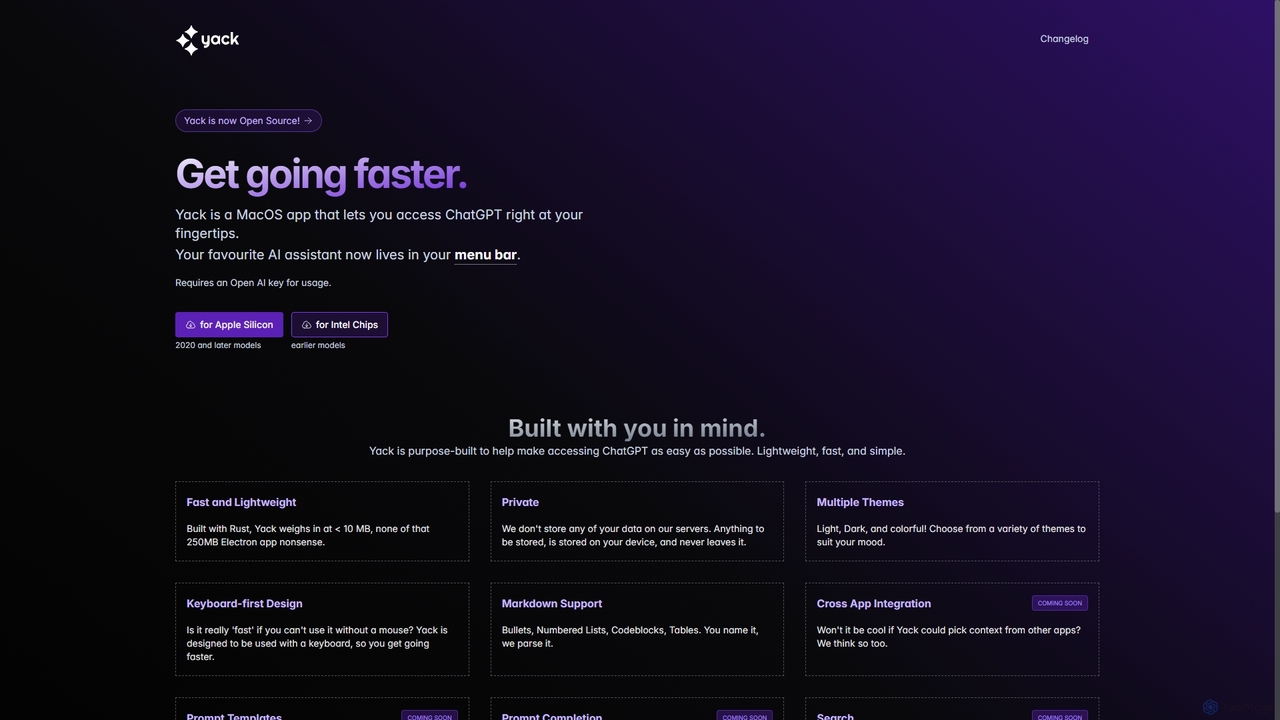
Yack is a lightweight, fast, and private open-source native macOS application that provides instant access to ChatGPT directly from your menu bar. Built with Rust, it's designed for efficiency with a keyboard-first approach, ensuring you can interact with AI without disrupting your workflow.

Api Client
Visits 8.6KFavorites 147Likes 145

About Api Client

API Clients are specialized developer tools designed to create, send, and test API requests within a structured graphical interface. As a crucial part of the developer toolkit, they streamline the process of interacting with web services by abstracting away command-line complexities. These tools provide organized workspaces for managing request collections, environments, and authentication, significantly improving debugging and development efficiency. Many modern API Clients now integrate AI features to automatically generate test cases, suggest request parameters, or create documentation from responses.

Core Features

  • Request Composer: A graphical interface for building complex HTTP/S requests, including methods, headers, body, and authentication parameters.
  • Environment Management: Allows for the creation and switching of environments with distinct variables, such as API keys and base URLs for development, staging, and production.
  • Automated Testing: Functionality to write and run test scripts that validate API responses, checking status codes, response times, and data structure.
  • Collaboration Workspaces: Features for sharing API request collections, environments, and documentation among team members to ensure consistency.
  • Protocol Support: Compatibility with various API protocols beyond REST, such as GraphQL, gRPC, and WebSockets.

Applicable Scenarios

API Clients are essential for backend developers building and debugging endpoints, frontend developers integrating with services, and QA engineers creating automated test suites. They are widely used in software development agencies, SaaS companies, and enterprise IT departments for tasks ranging from initial API exploration to continuous integration and delivery (CI/CD) pipeline validation.

Selection Criteria

When choosing an API Client, consider the scope of protocol support (REST, GraphQL, etc.), the robustness of its testing and automation features, and its collaboration capabilities. Also evaluate its integration with CI/CD tools, platform availability (desktop, web, CLI), and the pricing model, especially the features included in free versus paid tiers.

Api Client use cases

1

Backend API Development and Debugging

A backend developer is building a new user authentication endpoint. Using an API Client, they construct a POST request with various JSON payloads to test success cases (correct credentials), failure cases (incorrect password, missing fields), and edge cases. They can instantly view the server's response, including status codes and error messages, allowing them to iterate and fix bugs rapidly without needing to build a frontend interface first. This accelerates the development cycle significantly.

2

Automated QA Testing in CI/CD Pipelines

A QA engineer is responsible for ensuring new code changes don't break existing API functionality. They use an API Client to create a collection of requests that cover critical user flows. For each request, they write test scripts to assert that the response status is 200 OK and that the JSON body contains specific keys and values. This collection is then exported and run automatically via the client's command-line interface within a CI/CD pipeline (like Jenkins or GitHub Actions) every time new code is pushed, providing an automated safety net against regressions.

3

Exploring and Integrating Third-Party APIs

A developer needs to integrate a payment gateway API (like Stripe) into their e-commerce application. Before writing any code, they import the API's specification (e.g., an OpenAPI file) into their API Client. This instantly creates a collection of all available endpoints. They use the client to make test calls, understand the authentication flow (e.g., Bearer Tokens), and inspect the structure of successful responses and error messages. This hands-on exploration allows them to build a robust integration with a clear understanding of the API's behavior.

4

Creating Interactive API Documentation

A tech lead wants to improve the onboarding process for new developers. Instead of static documentation, they create a shared collection in an API Client. This collection is organized by feature, with each request having a descriptive name and detailed comments explaining its purpose, parameters, and expected response. New hires can be invited to this shared workspace, where they can execute the requests themselves, see live responses, and experiment with different inputs. This interactive approach serves as 'living documentation' that is always up-to-date and far more engaging than a traditional document.

5

Frontend Development Against a Mock Server

A frontend developer is building a new feature, but the corresponding backend API is not yet complete. To avoid being blocked, they use an API Client that includes a mock server feature. They define the expected API endpoints and the JSON responses the real API will eventually return. The API Client provides a local URL that the frontend application can call, which serves these predefined mock responses. This allows the developer to build and test the entire user interface, including data rendering and error handling, in parallel with backend development.

6

AI-Assisted Test Case Generation

A developer is working on a complex API with numerous parameters. Using a modern API Client with AI capabilities, they can simply provide the API endpoint and a sample request. The AI assistant analyzes the request structure and suggests a variety of test cases, including valid inputs, invalid data types, empty strings, and boundary values for numerical fields. This automates the tedious process of manually creating comprehensive test suites, helping the developer identify potential bugs and improve API robustness with minimal effort.

Api Client FAQ

What is an API Client?

An API Client is a software application that provides a graphical user interface for developers to interact with APIs. Instead of using command-line tools, developers can use an API Client to easily build requests, manage different environments (like development and production), save request history, and write automated tests. They are essential developer tools for building, testing, and debugging any application that communicates with web services.

How to choose the right API Client?

Choosing the right API Client depends on your specific needs. Consider the following factors:

  • Protocol Support: Does it support the protocols you use (e.g., REST, GraphQL, gRPC, WebSockets)?
  • Collaboration: Do you need to share collections and environments with a team? Look for strong team workspace features.
  • Automation & CI/CD: Do you plan to run tests automatically? Check for a command-line interface (CLI) and integration capabilities.
  • Platform: Do you need a native desktop app, a web-based client, or both?
  • AI Features: Do you want AI assistance for generating tests, documentation, or explaining responses?
What's the difference between an API Client and using cURL?

cURL is a powerful command-line tool for making single HTTP requests, excellent for scripting and quick checks. An API Client is a full-featured application built around the entire API development workflow. While cURL handles one request at a time, an API Client allows you to organize hundreds of requests into collections, manage variables for different environments, write complex test scripts, and collaborate with a team in a shared workspace. It provides a graphical interface that makes complex requests much easier to build and debug.

What are the key features of a modern API Client?

Modern API Clients go beyond simple request sending. Key features include:

  • Multi-protocol Support: Handling REST, GraphQL, gRPC, and WebSockets in one application.
  • Collaboration: Real-time syncing of collections, environments, and comments in team workspaces.
  • Automation: A command-line runner (CLI) for integrating API tests into CI/CD pipelines.
  • Mock Servers: The ability to create mock API endpoints that return example data for frontend development.
  • AI Assistance: AI-powered features for generating tests, writing documentation, or auto-completing requests.
Who are the primary users of API Clients?

API Clients are primarily used by technical professionals who build or interact with software services. This includes:

  • Backend Developers: For building, testing, and debugging the APIs they create.
  • Frontend & Mobile Developers: For interacting with and testing the APIs their applications consume.
  • QA Engineers / Testers: For creating and running automated API test suites to ensure quality and prevent regressions.
  • DevOps Engineers: For integrating API health checks and tests into deployment pipelines.
  • Technical Writers: For creating accurate and interactive API documentation.