
ToolMage
Sign in

Best 7 Coding AI tools for Developer Tools

Popular Coding AI tools in Developer Tools include Chatbox AI, BoltAI, Jovian, ilingban, 30tools, Foretoken AI, and Beamcast, helping you work more efficiently.

Beamcast
Freemium

Beamcast

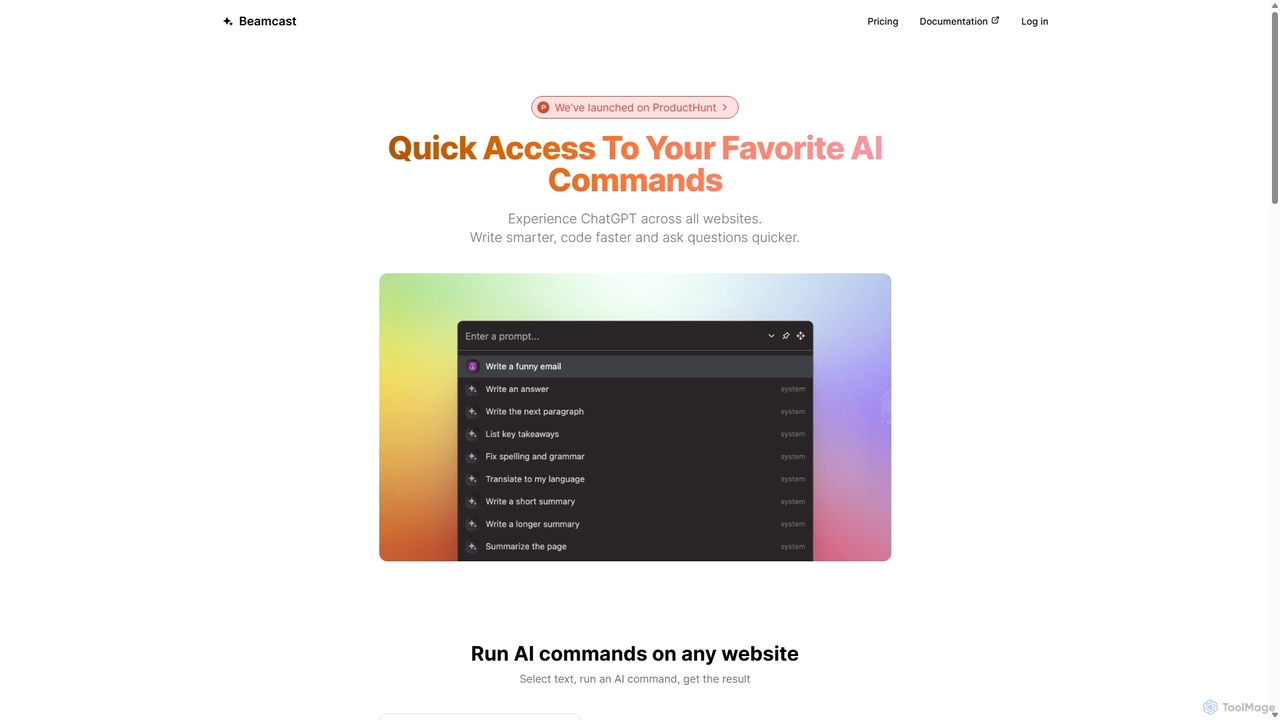
A browser extension that puts ChatGPT and Gemini at your fingertips. Select text on any website to run built-in or custom AI commands for writing, coding, and quick answers, streamlining your workflow and boosting productivity without ever leaving the page.

Search
Visits 3.4KFavorites 116Likes 116

About Coding

AI Coding tools are a category of AI-powered software designed to assist developers in writing, debugging, testing, and optimizing code. Leveraging advanced machine learning models, these tools can understand context, generate code snippets, identify errors, and suggest improvements, significantly accelerating the software development lifecycle. They empower developers to focus on complex problem-solving by automating repetitive and time-consuming coding tasks.

Core Features

  • Code Generation: Automatically generates functions, classes, or entire scripts from natural language descriptions or existing code context.
  • Intelligent Code Completion: Provides highly accurate and context-aware code suggestions beyond basic autocomplete, predicting developer intent.
  • Automated Debugging & Error Detection: Identifies potential bugs, syntax errors, and logical flaws in real-time, often suggesting fixes.
  • Code Refactoring & Optimization: Analyzes code for inefficiencies and suggests improvements for performance, readability, and maintainability.
  • Test Case Generation: Creates relevant unit tests and integration tests based on existing code logic and expected behavior.

Applicable Scenarios

AI coding tools are invaluable for individual developers seeking to boost productivity, development teams aiming for faster iteration cycles, and enterprises looking to maintain high code quality. They are particularly useful in rapid prototyping, learning new programming languages, maintaining large legacy codebases, and ensuring consistent coding standards across projects.

How to Choose

When selecting an AI coding tool, consider its compatibility with your preferred programming languages and IDEs, the accuracy and relevance of its code suggestions, its security features for handling sensitive code, and its pricing model. Evaluate the learning curve, community support, and the tool's ability to integrate seamlessly into your existing development workflow to maximize its benefits.

Featured tool rankings

Coding use cases

1

Rapid API Endpoint Generation

A backend developer needs to quickly create multiple REST API endpoints for a new service. Using an AI coding tool, they can describe the desired endpoint functionality in natural language (e.g., "create a GET endpoint for users with pagination"). The AI generates the boilerplate code, including routing, request handling, and basic data retrieval, allowing the developer to focus on business logic and significantly reduce setup time.

2

Automated Unit Test Creation

A QA engineer or developer is tasked with increasing code coverage for an existing module. Instead of manually writing numerous unit tests, they can use an AI coding assistant to analyze the module's functions and automatically generate a comprehensive suite of test cases. This ensures robust testing, catches edge cases, and frees up time for more complex testing scenarios.

3

Legacy Code Modernization

An experienced developer is working on updating an outdated application written in an older framework or language. An AI coding tool can assist by suggesting modern syntax equivalents, refactoring patterns, and identifying deprecated functions. This accelerates the migration process, reduces the risk of introducing new bugs, and improves the maintainability of the modernized codebase.

4

Learning New Programming Languages

A student or a developer transitioning to a new programming language (e.g., Python to Go) can leverage AI coding tools as an interactive learning aid. By describing desired functionality, the AI can generate code examples in the new language, explain syntax, and even suggest best practices, making the learning curve smoother and more efficient than relying solely on documentation.

5

Debugging Complex Applications

A software engineer is troubleshooting a subtle bug in a large, distributed application. An AI coding assistant can analyze stack traces, error messages, and surrounding code context to pinpoint potential root causes. It can suggest specific lines of code to examine, propose fixes, or even generate diagnostic code snippets, drastically reducing the time spent on debugging complex issues.

6

Code Refactoring for Performance

A senior developer identifies a performance bottleneck in a critical section of an application. An AI coding tool can analyze the code's execution path and resource consumption, then propose optimized algorithms or data structures. It can suggest more efficient ways to handle loops, memory allocation, or database queries, leading to significant performance improvements without extensive manual analysis.

Coding FAQ

What are AI Coding Tools?

AI Coding tools are software applications that utilize artificial intelligence, particularly machine learning and natural language processing, to assist developers in various coding tasks. They go beyond traditional IDE features by understanding code context, generating new code, suggesting intelligent completions, and identifying potential issues, thereby enhancing productivity and code quality.

How do AI coding tools differ from traditional code editors/IDEs?

Traditional code editors and IDEs provide essential features like syntax highlighting, basic autocomplete, and project management. AI coding tools, however, integrate advanced intelligence. They can generate entire functions from comments, suggest complex code structures, detect subtle bugs, and refactor code based on semantic understanding, offering a more proactive and intelligent coding assistance.

What are the main benefits of using AI in coding?

The primary benefits include significantly increased developer productivity by automating repetitive tasks, improved code quality through intelligent suggestions and error detection, faster learning for new languages or frameworks, and reduced debugging time. AI coding tools also help maintain consistent coding standards and accelerate the overall software development lifecycle.

Can AI coding tools integrate with existing IDEs and workflows?

Yes, most modern AI coding tools are designed to integrate seamlessly with popular Integrated Development Environments (IDEs) like VS Code, IntelliJ IDEA, PyCharm, and others. They often come as plugins or extensions, allowing developers to leverage AI capabilities directly within their familiar coding environment without disrupting their existing workflow.

How to choose the right AI coding assistant for my needs?

When selecting an AI coding assistant, consider its compatibility with your primary programming languages and development environment. Evaluate the accuracy and relevance of its code generation and completion features, its security protocols for handling your codebase, and its pricing model. Also, look for tools with good documentation, community support, and a clear roadmap for future enhancements.