ToolMage
Sign in

Best 2 Ide Extension AI tools for Developer Tools

Popular Ide Extension AI tools in Developer Tools include runyoyo and Archittect, helping you work more efficiently.

Archittect
Paid

Archittect

Archittect is an AI-powered code generation tool designed to eliminate repetitive boilerplate coding. Integrated directly into VSCode, it allows developers and teams to create, customize, and share dynamic project scaffolds. By automating the setup of files, folders, and code snippets, Archittect dramatically accelerates the development process, ensures code consistency, and lets you focus on building unique features instead of writing the same code over and over again.

Code Generation
Visits 3.4KFavorites 104Likes 96
runyoyo
Freemium

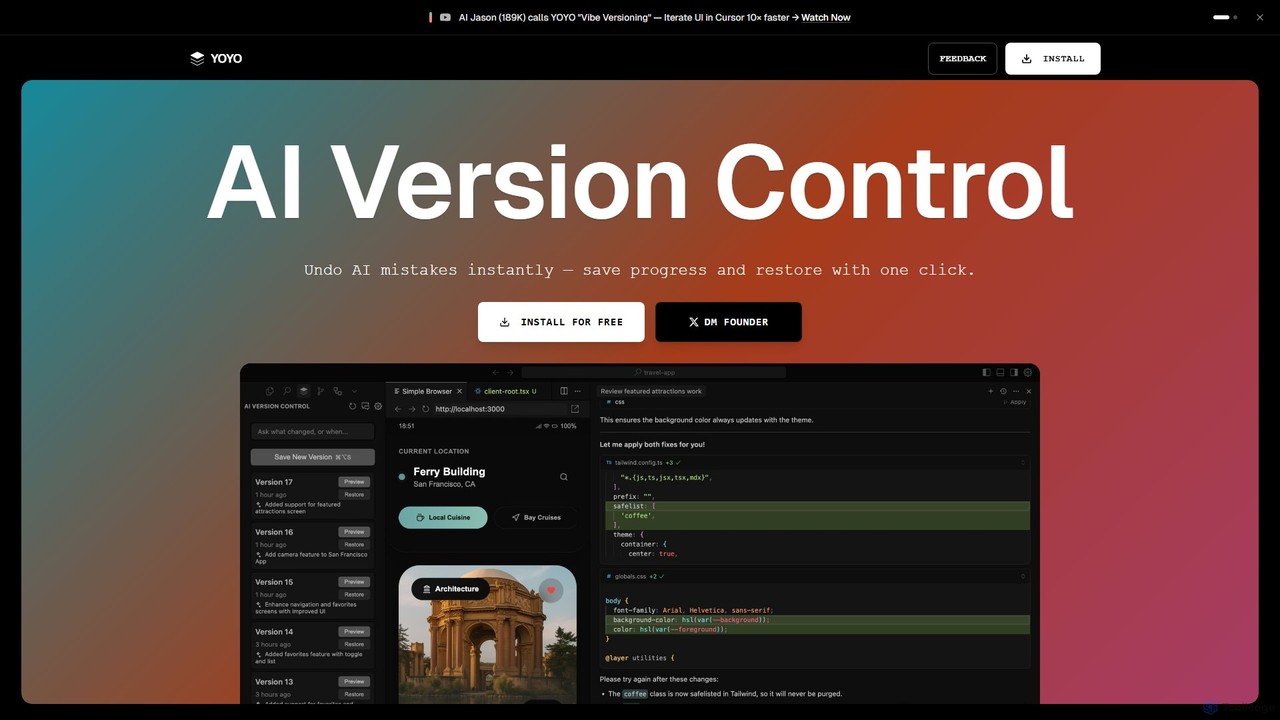
runyoyo

runyoyo is an AI-native version control system designed for the era of 'Vibe Coding'. It allows developers to instantly save progress, undo AI-generated mistakes with a single click, and search their entire coding timeline. It works alongside Git to keep your main repository clean while you experiment freely with AI assistants in IDEs like VS Code and Cursor.

Ide Extension
Visits 3.4KFavorites 109Likes 98

About Ide Extension

IDE Extensions are AI-powered plugins that integrate directly into your Integrated Development Environment (IDE) to augment the software development lifecycle. These tools leverage large language models (LLMs) trained on vast codebases to provide context-aware assistance, from code generation to debugging. They act as an intelligent pair programmer, helping developers write better code faster and reduce cognitive load. This direct integration allows for real-time feedback and suggestions without leaving the coding environment.

Core Features

  • AI Code Completion: Generates multi-line, contextually relevant code snippets and entire functions based on existing code and natural language comments.
  • Code Refactoring & Optimization: Analyzes code blocks and suggests improvements for readability, performance, and adherence to best practices.
  • Automated Bug Detection & Fixing: Identifies potential errors, logical flaws, and security vulnerabilities in real-time and often provides one-click solutions.
  • Natural Language to Code: Translates plain language descriptions or requirements into functional code, accelerating prototyping and development.
  • Automated Test Generation: Creates unit tests and test cases for functions and methods, helping to improve code coverage and reliability.

Use Cases

These extensions are primarily used by software developers, data scientists, and DevOps engineers across all industries. In a typical workflow, a developer might use an AI extension to generate boilerplate for a new API endpoint, get suggestions for optimizing a complex algorithm, or automatically create documentation for a recently completed function. They are also valuable learning aids for students and junior developers.

How to Choose

When selecting an AI IDE Extension, consider its compatibility with your specific IDE (e.g., VS Code, JetBrains, Eclipse) and primary programming languages. Evaluate the depth of its feature set—whether you need simple autocompletion or advanced capabilities like refactoring and test generation. Also, review the tool's performance impact on your IDE and, crucially, its data privacy and security policies regarding how your code is handled.

Featured tool rankings

Ide Extension use cases

1

Accelerating Backend API Development

A backend developer is tasked with creating a new set of RESTful API endpoints for a user management service. Instead of writing all the boilerplate code manually, they use an AI IDE extension. By writing a simple comment like 'create a POST endpoint to register a new user with email and password', the extension generates the complete function signature, request body validation, database interaction logic, and success/error responses. This significantly reduces development time for repetitive tasks, allowing the developer to focus on core business logic and complex integrations.

2

Refactoring Legacy Code for Maintainability

A senior developer is working on a legacy system with large, complex functions that are difficult to understand and maintain. They use an AI IDE extension's refactoring capabilities. By highlighting a monolithic function, the developer can ask the tool to 'refactor this into smaller, single-responsibility functions'. The AI analyzes the code's logic, identifies distinct operations, and suggests breaking it down into several smaller, well-named functions. It also updates all the call sites automatically. This process improves code readability and makes future modifications safer and easier.

3

Automated Unit Test Generation

A developer has just finished implementing a complex data processing function and needs to ensure its correctness by writing unit tests. Using an AI IDE extension, they can right-click the function and select 'Generate Unit Tests'. The tool analyzes the function's inputs, outputs, and edge cases (e.g., null inputs, empty arrays) and automatically generates a suite of test cases using the project's testing framework (like Jest or PyTest). This not only saves significant time but also helps achieve higher code coverage and catches potential bugs that might have been missed in manual test writing.

4

Debugging and Explaining Code Errors

A junior developer encounters a cryptic error message, such as a 'NullPointerException', and is unsure of the root cause. They highlight the problematic code block and use the AI extension's 'Explain Error' feature. The tool analyzes the code execution path, identifies the exact line where a variable becomes null, and provides a clear, natural language explanation of why the error is occurring. It then suggests several possible fixes, such as adding a null check or initializing the variable correctly. This transforms the debugging process from frustrating guesswork into a guided learning experience.

5

Learning a New Language or Framework

A developer experienced in Python needs to quickly pick up JavaScript for a new project. While working in their IDE, they use an AI extension as a learning companion. When they are unsure how to perform a task, like fetching data from an API, they can write a comment: 'fetch user data from /api/users and log the names'. The AI provides the correct JavaScript code using 'fetch' and '.then()', along with a brief explanation of how asynchronous operations work in JavaScript. This in-context learning is far more efficient than constantly switching to a web browser to search for documentation.

6

Automating Documentation Writing

A team lead wants to improve the documentation quality of their project's codebase. Instead of having developers manually write docstrings for every function, they use an AI IDE extension. After a developer writes a function, they can trigger a command like 'Generate Docstring'. The AI analyzes the function's parameters, return types, and internal logic to generate a comprehensive and well-formatted documentation comment (e.g., in JSDoc or Python's reST format). This ensures consistency across the codebase and frees up developer time to focus on writing code rather than documenting it.

Ide Extension FAQ

What is an AI IDE Extension?

An AI IDE Extension is a plugin for an Integrated Development Environment (IDE) that uses artificial intelligence to assist developers in real-time. It acts as an intelligent coding assistant directly within the editor. Key features typically include advanced code completion, bug detection, code refactoring, and generating code from natural language prompts. The primary goal is to increase developer productivity, improve code quality, and reduce the time spent on repetitive coding tasks.

How to choose the right AI IDE Extension?

Choosing the right extension depends on your specific needs. Consider the following factors:

  • IDE and Language Support: Ensure the extension is compatible with your preferred IDE (e.g., VS Code, JetBrains) and the programming languages you use most.
  • Feature Set: Determine if you need basic code completion or a full suite of tools including debugging, refactoring, and test generation.
  • Performance: Check user reviews or trial the extension to see if it negatively impacts your IDE's speed and responsiveness.
  • Privacy and Security: Review the tool's privacy policy to understand how your code is processed. For proprietary or sensitive projects, prefer tools that offer local processing or have strong data protection guarantees.
What's the difference between an AI IDE Extension and a traditional linter?

A traditional linter and an AI IDE extension serve different purposes. A linter is a static code analysis tool that checks for stylistic errors, programming mistakes, and adherence to a predefined set of rules (e.g., PEP 8 in Python). Its focus is on code quality and consistency based on rules.

An AI IDE extension, on the other hand, understands the context and intent behind the code. It doesn't just check for rule violations; it can generate new code, suggest complex refactors, explain logic, and fix bugs based on a deeper, semantic understanding of the program. It's a generative and assistive tool, whereas a linter is primarily a validation tool.

Will AI IDE Extensions replace human developers?

No, AI IDE extensions are designed to be powerful assistants, not replacements for developers. They excel at automating repetitive tasks, generating boilerplate code, and providing quick solutions to common problems. However, they lack the critical thinking, creativity, and architectural design skills of a human developer. Developers are still essential for understanding business requirements, designing complex systems, making high-level architectural decisions, and solving novel problems. These tools augment a developer's abilities, allowing them to focus on more creative and strategic aspects of software engineering.

Is my code secure when using an AI IDE Extension?

Security is a critical consideration. The security of your code depends on the specific extension's policy. Some tools process your code locally on your machine, ensuring it never leaves your environment. Others send code snippets or context to a cloud server for processing. It is crucial to:

  • Read the Privacy Policy: Understand what data is collected, where it is sent, and how it is used (e.g., for model training).
  • Check for Enterprise Options: Many providers offer enterprise plans with stricter security guarantees, such as private deployments or zero data retention policies.
  • Consider the Project's Sensitivity: For highly confidential or proprietary codebases, you should only use tools that guarantee local processing or have been explicitly approved by your organization's security team.