
ToolMage
Sign in

Best 1 Sketch To Image AI tools for Image Editing

Popular Sketch To Image AI tools in Image Editing include Floor Plan, helping you work more efficiently.

Floor Plan
Freemium

Floor Plan

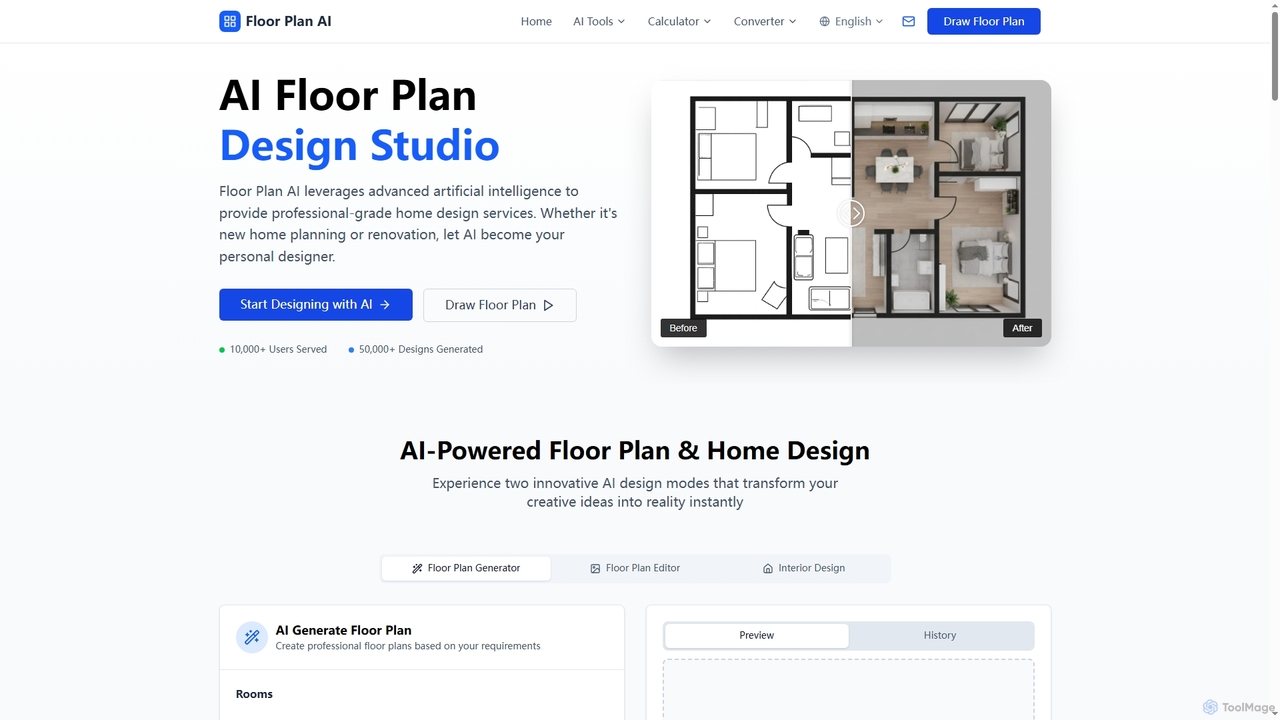
Floor Plan is an advanced AI-powered platform offering comprehensive home and architectural design solutions. It enables users to generate 2D floor plans, transform sketches into photorealistic images, create stunning 3D visualizations from 2D layouts, and instantly stage empty rooms with AI-driven interior designs. Ideal for professionals and homeowners seeking fast, accurate, and creative design tools.

Floor Planning
Visits 395.3KFavorites 95Likes 102

About Sketch To Image

Sketch To Image tools are AI-powered applications that transform rough sketches or drawings into polished, realistic images. These tools leverage advanced generative AI models, often based on diffusion or GAN architectures, to interpret visual input from simple lines and shapes. They enable designers, artists, and creators to quickly visualize concepts, iterate on ideas, and produce high-quality visuals from initial outlines. This significantly accelerates the creative workflow, bridging the gap between initial ideation and final rendering within the broader field of AI image editing.

Core Features

  • Sketch Interpretation: Accurately translates lines, shapes, and shading from a rough sketch into a coherent image structure.
  • Style Application: Applies various artistic styles, textures, and lighting effects to the generated image based on prompts or selected presets.
  • Detail Enhancement: Adds intricate details, realistic textures, and nuanced shading that are absent in the original simple sketch.
  • Prompt-Guided Generation: Allows users to refine the output by adding text prompts, guiding the AI to generate specific elements or moods.
  • Real-time Feedback: Some tools offer instant previews, enabling users to see changes as they draw or modify prompts.

Use Cases

These tools are invaluable for professionals across creative industries. They are used by concept artists to rapidly prototype visual ideas, by product designers to visualize new concepts, and by architects to render initial design sketches into realistic proposals, streamlining the early stages of visual development.

How to Choose

When selecting a Sketch To Image AI tool, consider its sketch interpretation accuracy, the versatility of available styles, and the level of control offered through text prompts or other customization options. Evaluate the generation speed and the quality of detail enhancement to ensure it meets your specific creative workflow demands.

Sketch To Image use cases

1

Generate Game Concept Art from Sketches

Game artists can use Sketch To Image tools to rapidly transform rough character or environment sketches into diverse, detailed concept art. By inputting a basic drawing and adding text prompts for style or mood, they can generate multiple visual iterations in minutes, significantly accelerating the ideation and pre-production phases of game development and saving hours of manual rendering time.

2

Visualize Product Designs from Hand-Drawn Ideas

Industrial designers and product developers leverage these tools to convert initial hand-drawn product sketches into photorealistic or stylized renderings. This allows for quick visualization of new concepts, material exploration, and form factor adjustments without needing complex 3D modeling software, enabling faster design reviews and client presentations.

3

Create Architectural Renderings from Floor Plans

Architects and interior designers can transform simple floor plans or elevation sketches into realistic architectural visualizations. By providing a basic layout and specifying materials or lighting through prompts, they can quickly generate compelling visual proposals for clients, reducing the time and cost associated with traditional rendering processes and enhancing client understanding.

4

Develop Storyboard Frames for Animation

Animators and storyboard artists utilize Sketch To Image AI to convert rough storyboard panels into more detailed and visually rich frames. This helps in visualizing the flow and aesthetics of a scene more clearly, allowing for quicker feedback and adjustments before committing to full animation production, thereby streamlining the pre-visualization stage.

5

Prototype Fashion Designs from Initial Doodles

Fashion designers can use these tools to bring their initial garment sketches to life, experimenting with different fabrics, patterns, and textures. By inputting a design sketch and describing desired attributes, they can quickly generate various visual prototypes, aiding in design iteration and presentation without the need for physical samples, accelerating the design cycle.

6

Produce Marketing Visuals from Simple Ideas

Marketing professionals and content creators can transform basic doodle ideas or rough layouts into polished marketing visuals for campaigns, social media, or advertisements. This capability reduces reliance on stock imagery and complex graphic design, enabling rapid content creation and visual experimentation to capture audience attention more effectively.

Sketch To Image FAQ

What are Sketch To Image AI tools?

Sketch To Image AI tools are specialized applications that use artificial intelligence to convert rough, hand-drawn sketches or digital outlines into detailed, high-quality images. They interpret the basic visual information from your drawing and, often guided by text prompts, generate a fully rendered image. These tools are invaluable for accelerating creative workflows, allowing users to quickly visualize concepts and iterate on designs without extensive manual rendering.

How do Sketch To Image tools convert drawings into images?

Sketch To Image tools typically employ advanced generative AI models, such as diffusion models or Generative Adversarial Networks (GANs). When you input a sketch, the AI analyzes its lines, shapes, and spatial relationships. It then uses its training data to "fill in" the details, textures, and lighting, often guided by additional text prompts you provide. This process transforms the abstract sketch into a coherent, stylized, or realistic image, effectively hallucinating the missing visual information.

What are the main benefits of using Sketch To Image AI?

The primary benefits include significantly accelerated creative workflows, enabling rapid ideation and prototyping. Users can quickly generate multiple visual variations from a single sketch, reducing manual effort and time. These tools also lower the barrier to entry for visual creation, allowing individuals with basic drawing skills to produce professional-grade images. They enhance visualization capabilities, making it easier to communicate complex ideas and iterate designs efficiently.

How do Sketch To Image tools differ from general AI Image Editing tools?

While both fall under AI image tools, Sketch To Image specifically focuses on generating a new image from a basic sketch input, essentially creating visual content from scratch. General AI Image Editing tools, conversely, primarily modify existing images. This includes tasks like background removal, object manipulation, upscaling, or applying filters to a photograph. Sketch To Image is about creation from an abstract idea, whereas image editing is about refinement or alteration of an existing visual.

What should I look for when choosing a Sketch To Image AI tool?

When selecting a Sketch To Image AI tool, consider several key factors. Firstly, evaluate its sketch interpretation accuracy – how well it translates your lines into recognizable objects. Secondly, assess the variety and quality of available styles, from realistic to artistic. Thirdly, look for control and customization options, such as the ability to refine outputs with text prompts or masks. Finally, consider the generation speed, ease of use, and whether it integrates with your existing design software for a seamless workflow.