ToolMage
Sign in

Best 1 Model Generation AI tools for Image

Popular Model Generation AI tools in Image include aimodelagency, helping you work more efficiently.

Paid

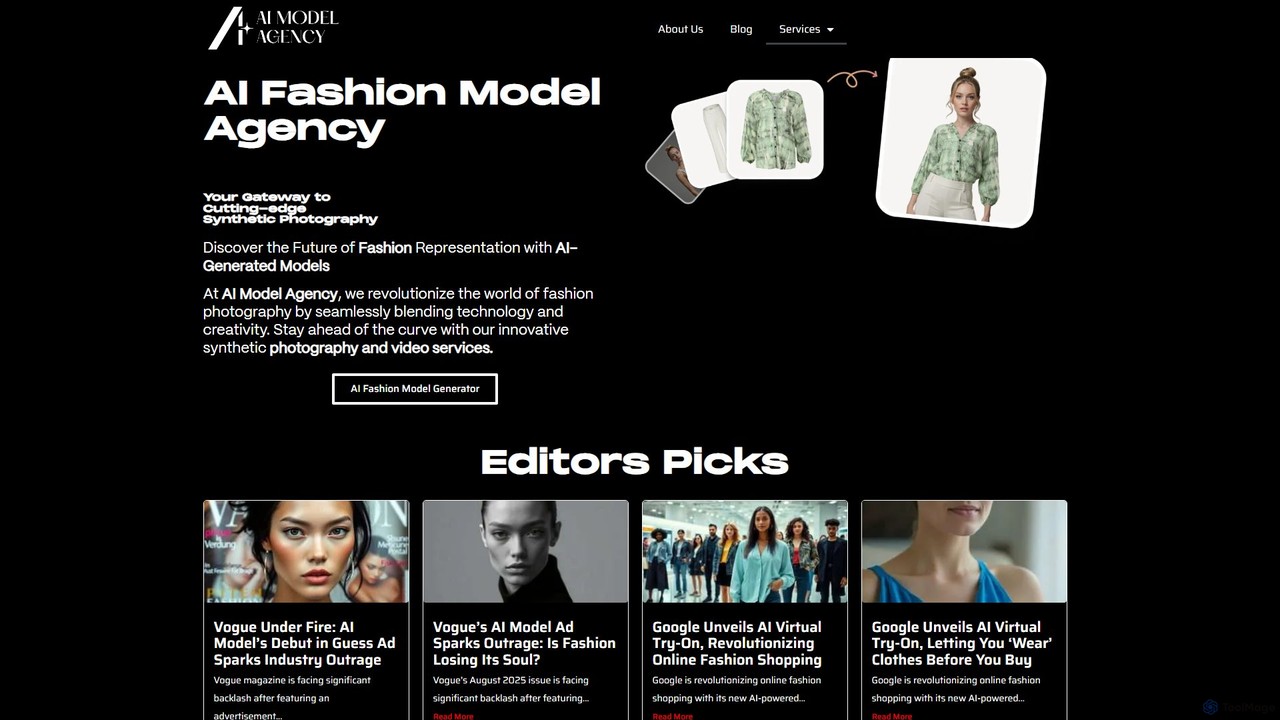
aimodelagency

aimodelagency is a pioneering AI fashion modeling agency that provides cutting-edge synthetic photography and video services. It specializes in creating hyper-realistic, customizable AI-generated models for e-commerce, advertising campaigns, and fashion brands. By blending technology with creativity, the agency helps businesses enhance their visual content, boost conversions, and significantly reduce production costs and time compared to traditional photoshoots.

Virtual Influencers
Visits 3.4KFavorites 127Likes 124

About Model Generation

Model Generation tools are AI-powered platforms that automatically create new visual models, often in 3D, from various inputs. Leveraging advanced AI algorithms like generative adversarial networks (GANs) and diffusion models, these tools transform text descriptions, 2D images, or sketches into detailed 3D assets, character models, or even specialized AI models (e.g., LoRAs) for image generation. They significantly accelerate content creation workflows, enabling designers, developers, and artists to rapidly prototype and produce complex visual elements for diverse applications within the broader field of image creation, offering a powerful bridge between conceptualization and tangible digital assets, thereby democratizing access to advanced 3D content production.

Core Features

  • Text-to-3D/Model: Generates intricate 3D objects, characters, or entire scenes directly from descriptive textual prompts, streamlining initial design phases and enabling rapid ideation.
  • 2D-to-3D Conversion: Transforms flat 2D images, concept art, or photographs into fully three-dimensional models, greatly simplifying asset creation from existing visuals and legacy content.
  • Custom AI Model Training: Enables users to create specialized AI models (like LoRAs or custom checkpoints) tailored for specific artistic styles, characters, or objects, ensuring consistent output and brand identity in subsequent image generation tasks.
  • Automatic Texturing & Rigging: Applies realistic textures, materials, and prepares generated models with skeletal structures for animation or seamless integration into game engines, rendering software, and virtual environments.
  • Style Transfer & Variation: Allows for the application of different artistic styles to generated models or the creation of multiple variations from a single input, fostering creative exploration and diverse design outcomes.

Use Cases

These tools are invaluable across industries for accelerating visual content production and fostering innovation. In game development, they are widely adopted for rapidly creating unique characters, props, and environmental assets, significantly reducing manual modeling time and enabling faster iteration cycles. For product design, they facilitate quick prototyping and realistic visualization of new concepts, allowing designers to present high-fidelity models for marketing and stakeholder review without extensive manual effort. Furthermore, they are crucial in virtual and augmented reality for populating immersive digital experiences with diverse and detailed 3D objects and environments. Artists and content creators also leverage these tools to train personalized AI models for consistent stylistic output in their creative projects, pushing the boundaries of digital art and personalized content generation.

How to Choose

When selecting a Model Generation tool, consider its input flexibility, assessing whether it robustly supports text, 2D images, or even 3D scans as source material, which impacts versatility. Evaluate the quality and level of detail of its output models, ensuring they meet your project's fidelity requirements, from low-poly game assets to high-resolution renders. Compatibility with your existing workflows is paramount, so check for support of standard export formats like OBJ, FBX, GLB, and USDZ, as well as potential integrations with popular design software. Additionally, assess the ease of customization for generated assets, the cost structure, and the availability of pre-trained models or a strong community support for specific needs, ensuring a scalable, efficient, and future-proof solution for your content creation pipeline.

Featured tool rankings

Model Generation use cases

1

Generate Game Characters & Assets

Game developers can input text descriptions or concept art to rapidly generate unique 3D character models, environmental props, and architectural elements. This significantly accelerates the asset creation pipeline, allowing for faster prototyping and iteration of game worlds, reducing manual modeling time by up to 70% and enabling more diverse in-game content.

2

Product Design Prototyping

Industrial designers and engineers utilize these tools to quickly create realistic 3D models of new product concepts. By feeding sketches or design specifications, they can generate multiple design variations for visualization, testing, and stakeholder feedback, streamlining the design iteration process and bringing products to market faster.

3

Architectural & Interior Visualization

Architects and interior designers can generate detailed 3D models of furniture, fixtures, and decorative elements from simple descriptions or reference images. This allows for rapid population of virtual spaces, creating photorealistic renderings for client presentations and design reviews without needing extensive libraries or manual modeling.

4

Virtual & Augmented Reality Content Creation

VR/AR content creators employ Model Generation tools to populate immersive digital environments with diverse and detailed 3D objects and scenes. From fantastical creatures to realistic urban landscapes, these tools enable the rapid creation of rich interactive experiences, enhancing immersion and reducing development costs for virtual worlds.

5

Custom AI Model (LoRA) Training for Artists

Digital artists and illustrators can use these platforms to train personalized AI models (e.g., LoRAs or custom Stable Diffusion checkpoints) based on their unique art style or specific characters. This allows for consistent stylistic output across numerous generated images, ensuring brand identity and artistic coherence in large-scale creative projects.

6

E-commerce 3D Product Views

E-commerce businesses can generate interactive 3D models of their products from 2D images or CAD files. These models can be embedded on product pages, allowing customers to view items from all angles, enhancing the online shopping experience and potentially reducing return rates by providing a more comprehensive product understanding.

Model Generation FAQ

What are AI Model Generation tools?

AI Model Generation tools are advanced software applications that leverage artificial intelligence to automatically create new visual models. Primarily, these tools can generate 3D objects, characters, environments, or even specialized AI models (like LoRAs for image generation) from various inputs such as text descriptions, 2D images, or sketches. They aim to automate and accelerate the complex process of digital asset creation, making sophisticated modeling accessible to a broader range of users beyond traditional 3D artists.

What types of models can AI Model Generation tools create?

These tools are highly versatile and can create a wide array of models. This includes detailed 3D models of objects (e.g., furniture, vehicles, props), realistic or stylized 3D characters, and entire virtual environments or scenes. Additionally, some platforms specialize in generating custom AI models, such as LoRAs or fine-tuned checkpoints, which can then be used in other AI image generation tools to produce images with specific styles, themes, or consistent characters.

How do AI Model Generation tools differ from traditional 3D modeling software?

The primary difference lies in the creation method. Traditional 3D modeling software (e.g., Blender, Maya) requires manual sculpting, polygon manipulation, and texturing by a skilled artist. AI Model Generation tools, conversely, automate much of this process. Users provide high-level inputs (text, 2D images), and the AI algorithms handle the complex geometry, texture, and rigging generation, significantly reducing the time and specialized skill required to produce 3D assets. While traditional software offers ultimate control, AI tools prioritize speed and accessibility.

What inputs do these tools typically accept, and what are the output formats?

AI Model Generation tools commonly accept a variety of inputs. These include natural language text descriptions (text-to-3D), 2D images or concept art (2D-to-3D), and sometimes even simple sketches or existing 3D scans. For outputs, they typically generate industry-standard 3D file formats such as OBJ, FBX, GLB, USDZ, and STL, ensuring compatibility with most 3D software, game engines, and rendering pipelines. For custom AI models, outputs are usually specific file types like `.safetensors` or `.ckpt` for integration into AI image generators.

What are the main benefits of using AI for Model Generation?

The key benefits include significantly increased speed and efficiency in content creation, allowing for rapid prototyping and iteration. They democratize access to 3D asset production, enabling users without extensive 3D modeling expertise to create high-quality models. Cost reduction is another major advantage, as less manual labor is required. Furthermore, these tools foster greater creative exploration by quickly generating numerous variations and styles, pushing the boundaries of what's possible in digital art and design.