ToolMage
Sign in

Best 1 Text Generation AI tools for Image

Popular Text Generation AI tools in Image include Image Caption Generator, helping you work more efficiently.

Image Caption Generator
Free

Image Caption Generator

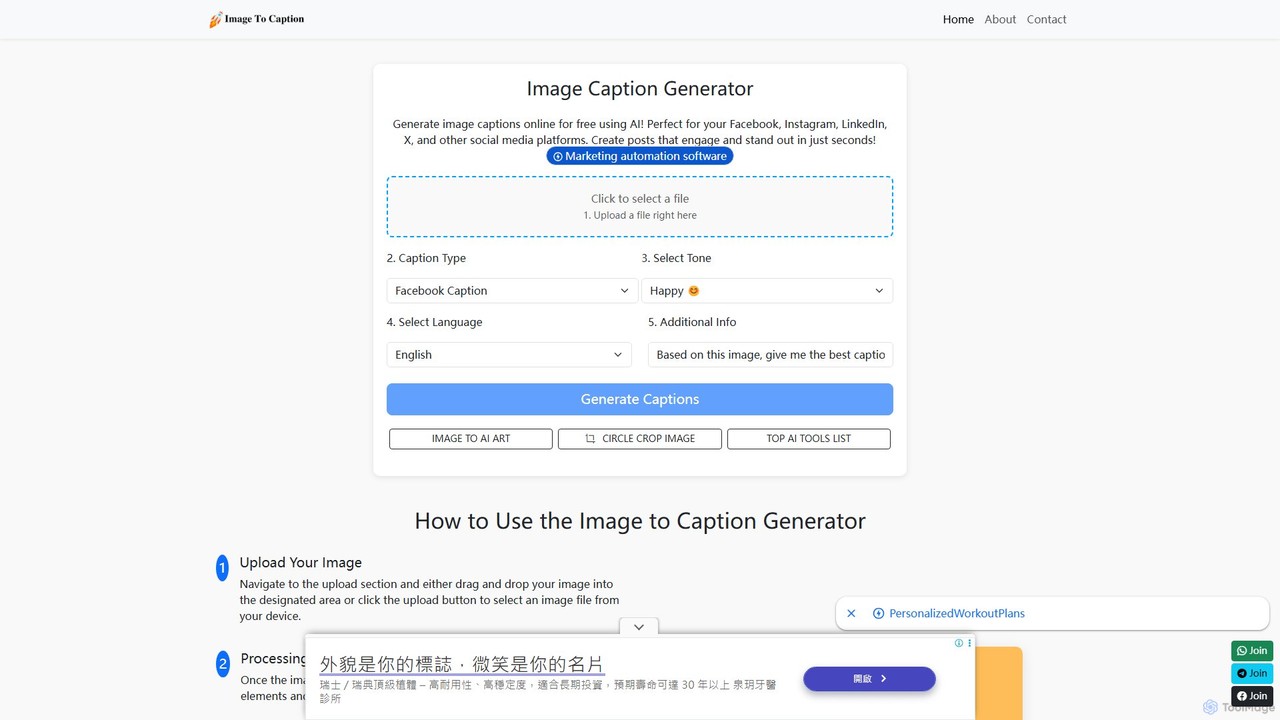
A 100% free AI-powered tool by Pallyy that instantly generates engaging and creative captions for your images. Simply upload a photo, select a tone, and get high-quality captions for social media, blogs, or e-commerce. No login or registration is required, making it perfect for quick content creation and overcoming writer's block.

Text Generation
Visits 137.8KFavorites 106Likes 106

About Text Generation

Text Generation tools, in the context of image processing, are a class of AI that automatically create textual content from or for visual media. These tools utilize computer vision and natural language processing models to analyze images and produce relevant text, such as descriptions, captions, or creative prompts. Their primary value lies in automating content creation, improving accessibility, and enhancing the descriptive power of images for marketing, creative, and data management purposes. They bridge the gap between visual information and textual communication.

Core Features

  • Automated Image Captioning: Generates concise, descriptive sentences that explain the content and context of an image.
  • Prompt Generation & Expansion: Creates detailed and effective text prompts for use in AI image generators, turning simple ideas into rich visual descriptions.
  • Text Overlay Creation: Designs and places stylized text directly onto images for social media posts, advertisements, or memes.
  • Alt Text Generation: Produces descriptive alternative text for images to improve web accessibility (WCAG compliance) and SEO.
  • Visual Q&A: Answers questions asked in natural language about the contents of a specific image.

Applicable Scenarios

These tools are widely used by social media managers for creating engaging post captions, e-tCommerce specialists for batch-generating product descriptions from photos, and digital artists seeking inspiration for AI art prompts. Web developers also use them to automate the creation of alt text, ensuring website accessibility and better search engine ranking.

Selection Criteria

When choosing a Text Generation tool for images, consider the specificity of its function (e.g., captioning vs. prompt generation). Evaluate its multilingual support, API availability for integration, customization options for text style and tone, and the accuracy of its image analysis. The pricing model, whether per-image or subscription-based, is also a key factor.

Featured tool rankings

Text Generation use cases

1

Automate Alt Text for Web Accessibility

Web developers and content managers are tasked with making websites compliant with accessibility standards like WCAG. Manually writing descriptive alt text for hundreds or thousands of images is time-consuming and prone to inconsistency. By using an AI Text Generation tool, they can upload images in bulk and automatically receive accurate, context-aware alt text. This process not only saves dozens of hours but also significantly improves the website's SEO by providing search engines with rich descriptions of visual content, making the site more accessible to users with visual impairments.

2

Generate Creative Prompts for AI Art

Digital artists and hobbyists using AI image generators often face creative blocks or struggle to write prompts that yield the desired visual style. A text generation tool specialized in prompt engineering can act as a creative partner. The user can input a simple idea (e.g., 'a cat in a library'), and the tool expands it into a detailed prompt with specifications for art style, lighting, composition, and mood (e.g., 'cinematic photo of a fluffy ginger cat sleeping on a stack of old books, warm afternoon light filtering through a dusty library window, hyperrealistic, 8K'). This helps artists explore new styles and achieve more complex and refined results from their image generators.

3

Batch Generate E-commerce Product Descriptions

An e-commerce manager for a fashion brand needs to upload 500 new products, each with multiple photos. Writing unique, compelling descriptions for every item is a massive undertaking. Using a visual-to-text generation tool, they can process all product images at once. The AI analyzes features like color, pattern, material (e.g., 'blue floral print cotton dress with short sleeves'), and style. It then generates a base description for each product, which the manager can quickly review and refine. This approach reduces the time-to-market for new products by over 80% and ensures consistent descriptive quality across the entire catalog.

4

Create Engaging Social Media Captions from Images

A social media manager for a travel agency posts multiple destination photos daily. Consistently writing fresh and engaging captions is challenging. They can use an AI tool that analyzes the photo (e.g., a beach in Thailand) and generates several caption options with different tones (e.g., adventurous, relaxing, luxurious). The AI can also suggest relevant hashtags (ThailandTravel, BeachLife, Phuket) and a call-to-action ('Tag someone you'd bring here!'). This allows the manager to maintain a high-volume, high-quality posting schedule, increasing audience engagement and saving hours of creative work each week.

5

Add Dynamic Text Overlays to Marketing Visuals

A marketing team needs to create a series of social media ads for a flash sale. Instead of manually opening each image in an editor to add text like '50% OFF TODAY ONLY', they use an AI text overlay tool. They can define a template with specific fonts, colors, and text placement. The tool then automatically applies this text overlay to dozens of different product images, ensuring brand consistency and saving significant design time. Some advanced tools can even analyze the image to place the text in an area with low visual clutter, maximizing readability and impact.

6

Index Photo Libraries with Descriptive Metadata

A stock photography agency or a large corporation's marketing department manages a library of millions of images. Manually tagging each image with relevant keywords is an impossible task. An AI text generation tool can process the entire library, automatically generating descriptive tags, titles, and detailed captions for each photo. For an image of a 'person working on a laptop in a cafe', it might generate tags like 'remote work', 'freelancer', 'coffee shop', 'laptop', 'business casual'. This makes the entire image library searchable, allowing team members to quickly find the exact visual asset they need, drastically improving workflow efficiency.

Text Generation FAQ

What are AI Text Generation tools for images?

AI Text Generation tools for images are specialized applications that use artificial intelligence to create written content related to visual media. Unlike general text generators, they analyze the content of an image to perform specific tasks. Key functions include generating descriptive captions, creating detailed prompts for AI art generators, producing accessibility alt text, and extracting text from images (OCR). They are designed to automate and enhance workflows where text and images are closely linked, such as in digital marketing, e-commerce, and web development.

How to choose the right text generation tool for images?

To choose the right tool, first identify your primary use case. Are you generating captions, creative prompts, or alt text? Consider these factors:

  • Function Specificity: Select a tool that excels at your specific task. A prompt generator is different from an alt text generator.
  • Accuracy & Quality: Evaluate the relevance and quality of the generated text. Look for demos or free trials to test its performance on your own images.
  • Integration: Check for API access or plugins if you need to integrate the tool into your existing workflow (e.g., a CMS or e-commerce platform).
  • Customization: Look for options to control the tone, style, and length of the output to match your brand's voice.
  • Language Support: Ensure it supports all the languages you require for your audience.
What's the difference between a general text generator and one for images?

The primary difference is the input and context. A general text generator (like a large language model) takes a text prompt as input and generates text based on that prompt. An image-focused text generator takes an image as its primary input. It uses computer vision to 'understand' the visual data first, then uses a language model to generate text *about* that visual data. While a general model could be prompted to 'describe a picture of a sunset,' an image-specific tool would analyze the actual pixels of a sunset photo to provide a more accurate and detailed description.

Can these tools understand complex or abstract images?

The capability of these tools varies significantly. Most are highly effective at identifying and describing concrete objects, scenes, and actions (e.g., 'a brown dog catching a red frisbee in a park'). However, understanding abstract concepts, emotions, artistic intent, or complex humor can be more challenging. High-end models are continuously improving their ability to interpret nuanced and abstract visuals, but it's an area of active development. For highly artistic or conceptual images, the generated text may be more literal and less interpretative than a human's description.

Who benefits most from image-to-text AI tools?

A wide range of professionals can benefit significantly. Key users include:

  • Digital Marketers & Social Media Managers: To quickly create captions, ad copy, and hashtags, increasing content output and engagement.
  • E-commerce Store Owners: For automating the creation of thousands of product descriptions, speeding up time-to-market.
  • Web Developers & SEO Specialists: To generate alt text at scale, improving website accessibility and search engine rankings.
  • Digital Artists & Designers: To brainstorm and generate detailed prompts for AI image generators, overcoming creative blocks.
  • Archivists & Librarians: For automatically tagging and cataloging large visual databases, making them easily searchable.