
ToolMage
Sign in

Best 1 Readers AI tools for News

Popular Readers AI tools in News include LoomLetter, helping you work more efficiently.

LoomLetter
Freemium

LoomLetter

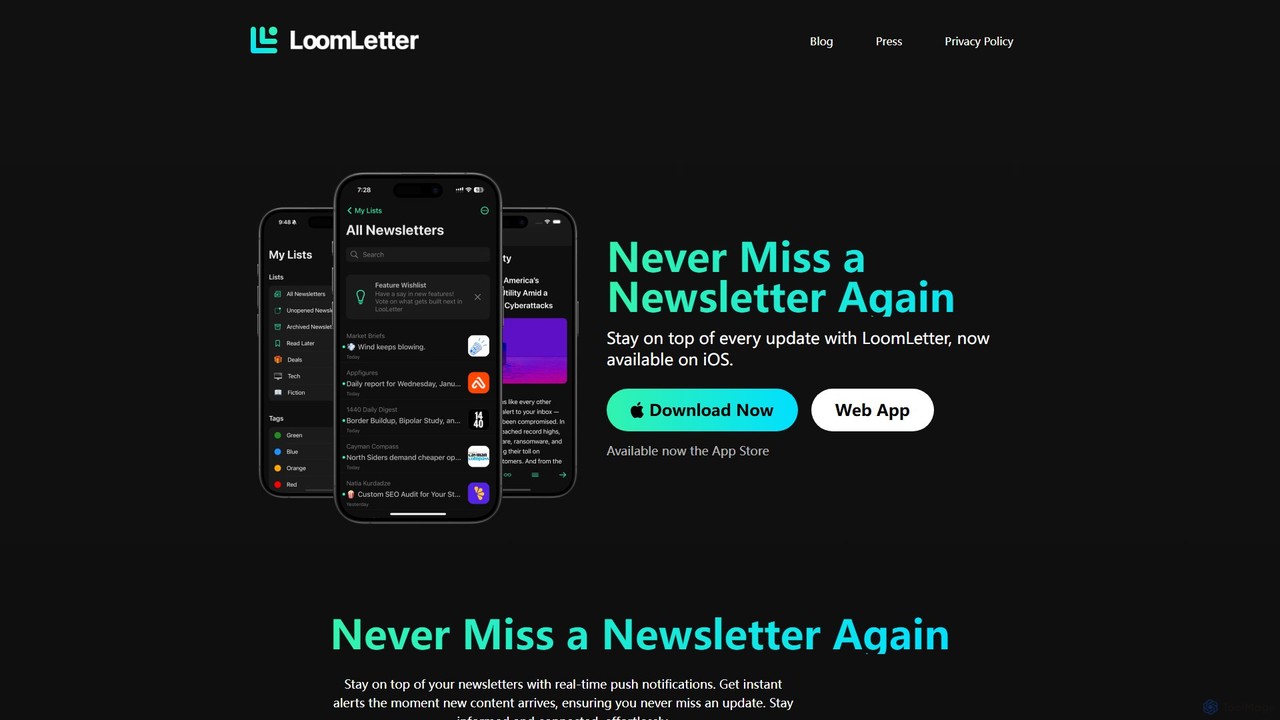
LoomLetter is an intelligent newsletter reader designed for busy professionals. It organizes all your newsletters in one place, away from your main inbox, and features AI-powered narration for listening on the go. With custom lists, real-time notifications, and home screen widgets, it helps you stay informed effortlessly.

Text To Speech
Visits 5.4KFavorites 155Likes 152

About Readers

AI Readers are intelligent tools designed to transform how you consume news and articles using artificial intelligence. They leverage technologies like natural language processing (NLP) to summarize long texts, convert articles into natural-sounding audio, and curate personalized content feeds. This allows users to stay informed more efficiently, absorb key information quickly, and reduce information overload. These tools go beyond simple news aggregation by actively processing content for an optimized reading or listening experience.

Core Features

  • AI Summarization: Condenses lengthy articles into concise, easy-to-digest summaries.
  • Text-to-Speech (TTS): Converts written content into high-quality audio for hands-free listening.
  • Personalized Curation: Learns user preferences to deliver a customized feed of relevant news and articles.
  • Distraction-Free Interface: Removes ads, pop-ups, and unnecessary clutter for a focused reading experience.

Use Cases

These tools are ideal for busy professionals who need daily industry briefings, commuters who prefer listening to news during their travels, and researchers tracking developments across multiple sources. They also serve anyone looking to manage information overload and focus on content that truly matters.

How to Choose

When selecting an AI Reader, consider the quality and accuracy of its summarization. Evaluate the naturalness of the text-to-speech voices, the range of supported content sources (e.g., websites, PDFs, RSS feeds), and its cross-platform syncing capabilities. Also, review the privacy policy to understand how your reading data is handled.

Readers use cases

1

Efficient Morning News Briefing

A business consultant starts their day with a 15-minute personalized audio briefing generated by an AI Reader. Instead of manually browsing multiple news sites, the tool automatically pulls top articles from their preferred industry publications, summarizes them, and reads them aloud in a natural voice. This allows the consultant to catch up on market trends, competitor news, and economic updates during their commute or while preparing breakfast, ensuring they arrive at work fully informed.

2

Accelerating Academic Research

A university student working on a thesis uses an AI Reader to process a large volume of research papers. By feeding URLs or uploading PDFs, the student gets concise summaries of each document in minutes. This helps them quickly identify the most relevant papers for their literature review, saving dozens of hours of reading time. They can tag and organize summaries within the tool, creating a structured knowledge base for their research project.

3

Enhancing Content Curation for Marketers

A content marketer uses an AI Reader to stay on top of industry trends. The tool aggregates news from hundreds of sources into a single feed. The marketer can quickly scan AI-generated summaries to identify shareable content, discover new topic ideas, and monitor competitor announcements. This streamlines the content discovery process, enabling them to create more timely and relevant content for their audience.

4

Language Learning Through Immersion

A student learning Spanish uses an AI Reader to improve their listening and reading comprehension. They add Spanish news websites to the tool, which then converts articles into clear, spoken audio. The user can listen to authentic content at a controlled speed while following along with the highlighted text. This method provides valuable exposure to native vocabulary and sentence structures in the context of current events, making the learning process more engaging.

5

Making Web Content Accessible

A user with a visual impairment or a reading disability like dyslexia relies on an AI Reader for daily web browsing. The tool can extract the main content from cluttered web pages and read it aloud in a clear, consistent voice. This provides a seamless and accessible way to consume online articles, blog posts, and newsletters from any source, overcoming challenges posed by inconsistent website layouts and inaccessible design.

6

Combating Information Overload

An individual feeling overwhelmed by the constant stream of online news uses an AI Reader to create a calm, focused information diet. They specify topics of interest, and the tool delivers a finite, curated digest each day. By focusing on summaries of important stories and filtering out clickbait and sensationalism, the user can stay informed without the anxiety and fatigue associated with traditional news feeds, reclaiming control over their digital consumption.

Readers FAQ

What are AI Readers?

AI Readers are applications that use artificial intelligence to enhance the way you consume written content, particularly news and articles. Their primary functions include automatically generating concise summaries of long texts and converting articles into natural-sounding audio for listening. They help users save time, reduce information overload, and access information more conveniently.

How do AI Readers differ from standard news aggregator apps?

The main difference lies in content processing. Standard news aggregators primarily collect and display headlines. AI Readers, on the other hand, actively process the content itself. They provide value-added features such as:

  • Summarization: Creating short versions of articles.
  • Audio Conversion: Turning text into podcasts on-demand.
  • Intelligent Curation: Personalizing feeds based on deep content analysis.
In short, aggregators show you *what* to read, while AI Readers change *how* you read it.

What are the key features to look for in an AI Reader?

When choosing an AI Reader, evaluate these key features:

  • Summarization Quality: Check if the summaries are accurate, coherent, and capture the main points.
  • Voice Quality & Options: Listen to the text-to-speech voices. Are they natural-sounding? Are there multiple voice and language options?
  • Source Compatibility: Ensure it can import content from various sources, such as web links, PDFs, or RSS feeds.
  • Cross-Platform Sync: Look for the ability to sync your library and settings across mobile and desktop devices.

Who can benefit from using an AI Reader?

AI Readers are beneficial for a wide range of users. This includes busy professionals needing to stay updated on industry news, students and researchers processing large amounts of text, and commuters who want to listen to articles during their travels. They are also valuable for individuals with visual impairments or reading disabilities, as well as anyone looking to combat information overload and consume content more mindfully.

How do AI Readers create summaries of news articles?

AI Readers typically use Natural Language Processing (NLP), specifically extractive or abstractive summarization models. Extractive models identify and pull the most important sentences from the original text to form a summary. Abstractive models go a step further by generating new sentences that paraphrase the core ideas of the source material, much like a human would. The result is a short, coherent overview of the article's key information.