
ToolMage
Sign in

Best 1 Status Tracking AI tools for Project Management

Popular Status Tracking AI tools in Project Management include Attrove, helping you work more efficiently.

Attrove
Freemium

Attrove

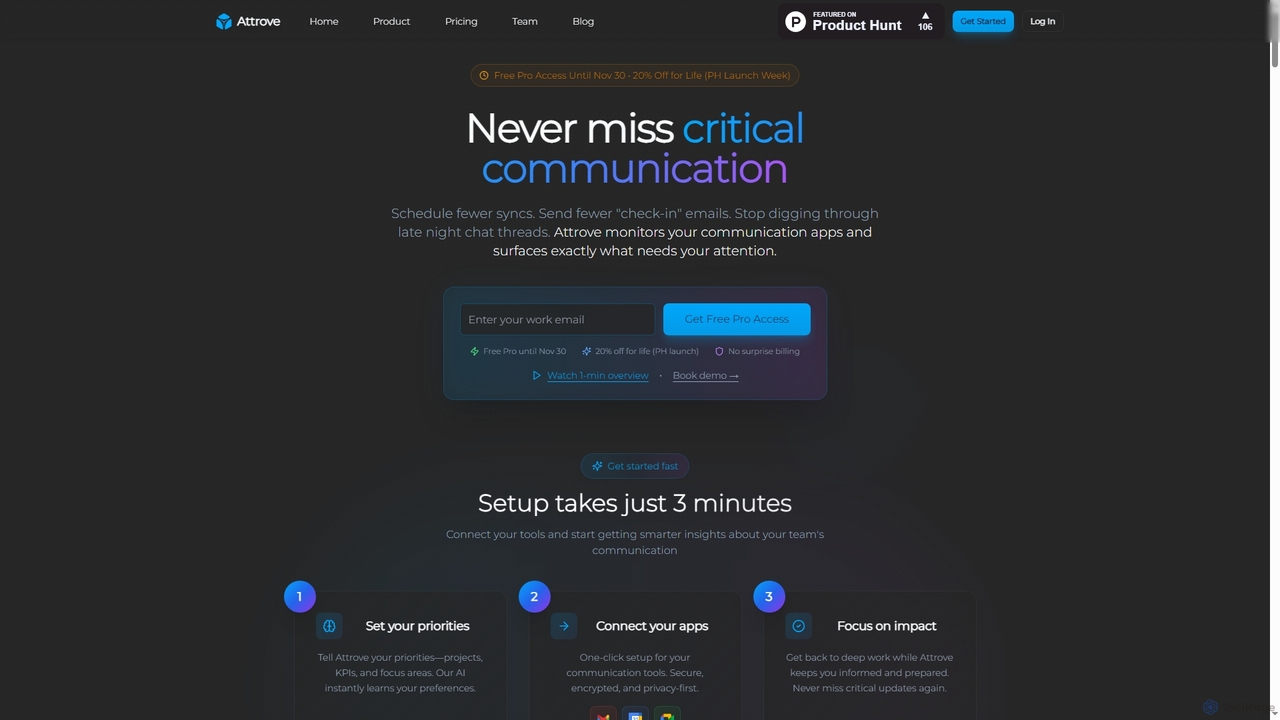
Attrove is an AI-powered communication intelligence platform designed to eliminate noise from work communication. It monitors apps like Slack, Gmail, and Calendar to surface critical updates, reduce meetings, and provide real-time insights, enabling teams to focus on high-impact work.

Workplace Insights
Visits 5.6KFavorites 109Likes 116

About Status Tracking

AI Status Tracking tools are specialized platforms designed to automatically monitor and report on the real-time progress of tasks, projects, and workflows. They leverage AI to aggregate data from various sources like code repositories and task managers, creating a single source of truth. This provides teams and leaders with instant, accurate visibility into project health, enabling them to proactively identify bottlenecks and mitigate risks without manual check-ins. Unlike broader project management systems, these tools focus specifically on granular progress visualization and predictive analysis.

Core Features

  • Real-time Dashboards: Centralized, visual displays of key performance indicators (KPIs) and task progress.
  • Automated Data Aggregation: Automatically syncs status updates from integrated tools like Jira, Slack, Asana, and GitHub.
  • AI-Powered Bottleneck Detection: Intelligently identifies stalled tasks, dependency issues, and potential roadblocks.
  • Predictive Delay Alerts: Uses historical data and current velocity to forecast potential deadline misses.
  • Customizable Stakeholder Reporting: Generates automated, tailored status reports for clients, executives, and team members.

Use Cases

These tools are particularly valuable for software development teams tracking sprint progress, marketing agencies monitoring multi-channel campaign performance, and operations managers overseeing complex logistical workflows. They provide clarity in fast-paced environments where manual status updates are inefficient and often outdated.

How to Choose

When selecting a Status Tracking tool, prioritize its integration capabilities with your existing tech stack. Evaluate the level of customization available for dashboards and reports to ensure they meet stakeholder needs. Also, consider the sophistication of its AI-driven analytics for bottleneck detection and the scalability of the platform to support your team's growth.

Status Tracking use cases

1

Monitoring Agile Development Sprints

A software development team lead uses an AI Status Tracking tool to get a live overview of their two-week sprint. The tool automatically pulls data from Jira tickets, GitHub commits, and Slack conversations. It visualizes the sprint burndown chart in real-time and uses AI to flag a user story that has been "In Progress" for too long without any associated code commits. This allows the lead to intervene early, uncover a hidden technical challenge, and reallocate resources to keep the sprint on track, avoiding last-minute surprises during the sprint review.

2

Managing Multi-Channel Marketing Campaigns

A marketing manager oversees a product launch campaign running across email, social media, and paid advertising. Instead of manually compiling data from Google Analytics, Mailchimp, and Facebook Ads, a Status Tracking tool aggregates all key metrics into one dashboard. The system provides a unified view of campaign reach, engagement, and conversion rates. It sends an automated alert when the click-through rate on a specific ad set drops significantly, prompting the team to adjust the creative or targeting before the budget is wasted.

3

Automating Client Project Reporting

An account manager at a digital agency is responsible for keeping five clients updated on their project progress. The Status Tracking tool provides each client with a secure, read-only dashboard showing completed milestones, upcoming deadlines, and the current status of key deliverables. This eliminates the need for weekly manual status report creation, saving the manager hours of work. It also enhances client trust and transparency by providing them with 24/7 access to accurate, up-to-date project information.

4

Tracking High-Priority Customer Support Tickets

A customer support manager needs to ensure that critical bug reports from enterprise clients are resolved within the agreed Service Level Agreement (SLA). An AI Status Tracking tool monitors high-priority tickets from Zendesk and Jira. It tracks the time each ticket spends in different stages (e.g., "Triage," "In Development," "Testing"). The system sends an alert to the manager and the assigned engineer if a ticket is at risk of breaching its SLA, ensuring prompt action is taken to resolve critical customer issues.

5

Gaining Executive Oversight of a Project Portfolio

A Director at a Project Management Office (PMO) needs a high-level view of the health of all 50 active projects in the company. The Status Tracking tool rolls up data from various project teams into a portfolio-level dashboard. Each project is assigned an AI-generated health score based on its progress, budget adherence, and identified risks. This allows the director to quickly identify at-risk projects that require executive attention and make informed decisions about resource allocation across the entire portfolio.

6

Visualizing a Complex Manufacturing Workflow

A factory operations manager uses a Status Tracking tool to monitor custom manufacturing orders as they move through design, fabrication, assembly, and quality assurance. By integrating with the company's ERP and shop floor systems, the tool provides a real-time visual representation of the entire production pipeline. It automatically flags orders that are stuck at a specific stage, helping the manager identify and resolve production bottlenecks, optimize workflow efficiency, and provide customers with more accurate delivery estimates.

Status Tracking FAQ

What are AI Status Tracking tools?

AI Status Tracking tools are specialized software that automatically monitor and report on the progress of tasks and projects in real-time. They use artificial intelligence to aggregate data from multiple work platforms, identify potential delays, and present the information in easy-to-understand visual dashboards. Their primary goal is to provide accurate, up-to-the-minute visibility without requiring manual updates from team members.

How do Status Tracking tools differ from general Project Management software?

While both manage projects, their focus differs. General Project Management tools (like Asana or Trello) are for planning, assigning, and organizing work. AI Status Tracking tools are specialized for monitoring and reporting. They often integrate with project management tools to automatically pull data and provide a higher-level, real-time view of progress, focusing on bottleneck detection and predictive alerts rather than task creation and management.

How do I choose the right AI Status Tracking tool?

When choosing a tool, consider these four factors:

  • Integrations: Ensure it connects seamlessly with your team's existing tools (e.g., Jira, Slack, GitHub).
  • Customization: Check if you can tailor dashboards and reports to the specific metrics your stakeholders care about.
  • AI Capabilities: Evaluate the sophistication of its predictive analytics and bottleneck detection features.
  • Scalability: Select a tool that can grow with your team and handle increasing project complexity.

What are the key benefits of using an AI Status Tracking tool?

The main benefits include:

  • Increased Visibility: Provides a single, real-time source of truth for project health, accessible to all stakeholders.
  • Time Savings: Automates the collection and reporting of status updates, freeing up teams from manual reporting tasks.
  • Proactive Risk Management: AI-powered alerts help identify potential delays and bottlenecks before they become critical issues.
  • Data-Driven Decisions: Offers objective data on progress and performance, enabling more informed leadership decisions.

Who should use AI Status Tracking tools?

These tools are ideal for project managers, team leads, product managers, and executives who need to oversee the progress of multiple tasks or projects. They are particularly effective for agile software development teams, marketing agencies managing campaigns, operations teams with complex workflows, and any organization that wants to replace manual status meetings with automated, real-time reporting.