ToolMage
Sign in

Best 1 Grammar Checker AI tools for Utilities

Popular Grammar Checker AI tools in Utilities include typeng, helping you work more efficiently.

typeng
Free

typeng

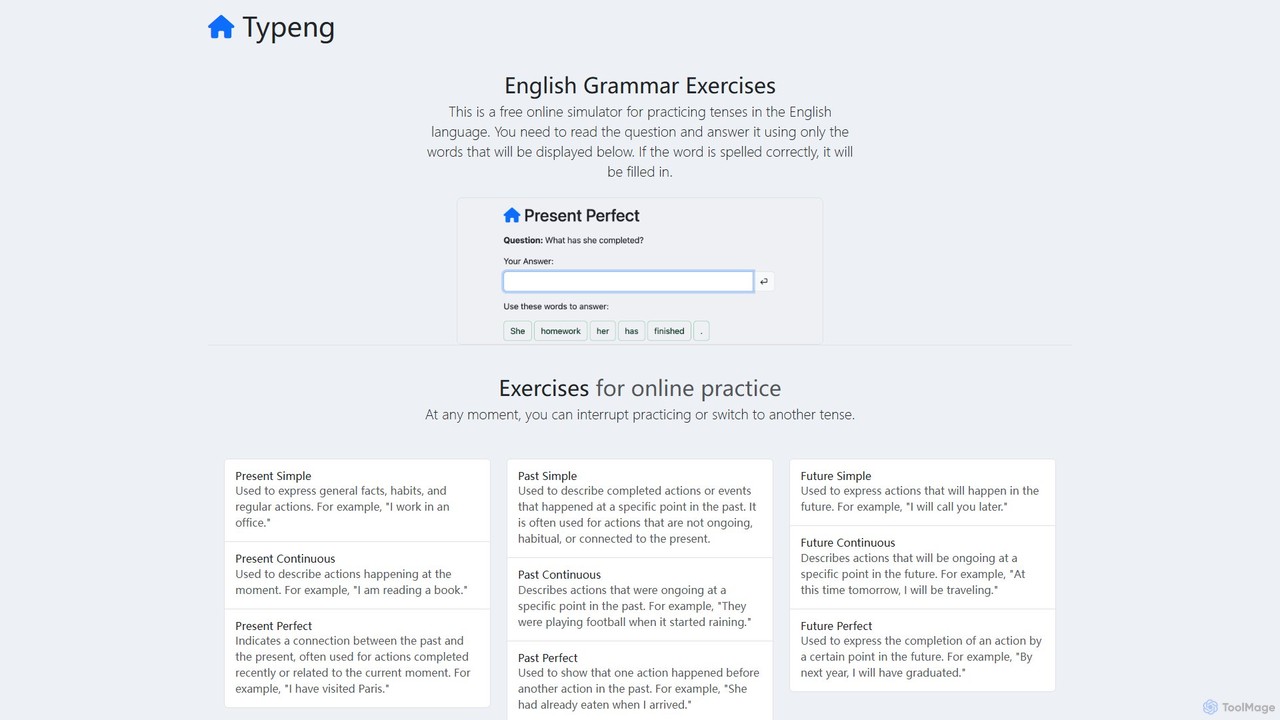
typeng is a free online simulator for mastering English grammar. It offers interactive exercises for a wide range of topics, from tenses to phrasal verbs. Users practice by constructing sentences from given words, reinforcing learning through repetition. It also provides downloadable PDF worksheets for all proficiency levels (A1-C1), requiring no registration.

Language Learning
Visits 6.5KFavorites 145Likes 122

About Grammar Checker

Grammar Checker tools are AI-powered writing assistants designed to identify and correct grammatical errors, spelling mistakes, and punctuation issues in text. Leveraging advanced Natural Language Processing (NLP) and machine learning algorithms, these tools analyze written content in real-time, offering suggestions to enhance clarity, conciseness, and overall writing quality. They serve as an essential utility for anyone aiming to produce polished, professional, and error-free written communication across various platforms.

Core Features

  • Grammar and Spelling Correction: Automatically detects and suggests fixes for a wide range of grammatical errors, typos, and misspellings.
  • Punctuation Check: Ensures correct usage of commas, periods, semicolons, and other punctuation marks for improved readability.
  • Style and Readability Suggestions: Provides recommendations to improve sentence structure, word choice, tone, and overall clarity, making text more engaging.
  • Vocabulary Enhancement: Suggests synonyms and alternative phrasing to enrich vocabulary and avoid repetitive language.
  • Plagiarism Detection: Some advanced grammar checkers include features to identify instances of unintentional plagiarism by comparing text against vast databases.

Applicable Scenarios

Grammar checkers are indispensable for content creators, students, and business professionals. They are widely used by bloggers to ensure error-free articles, by students for proofreading academic papers, and by marketing teams to refine ad copy and website content. Professionals also rely on them for drafting clear, concise, and impactful emails and reports.

How to Choose

When selecting a grammar checker, consider its accuracy and the breadth of languages it supports. Evaluate its integration capabilities with your preferred writing platforms (e.g., browser extensions, desktop apps, MS Word add-ons). Assess the range of features offered, from basic error correction to advanced style suggestions and plagiarism detection. Finally, compare pricing models, including free tiers versus premium subscriptions, to find a tool that aligns with your specific needs and budget.

Grammar Checker use cases

1

Ensuring Error-Free Blog Posts and Articles

Content creators, bloggers, and digital marketers frequently use grammar checkers to proofread their written content before publication. By running blog posts, articles, and website copy through these tools, they can quickly identify and correct grammatical errors, spelling mistakes, and awkward phrasing. This ensures that the published content is professional, credible, and easy for readers to understand, ultimately improving reader engagement and SEO performance.

2

Proofreading Academic Papers and Essays

Students, researchers, and academics rely on grammar checkers to ensure their academic submissions are polished and error-free. Before submitting essays, research papers, theses, or dissertations, they use these tools to catch grammatical inconsistencies, punctuation errors, and stylistic issues. This helps them present their ideas clearly, maintain academic integrity, and potentially achieve higher grades by eliminating distractions caused by writing errors.

3

Crafting Clear and Professional Business Communications

Business professionals across various industries utilize grammar checkers to refine their daily communications. From drafting important emails and client proposals to preparing internal reports and presentations, these tools help ensure that all written output is free of errors, professional in tone, and conveys messages clearly and effectively. This enhances credibility, reduces misunderstandings, and supports a polished corporate image.

4

Improving English Writing for Non-Native Speakers

Individuals for whom English is a second language (ESL) find grammar checkers invaluable for improving their writing proficiency. These tools not only correct errors but often provide explanations for the mistakes, helping users understand grammar rules and vocabulary nuances. This facilitates faster language learning and enables non-native speakers to produce more confident, accurate, and natural-sounding English text for academic, professional, or personal use.

5

Streamlining Editing for Copywriters and Editors

Professional copywriters and editors often integrate grammar checkers into their workflow to streamline the editing process. While human oversight remains crucial for nuanced stylistic choices and overall tone, these AI tools can quickly catch mechanical errors, freeing up editors to focus on higher-level creative and strategic aspects of the text. This leads to faster turnaround times and a more efficient production of high-quality marketing materials, articles, and books.

6

Final Review of Manuscripts for Authors and Publishers

Authors and independent publishers use grammar checkers as a crucial final step before releasing their manuscripts. After extensive writing and human editing, these tools provide an additional layer of scrutiny, catching any lingering typos, grammatical slips, or punctuation inconsistencies that might have been overlooked. This ensures a highly polished final product, enhancing the reader's experience and the author's professional reputation.

Grammar Checker FAQ

What is a Grammar Checker?

A Grammar Checker is an AI-powered tool that analyzes written text to identify and correct errors in grammar, spelling, and punctuation. It typically features real-time feedback, suggestions for improving sentence structure, and vocabulary enhancement. These tools are designed to help users produce clear, concise, and professional written content across various contexts, from academic papers to business emails.

How does an AI Grammar Checker work?

AI Grammar Checkers leverage sophisticated Natural Language Processing (NLP) and machine learning algorithms. They analyze text by breaking down sentences, identifying parts of speech, and understanding contextual relationships between words. By comparing the text against vast linguistic databases and learned patterns of correct usage, the AI can detect deviations from standard grammar rules, common misspellings, and punctuation errors, then suggest appropriate corrections, often with explanations.

What are the main benefits of using a Grammar Checker?

The main benefits of using a grammar checker include significantly improving writing quality by catching errors that human eyes might miss, saving time on manual proofreading, and enhancing the professionalism of written communication. For non-native speakers, it serves as an excellent learning tool, providing insights into grammar rules. Ultimately, it helps users produce more confident, credible, and impactful texts across all writing tasks.

Can Grammar Checkers replace human proofreaders?

No, grammar checkers cannot fully replace human proofreaders. While AI tools are highly effective at catching mechanical errors like grammar, spelling, and punctuation, they often struggle with nuanced contextual errors, stylistic preferences, tone, and the overall flow and coherence of a text. Human proofreaders offer a deeper understanding of intent, audience, and complex literary devices, making them indispensable for highly sensitive or creative writing. Grammar checkers are best used as a powerful first line of defense and a complement to human review.

How to choose the best Grammar Checker for my needs?

To choose the best grammar checker, consider several factors. First, evaluate its accuracy and the range of languages it supports. Second, check its integration capabilities with your primary writing platforms (e.g., browser extensions, desktop applications, MS Word add-ons). Third, assess the feature set: do you need basic error correction, or advanced style suggestions, plagiarism detection, and vocabulary enhancement? Finally, compare pricing models, including free tiers versus premium subscriptions, to find a tool that aligns with your specific requirements and budget.