
ToolMage
Sign in

Best 1 Gpts AI tools for Ai Tools

Popular Gpts AI tools in Ai Tools include Actionize, helping you work more efficiently.

Actionize
Paid

Actionize

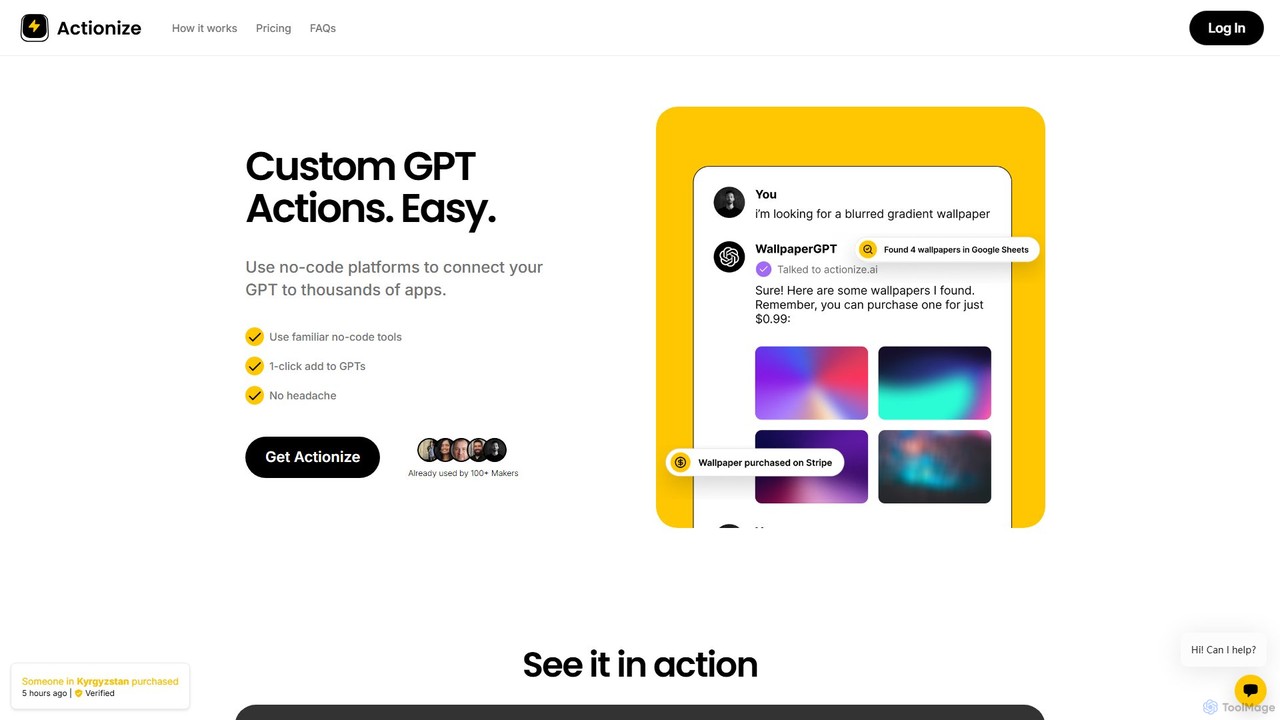
Actionize is a no-code platform that simplifies connecting custom GPTs to thousands of external applications. It acts as a bridge, allowing you to create powerful GPT Actions using familiar automation tools like Zapier and Make.com without writing any code. Manage your integrations, generate the necessary code with one click, and enhance your GPTs with real-world capabilities.

Gpts
Visits 6.1KFavorites 139Likes 145

About Gpts

GPTs are custom versions of large language models, designed to perform specific, tailored tasks. They operate by combining a foundational AI model with user-defined instructions, expanded knowledge, and specific skills. This allows users to create specialized AI assistants for personal or professional needs without requiring deep technical expertise. The primary value of GPTs lies in their ability to transform a general-purpose AI into a focused, expert tool for niche applications.

Core Features

  • Custom Instructions: Define the GPT's personality, tone, and specific rules to follow in its responses.
  • Knowledge Base Integration: Upload files like PDFs or text documents to provide the GPT with specific, private information.
  • Action Capabilities: Connect to third-party services via APIs to perform real-world tasks like booking appointments or searching databases.
  • Multi-modal Skills: Inherit capabilities from the base model, such as web browsing, data analysis, and image generation.
  • Shareability: Can be kept private, shared with specific people via a link, or published to a public marketplace.

Use Cases

GPTs are widely used by professionals and hobbyists to streamline workflows. For instance, marketing teams create GPTs to ensure brand voice consistency across all content, while developers build them as coding assistants trained on specific framework documentation. Educators also use them to create interactive learning tutors for students.

How to Choose

When selecting a GPT, first assess its specific purpose and whether its capabilities match your task. Check the knowledge base it uses to ensure the information is relevant and up-to-date. For GPTs with actions, verify the reliability of the connected APIs. Finally, consider the creator's reputation or user reviews if available, and decide whether an existing GPT meets your needs or if building a custom one is more effective.

Gpts use cases

1

Create a Corporate Brand Voice Guardian

A marketing team can build a GPT to act as a brand compliance checker. By uploading the company's brand guidelines, style guides, and examples of on-brand content into the GPT's knowledge base, they create a specialized assistant. Team members can then submit draft emails, social media posts, or blog articles to the GPT. The tool will review the text for tone, terminology, and style, providing specific suggestions to align it with the established brand voice, ensuring consistency across all communication channels.

2

Develop a Personalized Learning Tutor

A student can create a custom GPT to serve as a personal tutor for a specific subject, like history or biology. They can upload their course syllabus, lecture notes, textbooks, and relevant research papers into the GPT's knowledge base. The student can then ask complex questions, request summaries of specific topics, or generate practice quizzes based on the provided materials. This creates a highly focused learning environment, allowing the student to get instant, context-aware help 24/7 without searching through scattered documents.

3

Automate Meeting Summaries and Action Items

A project manager can configure a GPT specifically for processing meeting transcripts. By providing instructions to identify key decisions, action items with assigned owners, and important discussion points, they create an efficient summarization tool. After a meeting, the manager pastes the raw transcript into the GPT. The tool automatically generates a concise summary, a structured list of action items, and highlights key takeaways. This process reduces manual administrative work by over 80% and ensures that meeting outcomes are captured accurately and distributed quickly.

4

Build a Specialized Code Review Assistant

A software developer can create a GPT to assist with code reviews for a specific programming language and framework, like Python with Django. They can upload the official documentation, internal coding standards, and best practice guides into the GPT's knowledge base. When a developer submits a code snippet, the GPT can check for common errors, suggest more efficient implementations, ensure compliance with style guides, and even explain complex functions based on the provided documentation. This accelerates the review process and helps maintain high code quality across the team.

5

Design a Creative Writing Partner

An author or screenwriter can build a GPT as a creative partner for their project. By uploading their story bible, character profiles, world-building notes, and plot outlines, they create an assistant that deeply understands their fictional universe. The writer can then use the GPT to brainstorm plot twists, generate descriptive passages consistent with the established tone, check for plot holes, or develop dialogue for specific characters. This tool acts as a consistent, knowledgeable sounding board, helping the writer maintain continuity and overcome creative blocks.

6

Create a Customer Support FAQ Bot

A small business owner can create a public-facing GPT to handle common customer inquiries. By uploading product manuals, shipping policies, return information, and a comprehensive list of frequently asked questions, they can build a knowledgeable support bot. This GPT can be shared on their website or social media. When customers ask questions like "How do I track my order?" or "What is your return policy?", the GPT provides instant, accurate answers based on the provided documents, freeing up human support agents to handle more complex issues.

Gpts FAQ

What are GPTs?

GPTs are custom, user-created versions of a large language model like ChatGPT. They are designed to perform specific tasks by following a tailored set of instructions, using a specific knowledge base, or connecting to external tools. Instead of a general-purpose AI, a GPT acts as a specialized assistant, such as a code reviewer, a travel planner, or a brand voice analyst, built by anyone without needing to code.

How are GPTs different from standard AI chatbots?

The main difference is specialization and user control. A standard AI chatbot like the base ChatGPT is a generalist tool designed for a wide range of queries. A GPT, however, is a specialist. It is configured by a user for a narrow purpose with specific instructions, knowledge, and capabilities (Actions). This makes GPTs more effective and reliable for repeatable, domain-specific tasks compared to a general-purpose chatbot.

Do I need coding skills to create a GPT?

No, for most use cases, you do not need coding skills. Platforms for creating GPTs typically offer a conversational, natural language interface where you can define the GPT's behavior by simply writing instructions. You can also upload files to provide knowledge without any code. However, if you want to connect your GPT to external services using 'Actions' (APIs), some technical knowledge or familiarity with API documentation is beneficial.

What are the key features to look for in a GPT?

When choosing or evaluating a GPT, consider the following features:

  • Clear Purpose: The GPT should have a well-defined and specific function.
  • Relevant Knowledge Base: If it uses uploaded files, ensure the knowledge is accurate, up-to-date, and relevant to its purpose.
  • Necessary Capabilities: Check if it has the required skills, such as web browsing for current information or image generation for creative tasks.
  • Effective Actions (if applicable): If it connects to external APIs, verify that these integrations are reliable and perform the intended tasks correctly.
Who can benefit from using or creating GPTs?

A wide range of users can benefit from GPTs. Professionals in fields like marketing, software development, and project management can automate repetitive tasks and enforce standards. Students and researchers can create personalized study aids and data analysis tools. Content creators can build assistants for brainstorming and maintaining consistency. Essentially, anyone who performs a recurring, knowledge-based task can benefit from creating a specialized GPT to streamline their workflow.