ToolMage
Sign in

Best 1 Image Generator for Ai Tools

Popular Image Generator in Ai Tools include PromptlyGenerated, helping you work more efficiently.

PromptlyGenerated
Freemium

PromptlyGenerated

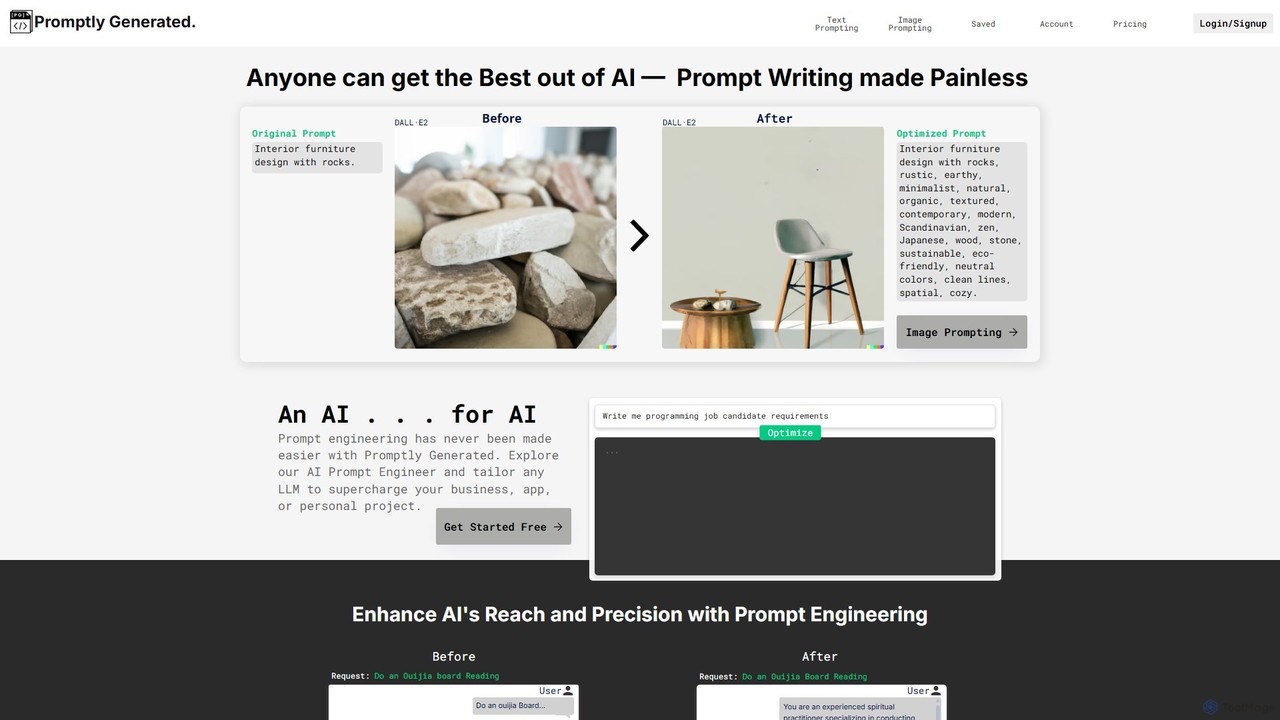
PromptlyGenerated is an AI-powered prompt engineering tool that helps users create highly optimized prompts for text and image generation models like GPT-4, Midjourney, and Stable Diffusion. It transforms simple ideas into detailed, structured instructions, unlocking the full potential of AI for developers, marketers, and creators without the need for deep technical expertise.

Image Generator
Visits 4.3KFavorites 113Likes 112

About Image Generator

Image Generators are AI-powered tools that automatically create visual content from textual descriptions, existing images, or other data inputs. Leveraging advanced deep learning models like diffusion networks, these tools transform abstract concepts or specific instructions into unique and diverse images, ranging from photorealistic scenes to artistic illustrations. They empower creators, marketers, and designers to rapidly prototype visuals, overcome creative blocks, and produce high volumes of tailored imagery without traditional artistic skills.

Core Features

  • Text-to-Image Generation: Converts descriptive text prompts into corresponding visual outputs, enabling users to "describe" their desired image.
  • Image-to-Image Transformation: Modifies existing images based on new prompts or style transfers, allowing for creative variations and enhancements.
  • Inpainting & Outpainting: Intelligently fills in missing parts of an image or extends its boundaries, seamlessly expanding visual narratives.
  • Style Transfer: Applies the artistic style of one image to the content of another, facilitating unique aesthetic combinations.
  • Variations & Iterations: Generates multiple distinct versions of an image from a single input, aiding in creative exploration and refinement.

Use Cases

Image Generators are invaluable for professionals across various sectors. Marketing teams use them to quickly produce diverse ad creatives and social media visuals. Game developers leverage them for rapid concept art generation and asset prototyping. Content creators utilize these tools to illustrate blog posts, presentations, and digital publications, significantly speeding up visual content production.

How to Choose

When selecting an AI Image Generator, consider the quality and diversity of its output models, ensuring they match your aesthetic needs. Evaluate the customization options, such as prompt engineering capabilities and control over image composition. Assess the speed of generation and the cost per image or subscription model. Finally, check for integration with existing workflows and the ease of use for your team's technical proficiency.

Featured tool rankings

Image Generator use cases

1

Generating Marketing Campaign Visuals

Marketing professionals can rapidly create a wide array of unique images for advertising campaigns, social media posts, and website banners. By inputting specific product descriptions, target audience demographics, and desired aesthetics, they can generate multiple visual concepts in minutes, significantly accelerating content production and A/B testing efforts without relying on stock photos or extensive design resources.

2

Designing Unique Game Concept Art

Game developers and concept artists use AI Image Generators to quickly visualize new characters, environments, and props. Inputting textual descriptions or rough sketches, they can generate numerous stylistic variations and detailed concepts, streamlining the initial design phase and providing a rich pool of ideas for further development and iteration, saving weeks of manual illustration time.

3

Creating Diverse Social Media Content

Social media managers and content creators can overcome the constant demand for fresh visuals by using image generators. They can produce engaging and on-brand images for daily posts, stories, and ads, tailored to specific themes or trends. This allows for a consistent and high-volume output of unique visual content, enhancing audience engagement and brand presence across platforms.

4

Visualizing Product Mockups and Prototypes

Product designers and e-commerce businesses can generate realistic mockups of new products or variations without the need for physical prototypes or expensive photoshoots. By providing product specifications and desired settings, they can visualize how items would look in different environments, with various materials, or in use, accelerating the design feedback loop and marketing preparation.

5

Illustrating Blog Posts and Articles

Bloggers, journalists, and content writers can quickly generate custom, high-quality images to accompany their articles, making content more engaging and visually appealing. Instead of searching for generic stock photos, they can create unique illustrations that perfectly match the tone and subject matter of their text, improving reader retention and SEO performance.

6

Developing Architectural and Interior Design Concepts

Architects and interior designers can utilize AI Image Generators to rapidly explore and visualize design concepts. By inputting floor plans, material preferences, and stylistic descriptions, they can generate photorealistic renderings or artistic interpretations of spaces, helping clients visualize projects before extensive modeling, and facilitating quicker design iterations and client approvals.

Image Generator FAQ

What are AI Image Generators?

AI Image Generators are advanced software tools that use artificial intelligence, primarily deep learning models like diffusion networks, to create images from various inputs. Their core function is to transform text descriptions (prompts), existing images, or other data into entirely new visual content, ranging from abstract art to photorealistic scenes. They are designed to automate and accelerate visual content creation.

How do AI Image Generators work?

Most modern AI Image Generators operate using sophisticated neural networks, often diffusion models. Users provide a text prompt (e.g., "a cat wearing a spacesuit on the moon") or an input image. The AI then processes this input, iteratively refining a noisy image until it matches the prompt's description, drawing from vast datasets of images it was trained on to understand concepts, styles, and compositions. This process allows for the creation of unique and contextually relevant visuals.

What's the difference between AI Image Generators and AI Image Editors?

AI Image Generators focus on *creating* new images from scratch based on prompts or data, producing visuals that didn't exist before. In contrast, AI Image Editors primarily *modify* existing images, enhancing them, removing elements, changing styles, or applying filters. While some generators offer editing capabilities (like inpainting), their core purpose is creation, whereas editors focus on manipulation and refinement of pre-existing visual content.

Who benefits most from using AI Image Generators?

A wide range of professionals and enthusiasts benefit from AI Image Generators. This includes marketing teams needing diverse ad creatives, graphic designers seeking inspiration or rapid prototyping, content creators illustrating articles, game developers designing concept art, and artists exploring new mediums. Anyone requiring high volumes of unique visual content or looking to overcome creative blocks can find these tools invaluable.

What can AI Image Generators create?

AI Image Generators can create a vast array of visual content. This includes photorealistic images of people, objects, and landscapes; abstract art and digital paintings in various styles; concept art for games and movies; product mockups; social media graphics; unique illustrations for books and articles; and even variations of existing images. Their capabilities are constantly expanding, allowing for highly customized and imaginative outputs based on user prompts.

How to choose the best AI Image Generator for my needs?

To select the best AI Image Generator, consider several factors. First, evaluate the quality and style of the images it produces – do they align with your aesthetic requirements? Second, assess the ease of use and prompt engineering capabilities; some tools offer more control than others. Third, compare pricing models and generation speed. Finally, consider specific features like inpainting, outpainting, or API access, and check for community support and integration options with your existing workflows.