
ToolMage
Sign in

Best 1 Text To App for Ai Tools

Popular Text To App in Ai Tools include a0.dev, helping you work more efficiently.

a0.dev
Freemium

a0.dev

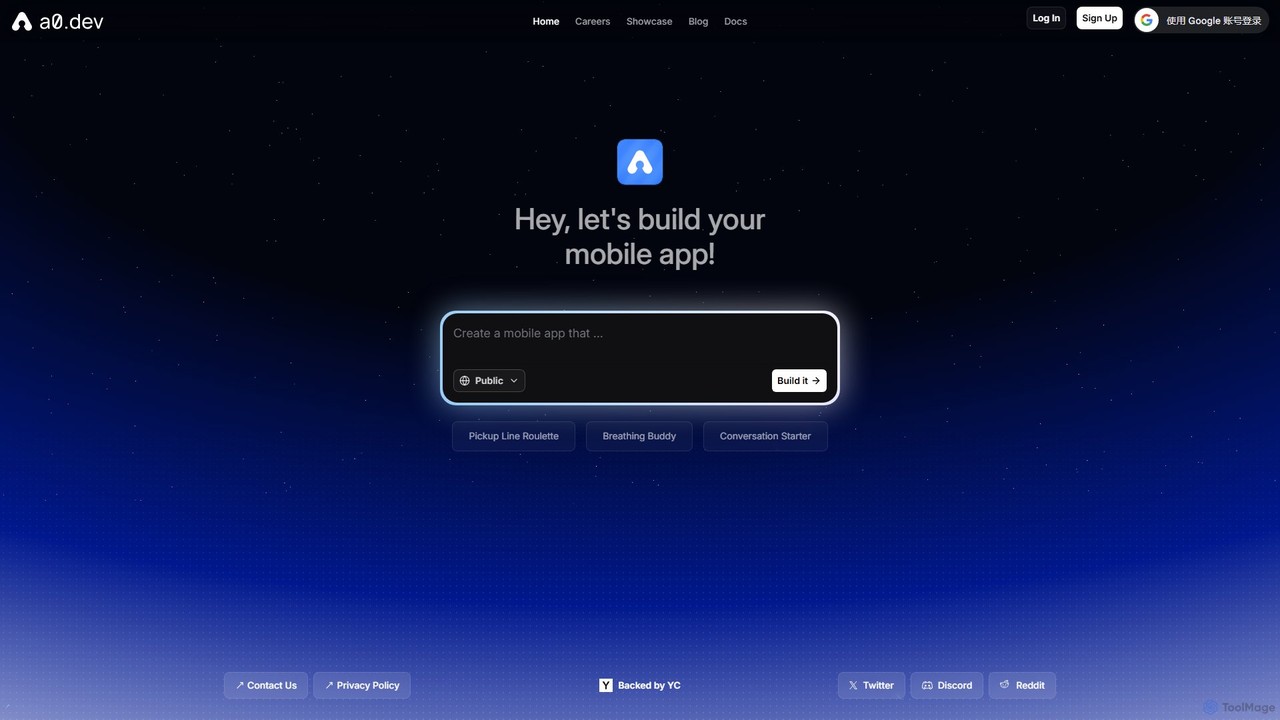
a0.dev is a revolutionary AI-powered platform that enables anyone to build native mobile apps for iOS and Android using simple text prompts. Describe your app idea in natural language, and the AI will generate, iterate, and help you publish it directly to the app stores, no coding required.

Text To App
Visits 91KFavorites 117Likes 129

About Text To App

Text To App tools are an innovative category of AI-powered platforms that enable users to generate functional software applications directly from natural language descriptions. These tools leverage advanced large language models (LLMs) and code generation capabilities to interpret user intent and translate it into executable code, user interfaces, and backend logic. They empower individuals and businesses to rapidly prototype and deploy applications without extensive coding knowledge, significantly accelerating the development process and democratizing app creation.

Core Features

  • Natural Language Input: Users describe desired app features and functionalities using plain text, which the AI interprets.
  • Automated UI Generation: The AI automatically designs and generates user interface components (buttons, forms, layouts) based on the textual description.
  • Backend Logic & Database Integration: Tools can generate underlying code for application logic, data handling, and often integrate with databases or APIs.
  • Code Export & Deployment: Many platforms allow exporting generated code in various languages or offer direct deployment options to cloud services.
  • Iterative Refinement: Users can refine their app by providing additional text prompts, allowing for continuous improvement and customization.

Use Cases

Text To App tools are particularly valuable for citizen developers, small businesses, and rapid prototyping teams. They enable non-technical users to build internal tools like inventory trackers or customer feedback forms, and allow entrepreneurs to quickly launch minimum viable products (MVPs) for web or mobile applications. This accelerates innovation by reducing the time and cost associated with traditional software development cycles.

How to Choose

When selecting a Text To App tool, consider the complexity of applications you intend to build, the supported programming languages or frameworks for code export, and the ease of integrating with existing systems. Evaluate the platform's natural language understanding capabilities, the flexibility of its UI customization options, and its pricing model. Also, assess the community support and available learning resources to ensure a smooth development experience.

Text To App use cases

1

Rapid Prototyping for Startups

A startup founder with a non-technical background needs to quickly validate a new business idea. By using a Text To App tool, they can describe their desired mobile app's core features, user flow, and data requirements in plain English. The AI generates a functional prototype with a basic UI and backend logic within hours or days, allowing the founder to gather early user feedback and secure initial funding without investing heavily in traditional development.

2

Building Internal Business Tools

A small business owner requires a custom internal tool, such as an employee shift scheduler or a simple CRM, but lacks in-house development resources. With Text To App, they can input descriptions like "create an app to manage employee shifts, allowing staff to request time off and managers to approve." The tool then generates a web application that streamlines operations and improves internal communication, tailored to their specific needs.

3

Educational App Development

An educator wants to create interactive learning modules or quizzes for their students without learning complex coding languages. They can use Text To App to describe the educational content, question types, and scoring logic. The AI then builds a simple web-based educational app, enabling students to engage with the material in a dynamic way and providing immediate feedback on their progress.

4

Personal Productivity & Utility Apps

An individual wants a personalized utility app, like a habit tracker or a simple budget manager, that isn't available off-the-shelf. By detailing the app's functions and desired interface through text prompts, they can generate a custom application. This empowers them to create tools perfectly suited to their unique needs, enhancing personal organization and efficiency.

5

Event Management & Registration Systems

An event organizer needs a quick solution for event registration, ticketing, and attendee management. Instead of hiring developers or using generic platforms, they can use Text To App to describe features like "event listing, ticket purchase, attendee list, email notifications." The tool generates a functional web application that handles registrations efficiently, saving time and resources for event planning.

6

Simple E-commerce Storefronts

A small artisan or craft seller wants to establish an online presence with a basic e-commerce store to showcase and sell their products. They can describe their product categories, payment methods, and shipping options to a Text To App platform. The AI then generates a simple, functional online storefront, allowing them to start selling quickly without the complexities of traditional e-commerce development platforms.

Text To App FAQ

What are Text To App tools?

Text To App tools are AI-powered platforms that allow users to create functional software applications by simply describing their desired features and functionalities in natural language. They interpret these textual prompts and generate the necessary code, user interfaces, and backend logic to build a working application, often without requiring any traditional coding skills.

How do Text To App tools work?

Text To App tools typically leverage large language models (LLMs) trained on vast datasets of code and application structures. When a user provides a text prompt, the AI analyzes the intent, breaks it down into components (UI elements, data models, logic flows), and then generates corresponding code snippets and configurations. These pieces are then assembled into a cohesive, functional application.

Who can benefit from using Text To App tools?

Text To App tools are highly beneficial for a wide range of users, including citizen developers, entrepreneurs, small business owners, educators, and anyone without extensive programming knowledge who needs to build applications quickly. They are ideal for rapid prototyping, creating internal tools, developing educational apps, or launching minimum viable products (MVPs) with limited resources.

What are the limitations of Text To App tools?

While powerful, Text To App tools have limitations. They are generally best suited for simpler applications with well-defined functionalities. Complex, highly customized, or performance-critical applications may still require traditional coding. The quality and efficiency of the generated code can vary, and deep integration with highly specialized legacy systems might be challenging. Users also need to be precise in their prompts to get the desired output.

How do Text To App tools differ from traditional software development?

Text To App tools drastically reduce the need for manual coding and design, allowing for much faster application creation compared to traditional software development. Traditional development involves writing code line by line, designing UIs manually, and configuring databases. Text To App automates much of this process, shifting the focus from coding to describing, making app development accessible to non-programmers and accelerating time-to-market.