
ToolMage
Sign in

Best 1 Voice Recognition AI tools for Ai Tools

Popular Voice Recognition AI tools in Ai Tools include Whisprlist, helping you work more efficiently.

Whisprlist
Freemium

Whisprlist

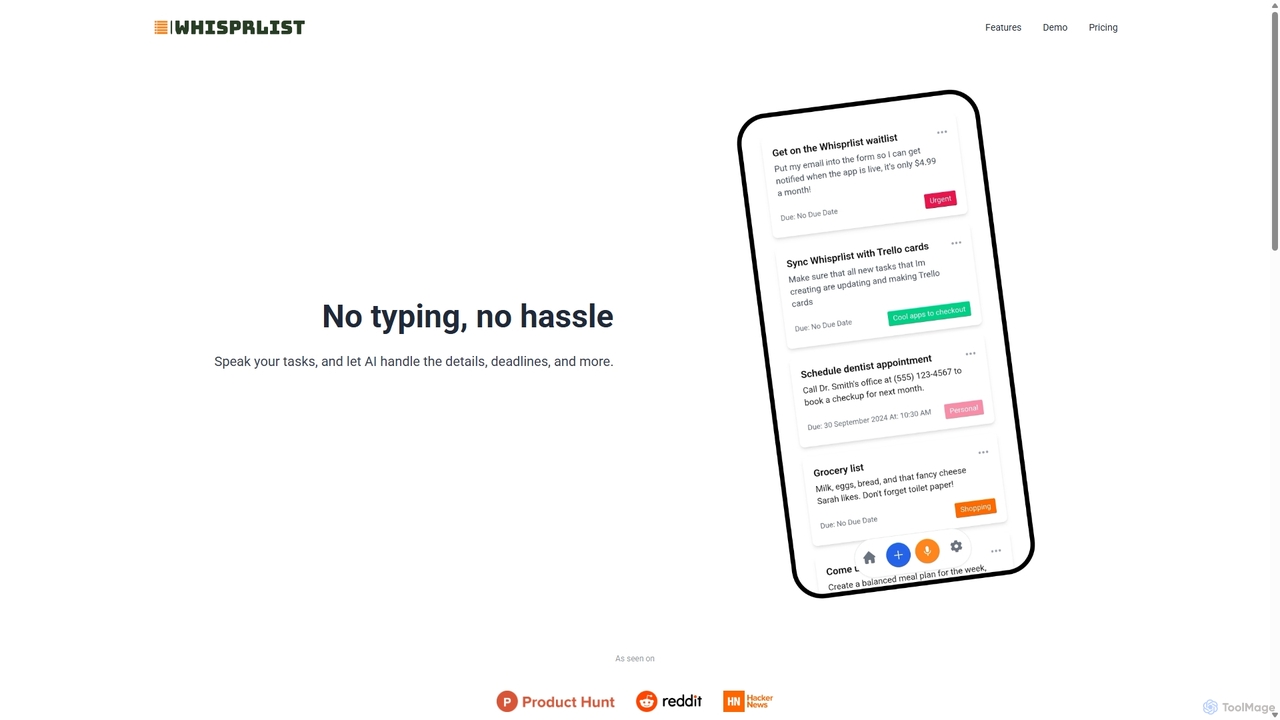
Whisprlist is an AI-powered task management tool that lets you create and organize your to-do list simply by speaking. It eliminates typing, using advanced voice recognition and AI to parse details, set deadlines, and structure your tasks. Receive a daily summary email to stay on track effortlessly.

Voice Recognition
Visits 5.4KFavorites 153Likes 125

About Voice Recognition

Voice Recognition tools are a category of AI-powered tools that convert spoken language into written text. Leveraging advanced Automatic Speech Recognition (ASR) and natural language processing (NLP) technologies, these tools accurately transcribe audio inputs from various sources. They provide significant value by enabling hands-free interaction, automating data entry, and making audio content searchable and accessible.

Core Features

  • Real-time Transcription: Converts spoken words into text almost instantly, ideal for live captions or dictation.
  • Speaker Diarization: Identifies and separates different speakers in a conversation, attributing text to each individual.
  • Custom Vocabulary: Allows users to add specific industry terms, product names, or jargon for improved accuracy.
  • Noise Reduction: Filters out background noise to enhance the clarity of speech and improve transcription quality.
  • Multilingual Support: Recognizes and transcribes speech in multiple languages, catering to diverse global needs.

Applicable Scenarios

Voice Recognition tools are widely adopted across various sectors. In healthcare, they enable doctors to dictate notes directly into patient records, saving time. For media companies, they automate the generation of subtitles and transcripts for video content. Customer service centers use them to analyze call recordings for sentiment and key topics, improving service quality.

How to Choose

When selecting a Voice Recognition tool, consider its accuracy across different accents and noise levels, especially for your target users. Evaluate its language support and custom vocabulary capabilities if you handle specialized terminology. Check for integration options with your existing workflows and assess its real-time processing speed for applications like live captioning. Finally, compare pricing models based on usage volume and included features.

Voice Recognition use cases

1

Automating Meeting Minutes

For business professionals and administrative staff, Voice Recognition tools can automatically transcribe entire meetings, including speaker identification. This eliminates manual note-taking, ensuring all discussions are captured accurately and can be easily searched or shared, saving hours of post-meeting work.

2

Enhancing Accessibility for Content

Content creators and educators can use Voice Recognition to generate accurate captions and subtitles for videos and podcasts. This makes content accessible to hearing-impaired audiences and those who prefer to consume content silently, broadening reach and improving SEO for video platforms.

3

Streamlining Customer Service Analytics

Call center managers utilize Voice Recognition to transcribe customer service calls. This allows for automated analysis of customer sentiment, identification of common issues, and agent performance evaluation, leading to improved service quality and training opportunities.

4

Enabling Hands-Free Device Control

Developers and smart home users leverage Voice Recognition for voice command interfaces. This enables users to control smart devices, navigate applications, or execute commands purely through spoken instructions, enhancing convenience and user experience, especially for those with limited mobility.

5

Accelerating Medical Dictation

Healthcare professionals, such as doctors and nurses, employ Voice Recognition to dictate patient notes, diagnoses, and treatment plans directly into electronic health records (EHR) systems. This significantly reduces administrative burden, improves documentation accuracy, and frees up time for patient care.

6

Facilitating Multilingual Communication

International businesses and travelers can use Voice Recognition tools with real-time translation capabilities. By speaking in one language, the tool transcribes and translates it into another, breaking down language barriers in live conversations or during content localization efforts.

Voice Recognition FAQ

What are Voice Recognition tools?

Voice Recognition tools are AI-powered software that convert spoken words into written text. They use advanced algorithms to analyze audio signals, identify speech patterns, and transcribe them into a digital format. These tools are crucial for hands-free operation, data entry automation, and making audio content searchable.

How do Voice Recognition tools work?

Voice Recognition tools typically work by processing audio input through an Automatic Speech Recognition (ASR) engine. This engine breaks down speech into phonemes, matches them against a language model, and then uses a dictionary and grammar rules to assemble words and sentences. Machine learning models are continuously trained on vast datasets to improve accuracy and adapt to different accents and speaking styles.

What is the difference between Voice Recognition and Speech Synthesis?

Voice Recognition (or Speech-to-Text) converts spoken language into written text, acting as an input mechanism. Speech Synthesis (or Text-to-Speech) does the opposite, converting written text into spoken language, acting as an output mechanism. Voice Recognition allows computers to understand human speech, while Speech Synthesis allows computers to "speak" to humans.

What factors should I consider when choosing a Voice Recognition tool?

When choosing a Voice Recognition tool, consider its accuracy for your specific use case, including language support and accent compatibility. Evaluate its real-time processing capabilities if speed is critical, and check for custom vocabulary features to handle specialized terminology. Integration with your existing software and data privacy compliance are also important considerations, alongside the pricing structure.

Who can benefit most from using Voice Recognition tools?

A wide range of users can benefit from Voice Recognition tools. This includes professionals who need to dictate notes (e.g., doctors, lawyers), content creators requiring captions or transcripts (e.g., podcasters, videographers), customer service teams analyzing call data, and individuals seeking accessibility solutions or hands-free device control. Anyone looking to convert spoken words into text efficiently will find these tools valuable.