ToolMage
Sign in

Best 1 Game Resources AI tools for Gaming

Popular Game Resources AI tools in Gaming include lockovercodes, helping you work more efficiently.

lockovercodes
Free

lockovercodes

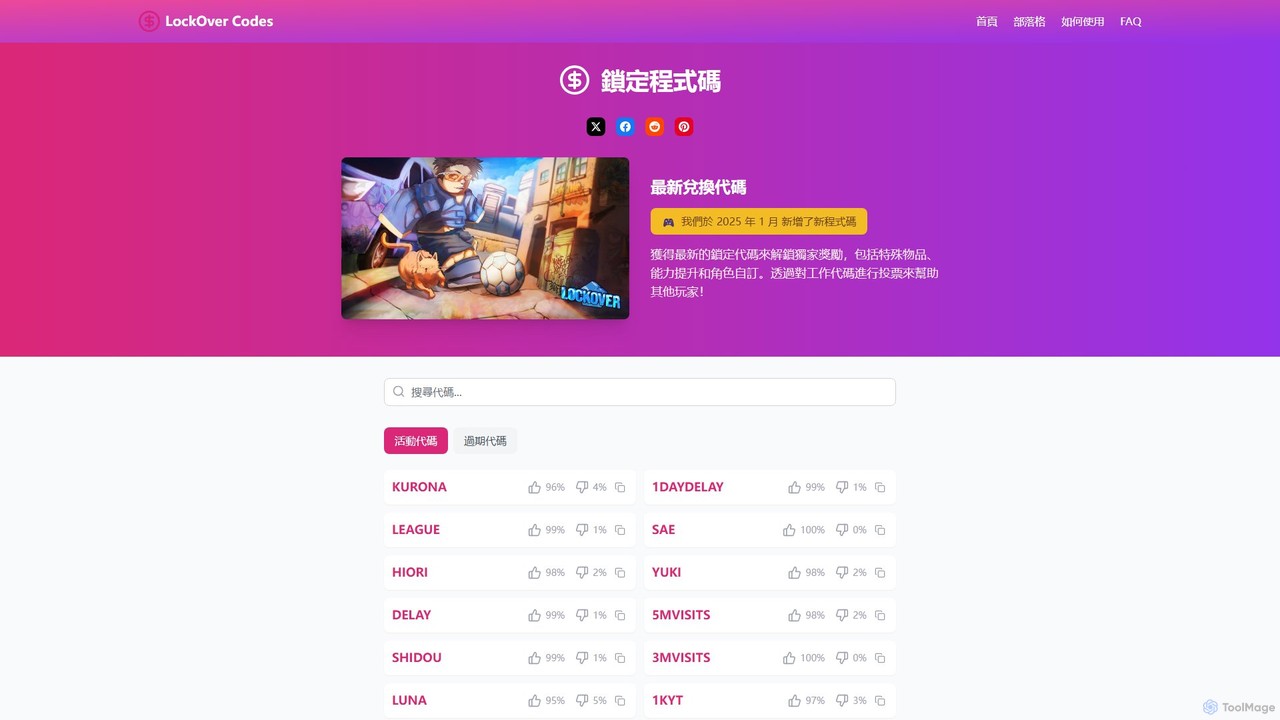
A dedicated resource hub for Roblox players, providing a comprehensive and updated list of active promotional codes for the game 'LockOver'. It helps gamers easily find and redeem codes for free in-game rewards, items, and boosts, saving them time and enhancing their gameplay experience.

Game Resources
Visits 5.3KFavorites 148Likes 152

About Game Resources

AI Game Resources are tools that leverage artificial intelligence to generate a wide range of assets for game development. These tools utilize generative models, such as GANs and diffusion models, to create unique textures, 3D models, sound effects, music, and even narrative content from user inputs like text prompts or reference images. Their primary value lies in accelerating the prototyping and production phases, enabling developers to quickly populate game worlds with high-quality, original content. This approach significantly reduces the time and cost associated with manual asset creation.

Core Features

  • Procedural Asset Generation: Creates unique game assets like textures, models, and sprites based on algorithms and user parameters.
  • AI-Powered Audio Creation: Generates original music, ambient sounds, and sound effects tailored to specific moods or in-game events.
  • Narrative and Content Generation: Produces game-related text, including NPC dialogue, quest descriptions, and item lore.
  • Concept Art and Character Design: Quickly visualizes characters, environments, and props from simple text descriptions for rapid iteration.
  • Texture and Material Synthesis: Generates seamless, high-resolution textures and materials for 3D models and environments.

Use Cases

These tools are invaluable for indie developers and small studios with limited resources, allowing them to create professional-grade assets without a large art team. Large studios use them for rapid prototyping, exploring creative concepts, and generating placeholder assets. Game jam participants also benefit by quickly producing functional assets within tight deadlines, focusing more on gameplay mechanics.

How to Choose

When selecting an AI Game Resources tool, first consider the specific asset type you need (e.g., 2D, 3D, audio, text). Evaluate the tool's integration capabilities and supported export formats (e.g., FBX, PNG, WAV) to ensure compatibility with your game engine. Assess the level of customization and artistic control it offers. Finally, compare pricing models—subscription, pay-per-asset, or free tiers—to find one that aligns with your project budget and scale.

Game Resources use cases

1

Rapid Prototyping for Indie Developers

An indie developer working alone needs to create a playable prototype for a new RPG concept within a month. Instead of spending weeks modeling characters and environments, they use an AI game resource tool. By inputting descriptions like 'low-poly fantasy knight' and 'mossy stone dungeon texture,' they generate all necessary placeholder assets in just a few days. This allows them to focus on core gameplay mechanics and programming, resulting in a functional prototype ready for playtesting and investor pitches much faster than traditional methods would allow.

2

Generating Diverse Environmental Textures

An art team for an open-world game needs to create thousands of unique textures for terrain, foliage, and buildings to avoid visual repetition. Manually creating each one is impractical. They use an AI texture synthesis tool trained on their game's art style. A level designer can now generate hundreds of variations of a 'cobblestone path' or 'bark' texture with slight, realistic differences. This populates the world with diverse, high-quality assets that maintain a consistent art direction, significantly enhancing player immersion.

3

Creating Adaptive Game Soundtracks

A solo developer creating a survival horror game lacks the budget for a composer. They need a dynamic soundtrack that changes based on the player's situation (e.g., exploring, hiding, in combat). Using an AI music generation tool, they define moods and intensity levels. The tool generates hours of royalty-free music that can transition seamlessly between 'eerie exploration' and 'high-intensity chase' themes. This provides a professional and adaptive audio experience that enhances tension and gameplay without requiring any musical expertise.

4

Generating NPC Dialogue and Quest Descriptions

A narrative designer is tasked with writing dialogue for hundreds of minor NPCs in a large RPG to make the world feel alive. To save time, they use an AI text generation tool. They provide the tool with character traits ('gruff blacksmith,' 'cheerful innkeeper') and a context ('discussing the recent dragon attack'). The AI generates multiple dialogue options and quest descriptions that fit the character's personality and the game's lore. The designer can then quickly review, edit, and implement this content, populating the game with rich narrative details in a fraction of the time.

5

Concept Art Exploration for Character Design

A lead artist needs to finalize the design for a game's main antagonist. Instead of having junior artists spend a week sketching dozens of variations, they use an AI image generator. The lead artist inputs a detailed prompt describing the character's key features, style, and mood. Within minutes, the AI produces a wide array of visual concepts. This allows the team to quickly identify promising design directions, combine elements from different generations, and move to a refined, final design much more efficiently, freeing up artists for more detailed production work.

6

Creating Unique Sound Effects for Actions

A sound designer for a sci-fi game needs hundreds of unique sound effects for futuristic weapons, doors, and user interfaces. Using an AI sound effect generator, they can input parameters like 'short laser blast with metallic echo' or 'holographic interface activation'. The tool generates multiple unique variations for each prompt. This avoids the repetitive sound design found in many games and allows the designer to quickly produce a rich, varied soundscape that enhances the game's futuristic setting, without needing to record or manually synthesize every sound from scratch.

Game Resources FAQ

What are AI Game Resources tools?

AI Game Resources tools are a category of software that uses artificial intelligence to generate assets for video games. Instead of relying on pre-made assets from a store, these tools create new, unique content on demand. This includes visual assets like 2D sprites and 3D models, audio like music and sound effects, and even text-based content such as NPC dialogue or quest descriptions. They are primarily used to accelerate development and empower creators with limited resources.

How do AI Game Resources differ from traditional asset stores?

The key difference is creation versus selection. Traditional asset stores offer a library of pre-made, static assets that you purchase and use as-is. AI Game Resources tools, on the other hand, are generative; they create new assets based on your specific inputs and parameters. This offers several advantages:

  • Uniqueness: Assets are generated for you, reducing the chance of seeing the exact same asset in another game.
  • Customization: You can guide the generation process to match your game's specific art style or requirements.
  • Iteration Speed: You can generate dozens of variations of an idea in minutes, which is ideal for prototyping and concepting.

Asset stores are better for finding specific, high-polish final assets, while AI tools excel at rapid creation and customization.

Who are the primary users of AI Game Resources tools?

These tools cater to a wide spectrum of game creators. Key user groups include:

  • Indie Developers & Solo Devs: They gain access to a virtual art and sound department, allowing them to create high-quality assets without a large budget or team.
  • Game Jam Participants: In time-constrained events, these tools are crucial for rapidly generating functional assets to build a playable game quickly.
  • Large Studio Prototyping Teams: They use these tools to quickly visualize ideas, create placeholder assets for new mechanics, and explore different artistic directions before committing to full-scale production.
  • Artists and Designers: They can use these tools as a creative partner to brainstorm ideas, generate base meshes or textures to work from, and accelerate their workflow.
What should I consider when choosing an AI Game Resources tool?

Selecting the right tool depends on your project's specific needs. Consider the following factors:

  • Asset Type: Does the tool specialize in 2D textures, 3D models, music, sound effects, or text? Choose one that aligns with your primary need.
  • Engine Compatibility: Check if the tool exports assets in formats compatible with your game engine (e.g., Unity, Unreal Engine). Common formats include .png, .fbx, and .wav.
  • Artistic Control: Evaluate how much control you have over the output. Some tools offer extensive parameters and style controls, while others are more automated.
  • Quality and Consistency: Review examples of a tool's output to ensure its quality meets your standards and that it can maintain a consistent style.
  • Pricing Model: Compare costs, whether it's a monthly subscription, a pay-per-asset model, or a free version with limitations.
Are assets generated by AI free to use in commercial games?

The commercial usage rights for AI-generated assets depend entirely on the terms of service of the specific tool you use. Many tools explicitly grant users full commercial rights to the assets they create, especially under paid subscription plans. However, some may have restrictions, particularly with free tiers. It is crucial to always read and understand the licensing agreement for any tool before using its output in a commercial project to ensure you are in full compliance and avoid any potential legal issues.