
ToolMage
Sign in

Best 1 Utilities AI tools for Mobile Apps

Popular Utilities AI tools in Mobile Apps include Treads, helping you work more efficiently.

Treads
Paid

Treads

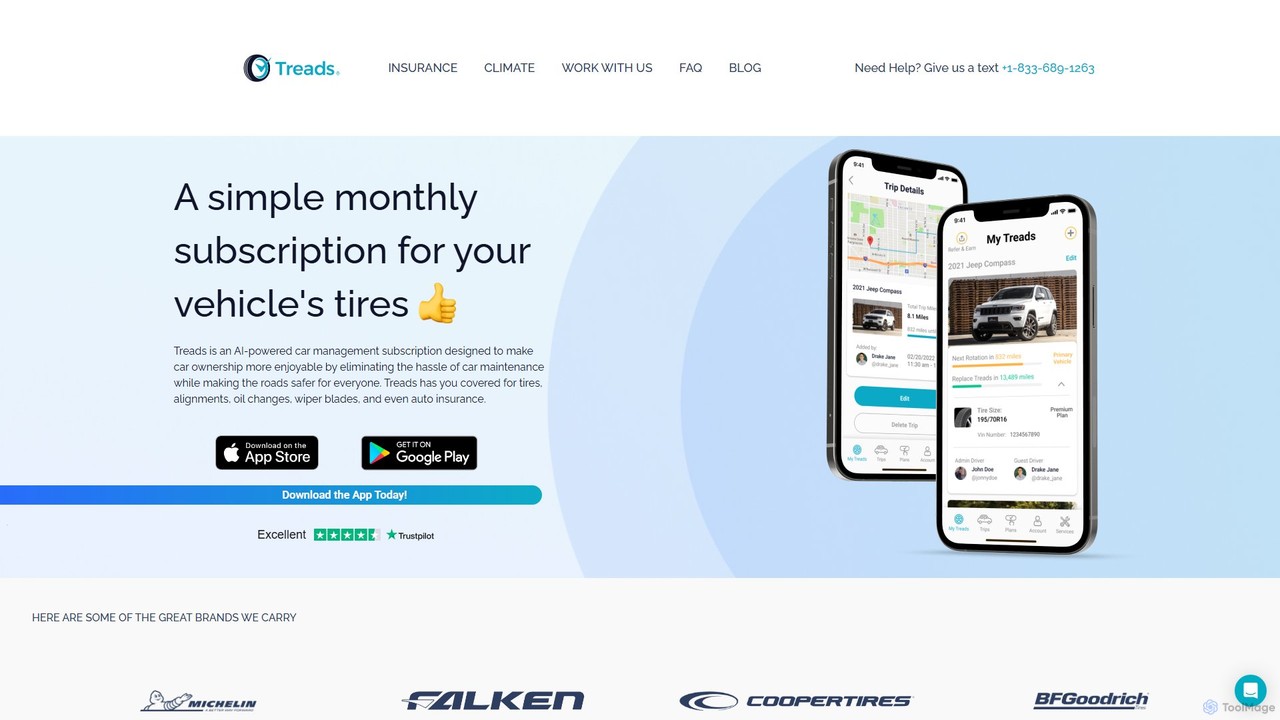
Treads is an AI-powered car management subscription that simplifies vehicle ownership. For a fixed monthly fee, it provides new tires, mobile installation and rotation, tire repairs, replacements, and 24/7 roadside assistance. The app uses AI to match you with the best tires and sends timely maintenance reminders, saving you time, money, and hassle.

Vehicle Maintenance
Visits 6.5KFavorites 133Likes 128

About Utilities

AI Utility mobile apps are applications designed to perform specific, practical tasks on a device with enhanced intelligence. They leverage AI algorithms to automate routines, optimize device performance, and provide predictive assistance. These tools act as a smart toolkit within the broader Mobile Apps category, making everyday mobile operations more efficient and intuitive, from managing files to improving typing speed. Their primary value lies in proactively solving problems rather than waiting for user commands.

Core Features

  • Smart Automation: Automatically perform tasks like cleaning junk files, managing notifications, or changing settings based on context.
  • Intelligent Recognition: Use the camera and AI for advanced OCR, QR code analysis, object identification, and document scanning.
  • Performance Optimization: Intelligently manage battery, CPU, and memory to ensure a smoother and longer-lasting device experience.
  • Predictive Assistance: Offer smart suggestions, from text prediction and grammar correction on keyboards to app recommendations based on usage patterns.

Use Cases

These apps are valuable for a wide range of users, from professionals needing automated file organization to everyday users wanting to boost their phone's speed and battery life. They are also used in specialized scenarios like smart network management for travelers or advanced screen recording for content creators, enhancing productivity on the go.

How to Choose

When selecting an AI utility app, focus on its specific function and whether it meets your primary need. Evaluate its impact on system resources by checking user reviews for reliability. Crucially, review its privacy policy, as many utility apps require access to sensitive device data to function effectively. Prioritize apps from reputable developers with transparent data handling practices.

Featured tool rankings

Utilities use cases

1

Automated Device Performance Tuning

For users whose phones have become slow over time, an AI utility app provides a hands-off solution. It runs in the background, learning usage patterns to intelligently freeze unused apps, clear cache before it impacts performance, and optimize battery usage for critical applications. This process restores the device's responsiveness and extends battery life without requiring any manual intervention or technical knowledge from the user.

2

Intelligent Text and Content Capture

For students and researchers, an AI utility with advanced OCR transforms the phone's camera into a powerful research tool. They can capture text from a textbook or document, and the app not only digitizes it but also understands the context. This allows for instant translation, summarization of key points, or direct saving of citations to a note-taking app, significantly streamlining the data collection and research process.

3

Smart Keyboard for Multilingual Communication

For international business professionals or language learners, an AI-powered keyboard is an essential utility. It provides real-time translation as they type, breaking down language barriers instantly. Furthermore, it offers advanced grammar correction and predictive text suggestions in multiple languages, ensuring all written communication is clear, professional, and error-free, regardless of the language being used.

4

Proactive File and Storage Management

For content creators and photographers who quickly fill their device storage, an AI file manager is a critical utility. It automatically categorizes photos and videos, identifies duplicate or blurry shots for deletion, and suggests archiving large, old files to the cloud. By proactively suggesting cleanup actions, it prevents 'storage full' errors before they happen and keeps the device's storage organized and optimized.

5

Context-Aware App Launcher and Organizer

For busy professionals who use many apps, a smart launcher utility simplifies their mobile experience. The AI learns which apps are used at certain times, locations, or even when connected to specific Bluetooth devices. It then presents a context-aware selection of apps on the home screen—work apps during office hours, music and podcast apps during a commute, and social apps in the evening, reducing clutter and time spent searching for apps.

6

Secure and Optimized Network Connectivity

For digital nomads and frequent travelers, an AI utility app for network management is invaluable. It constantly monitors network quality, automatically switching to the strongest Wi-Fi signal or most stable cellular connection. It can also be configured to automatically activate a VPN when connecting to an unsecured public network, or prioritize bandwidth for important tasks like video calls, ensuring a stable and secure connection anywhere.

Utilities FAQ

What are AI Utility mobile apps?

AI Utility mobile apps are tools that perform specific, practical functions on a mobile device, enhanced by artificial intelligence. Unlike standard utilities that require manual input, they use AI to learn user habits, automate complex tasks, and predict needs. This results in features like intelligent performance optimization, smart file management, and context-aware assistance that work proactively to improve the user's device experience.

How do I choose the right AI utility app?

To choose the right app, first identify the specific task you need to solve (e.g., battery saving, file organization). Then, consider these key factors:

  • Functionality: Does it offer the specific AI features you need, or is it just a standard utility with 'AI' branding?
  • Performance Impact: Check recent reviews to ensure it doesn't consume excessive battery or slow down your device.
  • Privacy Policy: Understand what data it accesses and how that data is used, especially since utilities often require deep system access.
  • User Interface: A good utility app should be simple to set up and then work unobtrusively in the background.
What's the difference between a standard utility and an AI utility app?

The key difference is proactivity and intelligence. A standard utility app is reactive; it performs a task only when you command it (e.g., you manually tap a 'clean cache' button). An AI utility app is proactive. It learns your usage patterns and can automatically clean the cache when it predicts performance might degrade, or suggest deleting duplicate photos it has identified on its own. It works to prevent problems, not just fix them on command.

What are the key functions of AI utility apps?

Key functions often revolve around intelligent automation and optimization. Common examples include:

  • System Optimization: Intelligent management of battery, memory (RAM), and storage to improve speed and longevity.
  • Task Automation: Automating repetitive actions based on triggers like time, location, or device state (e.g., silencing the phone at work).
  • Smart Input: AI keyboards with superior predictive text, real-time translation, and grammar correction.
  • Advanced Scanning & Recognition: Using AI for OCR, smart QR code analysis that checks for malicious links, and document scanning with automatic edge detection.
Are AI utility apps safe to use?

The safety of an AI utility app depends on the developer's reputation and their privacy practices. Since these apps often require broad permissions to manage your device, it is crucial to download them only from official app stores like Google Play or the Apple App Store. Always read the privacy policy to understand what data is collected and why. Choose apps from well-known developers with a track record of positive user reviews regarding security and privacy.