Bulk Rename Utility
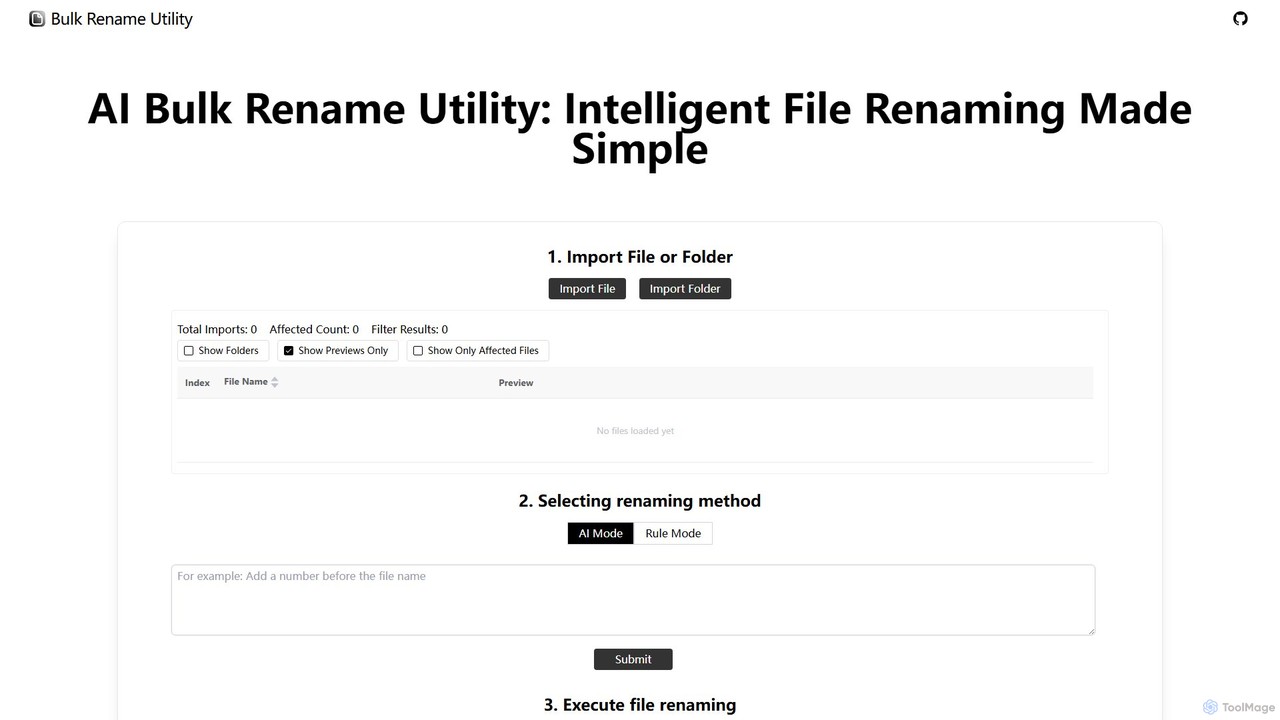
Bulk Rename Utility is a powerful, free online tool for batch renaming files. It offers a unique dual-mode …
Bulk Rename Utility is a powerful, free online tool for batch renaming files. It offers a unique dual-mode system: an intuitive AI mode for natural language commands and an advanced rule-based mode with features like regex and custom JavaScript. It operates locally in your browser for maximum privacy, supporting both Windows and Mac files.
About System Tools
System Tools are AI-powered applications designed to monitor, manage, optimize, and automate the performance, security, and stability of computer systems, networks, and software environments. As a specialized subset within the broader Utilities category, these tools leverage artificial intelligence to provide predictive insights, intelligent automation, and proactive problem-solving, moving beyond traditional reactive system management. They enhance operational efficiency, reduce manual intervention, and ensure robust infrastructure health across various IT landscapes.
Core Features
- AI-driven Performance Monitoring: Continuously analyze system metrics to predict bottlenecks, identify performance degradation, and suggest optimizations before issues impact users.
- Automated Resource Optimization: Dynamically allocate and adjust computing resources like CPU, memory, and storage based on real-time demand and predictive models.
- Intelligent Anomaly Detection: Utilize machine learning to identify unusual patterns in system logs, network traffic, and user behavior, signaling potential security threats or operational failures.
- Proactive Maintenance & Automation: Automate routine tasks, schedule predictive maintenance, and initiate self-healing actions to resolve detected issues without human intervention.
- Enhanced Security & Threat Intelligence: Employ AI to detect advanced persistent threats, manage vulnerabilities, and respond to security incidents more effectively than traditional methods.
Applicable Scenarios
IT administrators use AI System Tools to manage complex server infrastructures, ensuring high availability and optimal performance. DevOps teams integrate these tools into their CI/CD pipelines for automated monitoring, deployment optimization, and incident response. Cybersecurity professionals leverage them for advanced threat detection and proactive vulnerability management across enterprise networks.
How to Choose
When selecting AI System Tools, consider the scope of monitoring (e.g., cloud, on-premise, hybrid), the level of automation offered (from alerts to self-healing), integration capabilities with your existing IT stack, and the clarity of its predictive analytics and reporting. Evaluate the tool's scalability, security features, and compliance with industry standards to ensure it meets your operational and regulatory needs.

System ToolsUse Cases
Predictive Server Load Management
For IT operations teams managing dynamic cloud environments, AI System Tools analyze historical usage patterns and real-time traffic to predict future server load spikes. This allows for automated scaling of resources (e.g., adding virtual machines or adjusting CPU allocation) proactively, preventing service degradation and ensuring continuous application availability during peak demand, saving manual oversight time.
Automated Security Anomaly Detection
Cybersecurity analysts in large enterprises use AI System Tools to continuously monitor network traffic, user login patterns, and system logs for unusual activities. The AI identifies subtle deviations from normal behavior that might indicate a zero-day attack or insider threat, generating high-fidelity alerts and even initiating automated containment actions, significantly reducing response times and false positives.
Proactive Application Performance Optimization
DevOps engineers deploy AI System Tools to monitor critical business applications. These tools learn application behavior and dependencies, identifying performance bottlenecks before they impact end-users. For instance, they might detect a slow database query or a memory leak in a specific microservice and suggest or automatically apply configuration changes, ensuring smooth user experience.
Intelligent Log Analysis and Troubleshooting
Site Reliability Engineers (SREs) leverage AI System Tools to process vast volumes of log data from distributed systems. Instead of manually sifting through logs, the AI correlates events, identifies root causes of incidents, and highlights critical errors or warnings. This accelerates troubleshooting, reduces mean time to resolution (MTTR), and provides actionable insights for system improvements.
Optimizing Cloud Resource Costs
Cloud architects and finance teams utilize AI System Tools to analyze cloud resource consumption patterns. The AI identifies underutilized instances, recommends rightsizing opportunities, and suggests optimal purchasing options (e.g., reserved instances vs. spot instances). This leads to significant cost savings on cloud infrastructure without compromising performance or availability.
Automated Patch Management and Vulnerability Remediation
IT security teams use AI System Tools to automate the identification of vulnerabilities across their infrastructure and the deployment of necessary patches. The AI prioritizes patches based on risk and system criticality, schedules deployments during off-peak hours, and verifies successful application, ensuring systems are always up-to-date and protected against known exploits with minimal manual effort.