ToolMage
Sign in

Best 1 Transcription AI tools for Accessibility

Popular Transcription AI tools in Accessibility include Ekto Captions, helping you work more efficiently.

Ekto Captions
Freemium

Ekto Captions

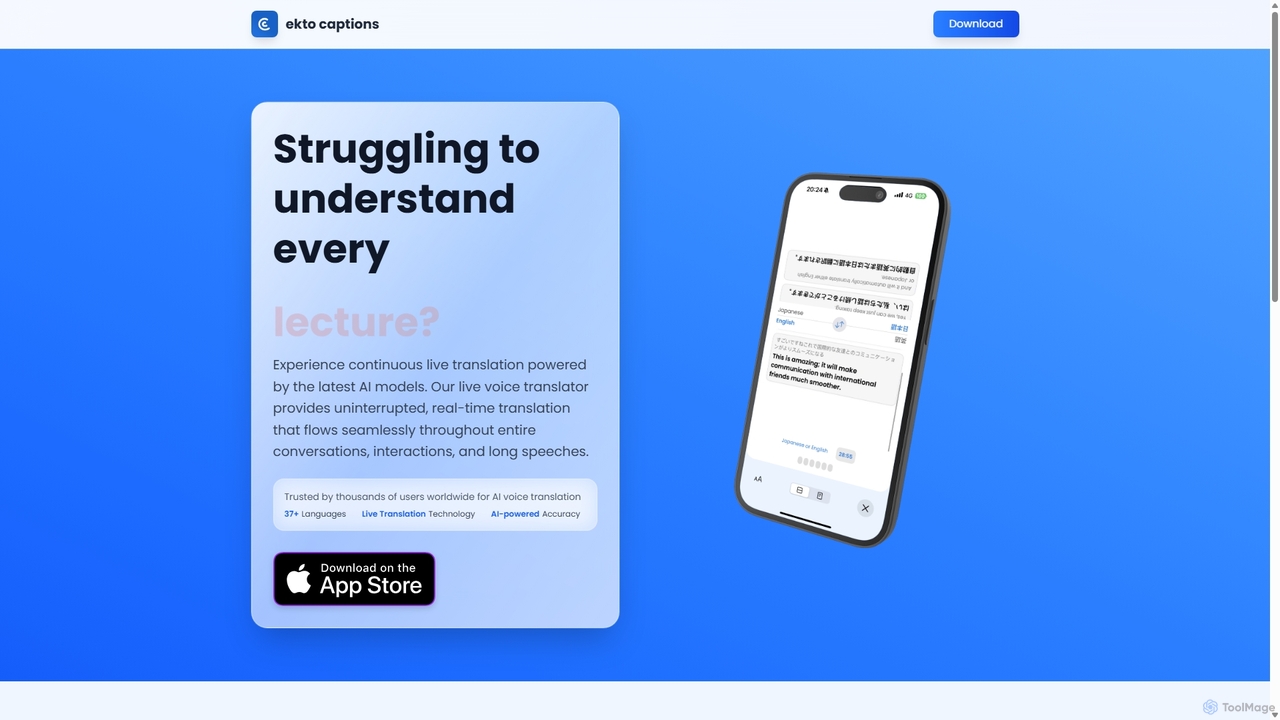
Ekto Captions is an AI-powered voice translator and live interpreter app for iOS. It provides continuous, real-time translation and captioning in over 37 languages. Ideal for lectures, meetings, travel, and language exchange, it breaks down communication barriers with high accuracy and a simple, intuitive interface.

Transcription
Visits 5.5KFavorites 124Likes 125

About Transcription

Transcription tools are AI-powered solutions that convert spoken language from audio or video into written text. Leveraging advanced speech recognition and natural language processing (NLP) algorithms, these tools provide accurate and efficient text versions of verbal content. They are essential for creating accessible content, improving documentation, and streamlining workflows across various industries, often featuring real-time capabilities, speaker identification, and multi-language support.

Core Features

  • Speech-to-Text Conversion: Accurately transforms audio and video recordings into editable written text.
  • Speaker Identification: Automatically distinguishes and labels different speakers within a conversation or recording.
  • Timestamping: Inserts time markers into the transcribed text, linking specific phrases to their exact points in the audio.
  • Multi-language Support: Processes and transcribes audio in a wide array of languages and dialects.
  • Custom Vocabulary: Allows users to add industry-specific jargon, proper nouns, or technical terms to enhance transcription accuracy.

Use Cases

Transcription tools are widely adopted by professionals needing to convert spoken words into text for various purposes. They are crucial for documenting meetings, interviews, and lectures, providing a searchable and reviewable record. Additionally, these tools are invaluable for content creators who need to generate subtitles, closed captions, or text-based content from podcasts and videos, significantly enhancing content accessibility and repurposing efforts.

How to Choose

When selecting an AI transcription tool, consider its accuracy, especially for specific accents or technical jargon, and the speed of transcription (real-time vs. batch processing). Evaluate its language support, speaker identification capabilities, and integration options with existing workflows. Security and privacy features are also paramount, particularly for sensitive data, alongside the pricing model and overall user-friendliness.

Transcription use cases

1

Documenting Meetings and Interviews

Business professionals and researchers utilize transcription tools to automatically convert recorded meetings, client calls, and in-depth interviews into accurate, searchable text. This streamlines the creation of meeting minutes, research notes, and comprehensive documentation, saving hours of manual listening and typing.

2

Generating Subtitles and Captions for Video

Content creators, educators, and media producers employ these tools to quickly generate precise subtitles and closed captions for videos, webinars, and online courses. This significantly enhances content accessibility for hearing-impaired audiences and non-native speakers, while also boosting SEO for video content.

3

Repurposing Audio/Video Content for Blogs

Podcasters and YouTubers leverage transcription to convert their audio and video content into written blog posts, articles, or show notes. This strategy maximizes content reach, provides alternative consumption formats, and improves search engine visibility by offering text-based versions of their multimedia assets.

4

Academic Research and Qualitative Data Analysis

Academics and students use transcription tools to process recorded lectures, focus group discussions, and qualitative research interviews. Having text transcripts simplifies the process of coding, analyzing themes, and extracting key insights from large volumes of spoken data, accelerating research workflows.

5

Legal and Medical Dictation and Record-Keeping

Legal professionals and healthcare providers rely on transcription tools to convert dictated notes, court proceedings, depositions, and patient consultations into written records. This ensures high accuracy for critical documentation, maintains compliance, and provides easily retrievable information for future reference.

6

Journalism and Media Production Workflow

Journalists and media teams use transcription to rapidly convert press conferences, field interviews, and broadcast footage into text. This enables quick fact-checking, quote extraction, and script preparation, significantly accelerating the news reporting and content production cycle.

Transcription FAQ

What are AI Transcription tools?

AI Transcription tools are software applications that use artificial intelligence, specifically speech recognition and natural language processing, to convert spoken audio into written text. They automate the process of transcribing recordings, making verbal content searchable, editable, and accessible. These tools are distinct from manual transcription services due to their speed and scalability.

How accurate are AI Transcription tools?

The accuracy of AI transcription tools varies significantly, typically ranging from 80% to 95% or higher, depending on audio quality, speaker clarity, background noise, and the complexity of vocabulary. Tools with custom vocabulary features or specialized models for specific domains (e.g., medical, legal) often achieve higher accuracy. For critical applications, human review is usually recommended.

What's the difference between AI Transcription and manual transcription?

AI transcription offers speed and cost-effectiveness, converting hours of audio in minutes at a fraction of the cost of human transcribers. However, manual transcription generally provides superior accuracy, especially for poor audio quality, multiple overlapping speakers, or highly specialized jargon. AI is ideal for drafts and large volumes, while manual is preferred for maximum precision.

Can AI Transcription tools handle multiple speakers and accents?

Yes, most advanced AI transcription tools are equipped with speaker diarization features that identify and label different speakers in a conversation. They also support a wide range of accents and dialects, though accuracy can sometimes be lower for less common or very strong accents. Users can often train models with specific accent profiles for better results.

What are the key benefits of using AI Transcription tools?

The primary benefits include significant time and cost savings compared to manual transcription. They enhance accessibility by providing text versions for hearing-impaired individuals and improving content searchability. AI transcription also facilitates content repurposing (e.g., turning a podcast into a blog post) and improves documentation efficiency across various professional fields.