
ToolMage
Sign in

Best 1 Monitoring AI tools for Automation

Popular Monitoring AI tools in Automation include Ogmax, helping you work more efficiently.

Ogmax
Freemium

Ogmax

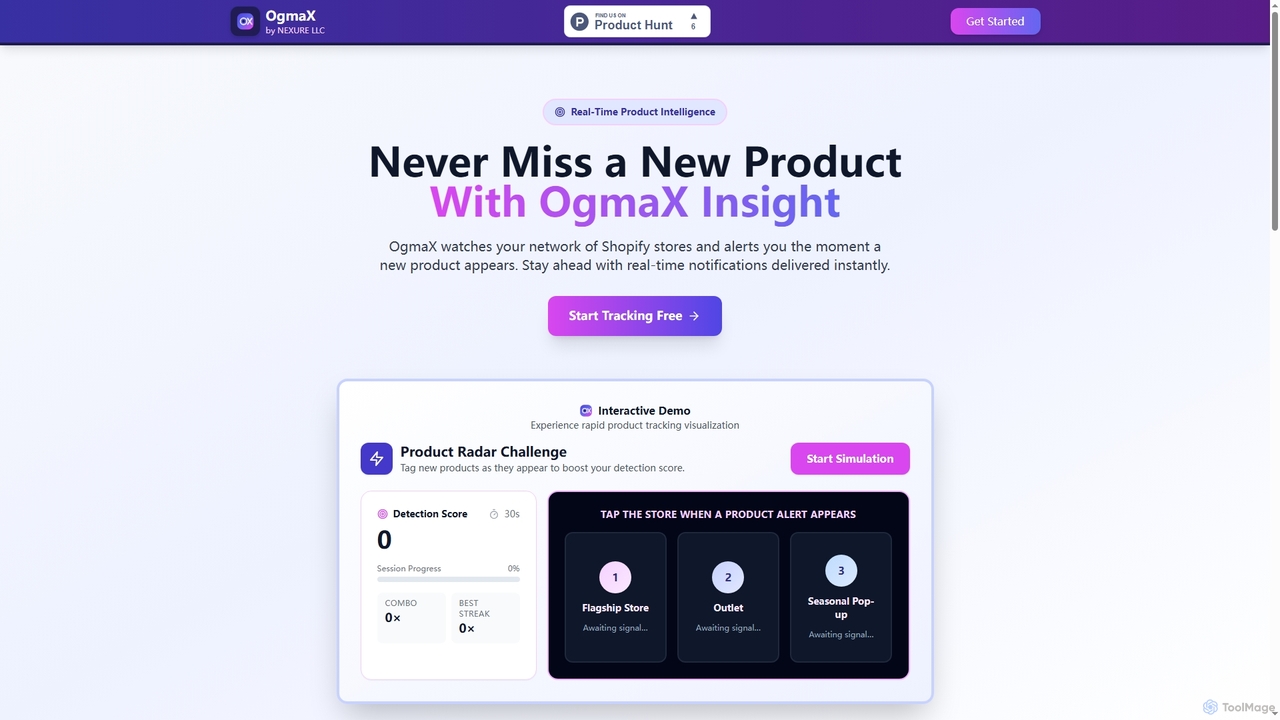
Ogmax is a real-time product intelligence tool for Shopify. It automatically monitors your chosen Shopify stores and sends instant notifications the moment a new product is launched, helping you stay ahead of competitors and never miss a product drop.

Monitoring
Visits 6KFavorites 158Likes 143

About Monitoring

AI Monitoring tools are a specialized category of automation software that uses machine learning to proactively track, analyze, and predict the behavior of complex systems, applications, or business data streams. They go beyond traditional rule-based alerts by establishing dynamic performance baselines and identifying subtle anomalies that often precede major issues. This enables organizations to shift from reactive problem-solving to proactive issue prevention, ensuring system reliability and operational efficiency. These tools serve as the intelligent sensory system for a modern automation strategy.

Core Features

  • Anomaly Detection: Automatically identifies unusual patterns or outliers in data that deviate from the established norm.
  • Predictive Alerting: Forecasts potential future issues or system failures based on historical data trends, allowing for preemptive action.
  • Root Cause Analysis (RCA): Pinpoints the underlying causes of detected problems by correlating events across multiple data sources.
  • Dynamic Baselining: Learns the normal operational range of a system, which continuously adapts to changes like seasonality or growth.
  • Automated Response Triggers: Initiates predefined automation workflows or actions when specific events or anomalies are detected.

Use Cases

These tools are critical in environments where system uptime and performance are paramount. In IT Operations (AIOps), they predict server failures and network bottlenecks. For e-commerce platforms, they detect fraudulent transactions or sudden drops in sales conversions. In manufacturing, they enable predictive maintenance by monitoring sensor data from machinery to anticipate equipment failure.

How to Choose

When selecting an AI Monitoring tool, consider its integration capabilities with your existing data sources (e.g., logs, metrics, cloud services). Evaluate the sophistication of its machine learning models and the ease of customization. Assess the quality of its alerting system—specifically its ability to reduce false positives and provide actionable context. Finally, consider its ability to trigger external automation platforms to close the loop from detection to resolution.

Monitoring use cases

1

IT Infrastructure & Server Uptime Monitoring

For DevOps engineers and IT administrators, maintaining server health is paramount. An AI Monitoring tool continuously tracks key metrics like CPU usage, memory, disk space, and network latency across all servers. Instead of just alerting when a threshold is breached, the AI learns the normal operational baseline and detects subtle performance degradations that precede an outage. It can send a predictive alert to the team, allowing them to investigate and resolve the issue proactively before users are impacted, preventing costly downtime and ensuring service reliability.

2

Proactive Server Health Monitoring for IT Operations

An SRE or DevOps team manages a large-scale cloud infrastructure. Instead of relying on static CPU or memory threshold alerts, they use an AI Monitoring tool. The tool learns the normal rhythmic patterns of their application traffic, including daily and weekly cycles. When it detects a subtle, abnormal memory leak that would not trigger a traditional alert, it sends a predictive warning. This allows the team to investigate and patch the issue during low-traffic hours, preventing a potential application crash during peak business times and ensuring service reliability.

3

Real-time Sales Anomaly Detection for E-commerce

An e-commerce manager needs to ensure the checkout process is always functional. An AI Monitoring tool is configured to track key business metrics like 'add to cart' events, successful checkouts, and payment gateway response times. The AI establishes a baseline for normal sales patterns. One afternoon, the tool detects a sharp, statistically significant drop in successful checkouts for a specific payment method. It immediately alerts the manager, who discovers a misconfiguration in the payment gateway. The issue is fixed in minutes, preventing thousands of dollars in lost revenue.

4

Real-time Social Media Brand Sentiment Analysis

Marketing and PR teams need to understand public perception of their brand in real time. An AI Monitoring tool can be configured to scan social media platforms, news sites, and forums for brand mentions. It uses Natural Language Processing (NLP) to analyze the sentiment (positive, negative, neutral) of each mention. If there's a sudden spike in negative sentiment, indicating a potential PR crisis, the system immediately alerts the team. This allows for a rapid response to mitigate damage, engage with customers, and manage the brand's reputation effectively.

5

Brand Sentiment Monitoring for Crisis Management

A public relations team for a global brand uses an AI Monitoring tool to track brand mentions across social media, news sites, and forums. The tool analyzes the sentiment of each mention in real-time. Following a product launch, the tool detects a sudden spike in negative sentiment originating from a specific platform, linked to a viral customer complaint. The PR team is alerted within minutes, far faster than manual tracking would allow. They can immediately address the complaint publicly and activate their crisis communication plan, mitigating reputational damage before it escalates.

6

Predictive Maintenance for Manufacturing Equipment

In a manufacturing plant, unexpected equipment failure leads to costly production halts. Factory managers can deploy AI Monitoring tools connected to sensors on industrial machinery. These tools analyze real-time data streams like temperature, vibration, and pressure. The AI model learns the normal operating signature of each machine and can predict when a component is likely to fail based on subtle changes in the data. This enables a predictive maintenance schedule, where repairs are performed just before a failure occurs, maximizing equipment uptime and reducing maintenance costs.

7

Predictive Maintenance for Industrial Machinery

A factory manager oversees a critical assembly line. An AI Monitoring tool is connected to IoT sensors on the machinery, collecting data on vibration, temperature, and power consumption. The AI model, trained on historical data, identifies a subtle vibration pattern that is a known precursor to motor failure. It predicts a 90% chance of failure within the next 72 hours and automatically creates a high-priority maintenance ticket in the factory's management system. Technicians replace the part during scheduled downtime, preventing a costly unplanned shutdown of the entire production line.

8

Application Performance Monitoring (APM)

For software developers and Site Reliability Engineers (SREs), ensuring a fast and reliable user experience is critical. An AI-powered APM tool monitors application response times, error rates, and transaction traces in real-time. It can automatically identify performance bottlenecks, such as slow database queries or inefficient code paths, that would be difficult to find manually. By correlating user-facing slowdowns with specific backend issues, the AI provides actionable insights, helping developers quickly pinpoint and fix problems to optimize application performance and maintain user satisfaction.

9

Financial Transaction Fraud Detection

Financial institutions and e-commerce platforms face constant threats from fraudulent transactions. An AI Monitoring tool analyzes streams of transaction data in real-time, building a behavioral profile for each customer. It learns normal spending habits, locations, and transaction types. When a transaction occurs that deviates significantly from this learned profile—such as an unusually large purchase from a foreign country—the system flags it as suspicious. This allows for immediate intervention, such as blocking the transaction or requiring further verification, which minimizes financial losses and protects customer accounts.

10

Monitoring Financial Transactions for Fraud Detection

A financial institution employs an AI Monitoring system to analyze customer transaction data in real-time. The system builds a unique behavioral profile for each customer, including typical transaction amounts, locations, and times. When a transaction occurs that significantly deviates from a customer's established profile—such as a large withdrawal from an unusual foreign location—the system flags it as high-risk. It can automatically place a temporary hold on the transaction and trigger an SMS alert to the customer for verification, preventing fraud before the funds are lost.

11

E-commerce Website Performance Tracking

For e-commerce managers, website performance directly impacts revenue. An AI Monitoring tool can track the entire customer journey, from landing page load times to checkout completion rates. It can identify anomalies like a sudden increase in cart abandonment or a spike in payment processing errors. By correlating these events, the AI might discover that a slow-loading third-party payment gateway is causing users to leave. This provides a clear, data-driven signal to the development team to investigate and resolve the issue, thereby protecting sales and improving the customer experience.

12

Analyzing Chatbot Performance for Customer Support

A customer support manager wants to improve their automated chatbot's effectiveness. They use an AI Monitoring tool to analyze all chatbot conversation logs. The tool identifies patterns such as high conversation drop-off rates at specific points in a dialogue, frequently misunderstood user questions, and topics that consistently require escalation to a human agent. By monitoring these performance metrics, the manager gets actionable insights to refine the chatbot's scripts, add new knowledge base articles, and improve its natural language understanding, ultimately boosting customer satisfaction and reducing the load on human agents.

Monitoring FAQ

What are AI Monitoring tools?

AI Monitoring tools are advanced software that use machine learning and artificial intelligence to automatically and proactively track the health and performance of IT systems, applications, and business processes. Unlike traditional tools that rely on static, pre-defined thresholds, AI monitoring tools learn what is 'normal' behavior for a system and can detect subtle anomalies and predict future issues before they impact users. Key features often include anomaly detection, predictive alerting, and automated root cause analysis.

What are AI Monitoring tools?

AI Monitoring tools are advanced software that use machine learning and data analysis to automatically observe and understand the behavior of digital systems. Unlike traditional tools that rely on preset rules, AI monitoring systems learn what is 'normal' for a system and can detect subtle deviations and predict future problems. They are primarily used to ensure the reliability, performance, and security of IT infrastructure, applications, and business processes by providing proactive alerts and deep insights.

How to choose the right AI Monitoring tool?

Choosing the right tool depends on your specific needs. Consider these key factors:

  • Integration: Ensure the tool can connect seamlessly with your existing technology stack, such as cloud platforms (AWS, Azure), databases, and applications.
  • Scalability: Select a tool that can handle the volume and velocity of your data, both now and as your business grows.
  • Customization: Look for flexible alerting rules and customizable dashboards to tailor the monitoring to your specific KPIs and reduce unnecessary noise.
  • Ease of Use: Evaluate the user interface and the level of technical expertise required to set up and manage the tool effectively.
How do AI Monitoring tools differ from traditional monitoring?

The key difference lies in intelligence and proactivity. Traditional monitoring uses static, manually set thresholds (e.g., 'alert if CPU > 90%'). This often leads to alert fatigue from false positives or missed issues that don't cross the threshold. AI monitoring, in contrast, uses machine learning to:

  • Establish dynamic baselines: It learns what's normal, even if it changes over time.
  • Detect anomalies: It finds unusual patterns, not just threshold breaches.
  • Reduce noise: It correlates alerts to pinpoint the root cause, reducing redundant notifications.
  • Predict failures: It analyzes trends to warn about issues before they occur.
In essence, traditional tools ask 'Is something broken now?', while AI tools ask 'Is something behaving abnormally, and could it break soon?'.

What are the key features to look for in an AI Monitoring tool?

When evaluating AI Monitoring tools, focus on these core features:

  • Broad Data Integration: The ability to ingest data from various sources like logs, metrics, traces, and third-party APIs.
  • Automated Anomaly Detection: A strong machine learning engine that can identify unusual patterns without manual configuration.
  • Root Cause Analysis: Features that help correlate events and data points to quickly identify the source of a problem.
  • Predictive Analytics: The capability to forecast future trends or potential failures based on historical data.
  • Actionable & Contextual Alerts: An intelligent alerting system that reduces noise, groups related events, and provides context to help with troubleshooting.

What's the difference between AI Monitoring and traditional monitoring?

The primary difference lies in their approach to detecting issues. Traditional monitoring relies on static, manually set thresholds (e.g., 'alert if CPU usage exceeds 90%'). This can lead to false alarms or missed issues that don't cross the threshold. AI Monitoring, on the other hand, is dynamic. It learns the normal patterns and correlations in your data over time. It can then identify subtle anomalies that deviate from this learned baseline, allowing it to catch complex problems earlier and with greater accuracy, significantly reducing alert noise.

Who typically uses AI Monitoring tools?

AI Monitoring tools are used by a wide range of professionals and teams. Key users include:

  • DevOps and IT Operations Teams: For monitoring infrastructure health, server performance, and application uptime to ensure service reliability.
  • Software Developers & SREs: For Application Performance Monitoring (APM) to identify and fix code-level bottlenecks.
  • Marketing and PR Teams: To track brand sentiment and manage reputation by analyzing social media and news mentions.
  • Security Analysts: To detect anomalous network traffic or user behavior that could indicate a security threat.
  • Business Analysts: To monitor key business metrics and KPIs in real-time to track performance and identify trends.
How does AI Monitoring fit into a broader Automation strategy?

AI Monitoring acts as the 'nervous system' for a broader automation strategy. While automation tools execute tasks, AI monitoring tools provide the critical intelligence and triggers for those tasks. For example, a simple automation might restart a server every night. An advanced, monitored automation would only trigger a server restart when the AI monitoring tool predicts an imminent failure based on abnormal performance data. This makes automation more efficient, precise, and proactive, moving from simple scheduled tasks to intelligent, event-driven responses that optimize system health and business outcomes.

How does AI Monitoring fit into the broader field of Automation?

AI Monitoring is a critical component of the modern automation ecosystem, often acting as the 'nervous system'. While other automation tools execute tasks (e.g., deploying code, scaling servers), AI Monitoring tools provide the necessary intelligence and triggers for those actions. They automate the process of observation and analysis. For example, an AI monitoring tool can detect an impending server failure and automatically trigger another automation tool to provision a new server and migrate traffic, creating a self-healing system with minimal human intervention.

Who should use AI Monitoring tools?

AI Monitoring tools are valuable for a wide range of roles and industries. Key users include:

  • DevOps and SRE Teams: For ensuring the reliability and performance of applications and infrastructure in complex, dynamic environments.
  • IT Operations Managers: To move from reactive firefighting to proactive problem prevention and optimize resource allocation.
  • Business Analysts: To monitor key performance indicators (KPIs) in real-time, such as sales conversions or user engagement, and detect business-impacting anomalies.
  • Cybersecurity Analysts: To detect unusual network traffic or user behavior that could indicate a security threat.
  • E-commerce Managers: To monitor website performance, transaction success rates, and detect issues affecting customer experience.