
ToolMage
Sign in

Best 1 Identity Management AI tools for Productivity

Popular Identity Management AI tools in Productivity include TypingDNA, helping you work more efficiently.

TypingDNA
Freemium

TypingDNA

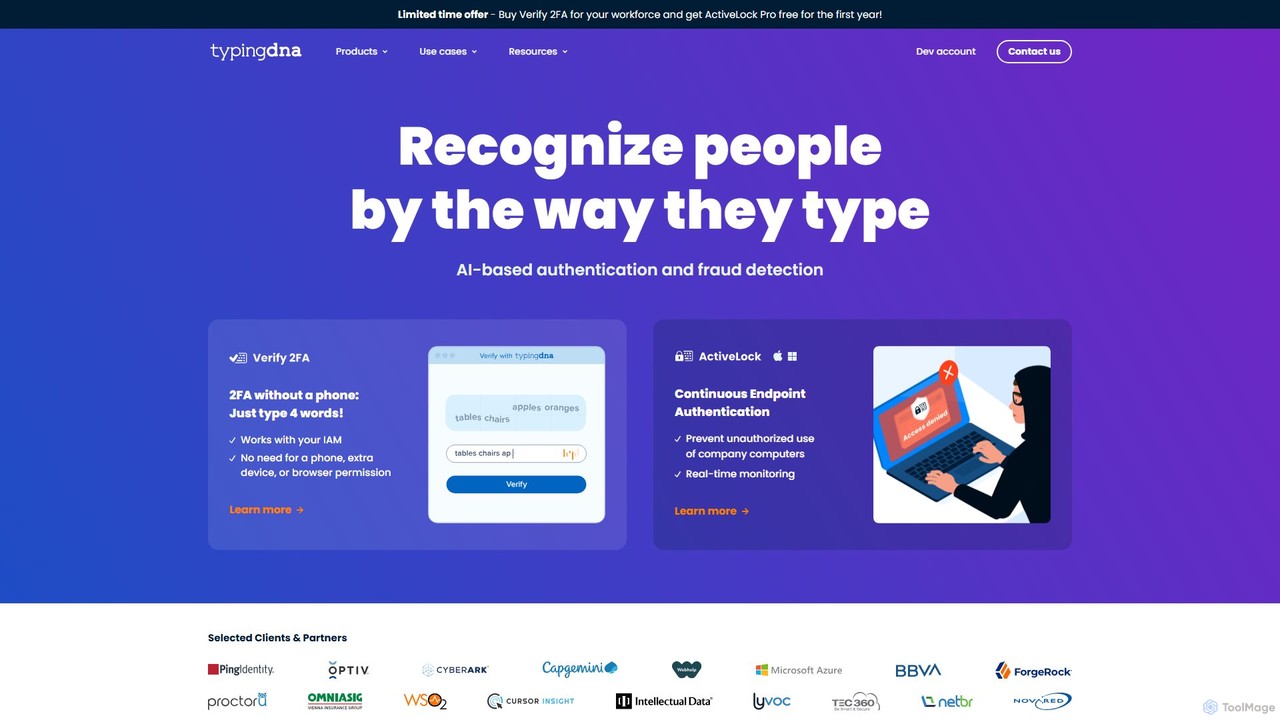
TypingDNA offers advanced user authentication through typing biometrics. It verifies users based on their unique typing patterns, providing a frictionless and secure alternative to traditional 2FA. Its solutions include a ready-to-use 2FA product and a flexible Authentication API for custom integrations, enhancing security for finance, education, and enterprise applications without compromising user experience.

Api
Visits 30.9KFavorites 161Likes 167

About Identity Management

AI Identity Management tools are systems that use artificial intelligence to automate and secure user access to digital resources. They leverage machine learning to analyze user behavior, detect threats in real-time, and provide adaptive authentication. This approach enhances security beyond static passwords and rules, streamlining access for legitimate users while preventing unauthorized entry, thereby boosting organizational productivity and security posture.

Core Features

  • Adaptive Multi-Factor Authentication (MFA): Dynamically adjusts authentication requirements based on real-time risk assessment, such as location or device.
  • Behavioral Biometrics: Analyzes patterns like typing speed and mouse movements to continuously verify user identity without intrusion.
  • AI-Powered Threat Detection: Identifies anomalous access patterns and potential account takeover attempts using predictive analytics.
  • Automated Lifecycle Management: Intelligently manages user access rights from onboarding to offboarding based on roles and policies.

Use Cases

These tools are crucial for enterprises securing a remote workforce, financial institutions preventing fraud, and SaaS platforms offering secure, frictionless user logins. They are also vital in healthcare for protecting patient data and in e-commerce for securing customer accounts against takeovers.

How to Choose

When selecting an AI Identity Management tool, evaluate its integration capabilities with your existing systems (e.g., HRIS, Active Directory). Assess the sophistication of its AI threat detection models, its compliance with regulations like GDPR and HIPAA, and its scalability to support future user growth.

Identity Management use cases

1

Secure Remote Workforce Access

An IT administrator for a global company uses an AI Identity Management tool to secure access for remote employees. The system analyzes login context like location, device health, and time of day. If an employee tries to log in from an unrecognized network, the AI flags it as a higher risk and automatically triggers a step-up authentication, such as a biometric scan, instead of just a password. This dynamic approach prevents unauthorized access to sensitive company data without inconveniencing legitimate users during their normal workflow.

2

Prevent E-commerce Account Takeover

An e-commerce platform integrates an AI identity tool to protect customer accounts. The tool builds a behavioral profile for each user, learning their typical navigation patterns, typing speed, and mouse movements. If a fraudster gains access to a user's credentials and tries to make a large purchase, their behavior will deviate from the established profile. The AI detects this anomaly in real-time, blocks the transaction, and prompts for additional verification, effectively preventing account takeover fraud and protecting customer assets.

3

Automate Employee Lifecycle Management

An HR manager at a fast-growing tech company uses an AI identity platform integrated with their HRIS. When a new software developer is hired, the system automatically provisions access to specific tools like GitHub, Jira, and the development server based on their pre-defined role. The AI can also suggest additional access rights based on the patterns of other developers. When the employee is promoted or leaves the company, the system instantly updates or revokes all permissions, eliminating manual errors and closing security gaps immediately.

4

Frictionless Customer Onboarding for FinTech

A new digital bank uses an AI identity verification service to onboard customers quickly and securely. When a user signs up, they are prompted to take a photo of their government-issued ID and a selfie. The AI tool performs document authenticity checks, extracts data via OCR, and uses facial recognition to match the selfie to the ID photo. This entire process takes less than a minute, significantly reducing customer drop-off rates compared to manual verification processes, while still meeting strict KYC (Know Your Customer) compliance requirements.

5

Implement Risk-Based Access for Healthcare Data

A hospital network deploys an AI identity system to protect electronic health records (EHR). The system establishes a baseline of normal access patterns for each clinician. A doctor accessing patient records from a hospital-issued tablet during work hours is granted seamless access. However, if the same doctor's credentials are used to access an unusually high number of records from an off-site location at 3 AM, the AI flags this as high-risk behavior. It then automatically restricts access and sends an alert to the security team, helping to ensure HIPAA compliance and prevent data breaches.

6

Secure Privileged Access for DevOps

A software company uses an AI-powered Privileged Access Management (PAM) tool to monitor its DevOps team. The tool grants just-in-time access to critical production servers, meaning permissions are temporary and specific to a task. The AI continuously monitors sessions, analyzing commands and actions. If a developer runs a command that deviates from their typical behavior or matches a known threat pattern (e.g., attempting to export a large database), the system can automatically terminate the session and alert a security officer, mitigating insider threats and external attacks.

Identity Management FAQ

What is AI Identity Management?

AI Identity Management refers to security systems that use artificial intelligence and machine learning to manage and secure digital identities. Unlike traditional systems that rely on static rules like passwords, AI-powered tools continuously analyze behavioral and contextual data to make smarter, real-time decisions about user access. Key features include adaptive authentication, threat detection, and automated identity lifecycle management, providing a more dynamic and robust security framework.

How to choose the right AI Identity Management tool?

When selecting a tool, consider these factors:

  • Integration: Ensure it can seamlessly connect with your existing applications, directories (like Active Directory), and cloud infrastructure.
  • AI Model Sophistication: Evaluate the effectiveness of its behavioral analysis and threat detection models. Ask for proof of performance or case studies.
  • User Experience: The system should enhance security without creating unnecessary friction for legitimate users. Look for features like passwordless and adaptive MFA.
  • Compliance: Verify that the tool meets industry-specific regulations relevant to your business, such as GDPR, HIPAA, or PCI DSS.
What's the difference between AI Identity Management and traditional IAM?

The primary difference is the shift from static, rule-based security to dynamic, risk-based security. Traditional Identity and Access Management (IAM) relies on pre-defined rules, such as requiring a password and checking group membership. AI Identity Management adds a layer of intelligence that continuously analyzes context (device, location, time) and behavior (typing speed, app usage) to assess risk in real-time. This allows for adaptive responses, like requiring stronger authentication for risky actions while allowing frictionless access for normal activities, a capability traditional IAM lacks.

What are the main benefits of using AI in identity management?

Using AI in identity management offers several key benefits. Firstly, it significantly enhances security by proactively detecting threats like account takeovers and insider threats that rule-based systems might miss. Secondly, it improves user experience by enabling frictionless access through methods like passwordless authentication and adaptive MFA, which only challenges users when risk is detected. Finally, it increases operational efficiency by automating complex tasks such as user provisioning, access reviews, and compliance reporting, freeing up IT and security teams to focus on more strategic initiatives.

Who should use AI Identity Management tools?

AI Identity Management tools are suitable for a wide range of organizations, particularly those with complex security needs. This includes medium to large enterprises managing a diverse workforce (remote, hybrid, contractors), companies in highly regulated industries like finance and healthcare that must adhere to strict compliance standards, and digital-native businesses like e-commerce or SaaS platforms that prioritize both robust security and a seamless customer experience. Any organization looking to move beyond basic password protection towards a more proactive, intelligent security posture can benefit.