ToolMage
Sign in

Best 1 Code Analysis AI tools for Productivity

Popular Code Analysis AI tools in Productivity include tldrdev, helping you work more efficiently.

tldrdev
Freemium

tldrdev

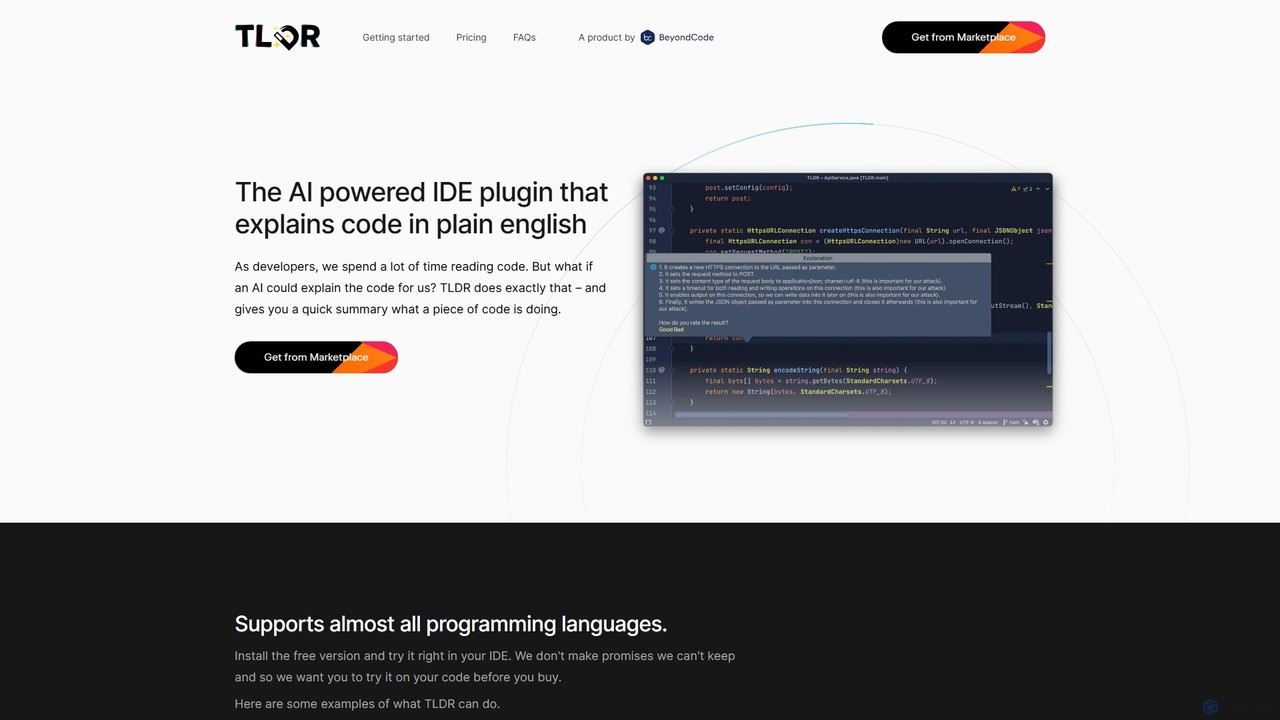
tldrdev is an AI-powered IDE plugin for JetBrains that explains code in plain English. It helps developers quickly understand complex functions, regular expressions, and SQL queries, boosting productivity and accelerating the process of onboarding to new codebases. It integrates seamlessly into your development workflow.

Code Assistant
Visits 5.1KFavorites 124Likes 136

About Code Analysis

Code Analysis tools are AI-powered solutions designed to automatically examine source code for quality, security vulnerabilities, performance issues, and adherence to coding standards. Leveraging advanced machine learning and static analysis techniques, these tools provide deep insights into codebases, identifying potential problems before they reach production. They significantly enhance developer productivity and software reliability by automating critical aspects of code review and quality assurance.

Core Features

  • Automated Bug Detection: Identifies logical errors, runtime exceptions, and common programming mistakes.
  • Security Vulnerability Scanning: Detects potential security flaws like SQL injection, cross-site scripting (XSS), and insecure configurations.
  • Code Quality & Style Enforcement: Ensures adherence to coding standards, identifies code smells, and suggests improvements for maintainability.
  • Performance Optimization Suggestions: Pinpoints inefficient code patterns and offers recommendations for faster execution.
  • Dependency Analysis: Maps out external library usage and flags outdated or vulnerable dependencies.

Applicable Scenarios

These tools are indispensable for software development teams, security engineers, and quality assurance professionals. They are used in continuous integration/continuous deployment (CI/CD) pipelines to provide instant feedback, during code reviews to augment human analysis, and for auditing large legacy codebases to identify technical debt and security risks. They help maintain high code quality across projects of all sizes.

How to Choose

When selecting a Code Analysis tool, consider its support for your programming languages, integration capabilities with your existing IDEs and CI/CD systems, the accuracy and relevance of its findings, and its ability to provide actionable recommendations. Evaluate the reporting features, customization options for rulesets, and the pricing model. Scalability for growing projects and community support are also important factors.

Featured tool rankings

Code Analysis use cases

1

Automated Pre-Commit Code Review

A software developer integrates an AI code analysis tool into their IDE. Before committing new code, the tool automatically scans for common bugs, style violations, and minor security issues, providing instant feedback. This allows the developer to fix problems immediately, preventing them from entering the main codebase and significantly reducing the time spent on manual code reviews later in the development cycle.

2

Continuous Security Vulnerability Scanning

A security team deploys an AI code analysis tool within their CI/CD pipeline. Every time new code is pushed, the tool automatically scans for critical security vulnerabilities like injection flaws, insecure API usage, or misconfigurations. If a high-severity issue is detected, the build fails, and an alert is sent to the development team, ensuring that no vulnerable code makes it to production environments.

3

Optimizing Performance in High-Traffic Applications

For a team developing a high-traffic web application, an AI code analysis tool is used to identify performance bottlenecks. The tool analyzes complex algorithms and database queries, suggesting more efficient data structures or optimized query patterns. This proactive approach helps developers refactor critical sections of code, leading to faster response times and a better user experience under heavy load.

4

Enforcing Enterprise-Wide Coding Standards

A large enterprise with multiple development teams needs to maintain consistent code quality and style across all projects. An AI code analysis tool is configured with custom rulesets reflecting the company's coding standards. The tool automatically checks all submitted code against these rules, flagging deviations and suggesting corrections, thereby ensuring uniformity, readability, and easier onboarding for new team members.

5

Refactoring and Modernizing Legacy Codebases

A development team is tasked with modernizing an old, complex legacy system. They use an AI code analysis tool to gain a comprehensive understanding of the existing codebase. The tool helps identify dead code, redundant logic, and areas with high technical debt, providing insights and suggestions for refactoring. This accelerates the modernization process and reduces the risk of introducing new bugs.

6

Enhancing Code Review Efficiency for Open Source Projects

Maintainers of a popular open-source project receive numerous pull requests daily. An AI code analysis tool is integrated to automatically pre-screen contributions for basic quality, potential bugs, and adherence to project guidelines. This allows human reviewers to focus on architectural decisions and complex logic, significantly speeding up the review process and ensuring a higher quality of merged code.

Code Analysis FAQ

What are AI Code Analysis tools?

AI Code Analysis tools are software applications that use artificial intelligence, particularly machine learning and natural language processing, to automatically examine source code. Their primary purpose is to identify potential bugs, security vulnerabilities, performance issues, and deviations from coding standards. Unlike traditional static analysis, AI-powered tools can often understand code context more deeply and learn from past patterns to provide more accurate and relevant insights.

How do AI Code Analysis tools differ from traditional static analysis?

Traditional static analysis tools rely on predefined rules and patterns to check code. While effective, they can sometimes produce many false positives or miss subtle issues. AI Code Analysis tools, on the other hand, leverage machine learning to learn from vast code repositories and historical bug data. This allows them to detect more complex and nuanced issues, understand developer intent, and often provide more intelligent, context-aware suggestions, reducing noise and improving accuracy.

How to choose the right AI Code Analysis tool for my team?

When selecting an AI Code Analysis tool, consider several factors. First, ensure it supports the programming languages and frameworks your team uses. Second, evaluate its integration capabilities with your existing development workflow (IDEs, CI/CD pipelines). Third, assess the accuracy of its findings and the clarity of its recommendations. Finally, look at its scalability, reporting features, customization options for rules, and the overall cost-effectiveness for your team's size and needs.

What specific problems do AI Code Analysis tools solve for developers?

AI Code Analysis tools address several critical problems for developers. They automate the detection of common bugs and logical errors, saving significant debugging time. They proactively identify security vulnerabilities, reducing the risk of breaches. They enforce coding standards, leading to more maintainable and readable code. Furthermore, they can suggest performance optimizations and help understand complex legacy code, ultimately improving code quality, reducing technical debt, and accelerating the development cycle.

Who benefits most from using AI Code Analysis tools?

Software developers benefit by catching errors early and improving code quality. Quality Assurance (QA) engineers gain a powerful ally in identifying potential issues before testing. Security teams leverage these tools for continuous vulnerability scanning and compliance. Project managers see improved project timelines due to reduced debugging and rework. Ultimately, any organization involved in software development, from small startups to large enterprises, can benefit from enhanced code quality, security, and development efficiency.