ToolMage
Sign in

Best 1 Code Review AI tools for Productivity

Popular Code Review AI tools in Productivity include CodeSensAI, helping you work more efficiently.

CodeSensAI
Freemium

CodeSensAI

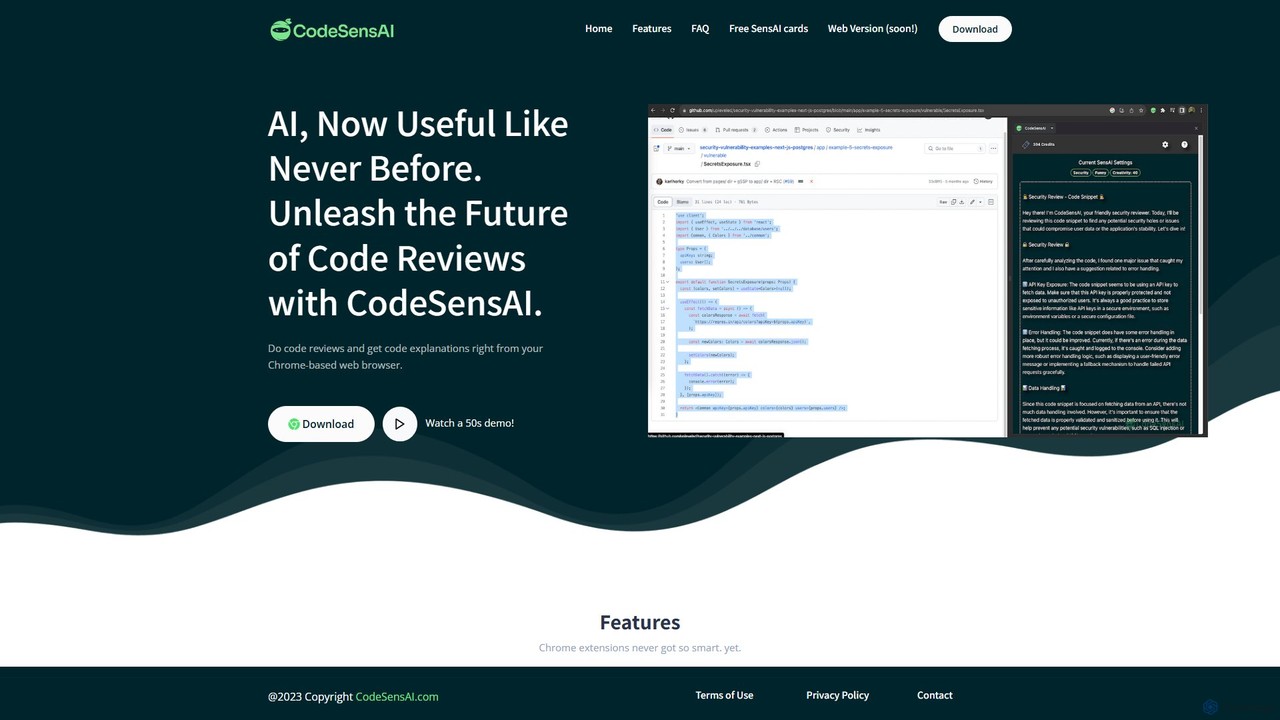
CodeSensAI is an AI-powered Chrome extension that provides instant, detailed code reviews and simple explanations for code snippets. Powered by OpenAI, it helps developers of all levels improve code quality, understand complex logic, and enhance their productivity directly within their workflow on platforms like GitHub.

Code Assistant
Visits 3.4KFavorites 124Likes 129

About Code Review

AI Code Review tools are intelligent platforms that automate and enhance the process of examining source code for errors, vulnerabilities, style inconsistencies, and best practice violations. Leveraging machine learning and static analysis, these tools provide real-time feedback and actionable suggestions, significantly improving code quality and security. They streamline development workflows by catching issues early, reducing manual effort, and fostering consistent coding standards across teams.

Core Features

  • Automated Bug Detection: Identifies potential logical errors, runtime issues, and common programming mistakes.
  • Security Vulnerability Scanning: Scans code for known security flaws, injection risks, and insecure coding patterns.
  • Coding Style Enforcement: Automatically checks adherence to predefined coding standards and style guides.
  • Performance Optimization Suggestions: Pinpoints inefficient code segments and suggests improvements for better performance.
  • Code Complexity Analysis: Measures and visualizes code complexity to highlight areas that may be difficult to maintain or prone to errors.

Applicable Scenarios

Software development teams use AI Code Review tools to integrate automated checks into their CI/CD pipelines, ensuring every code commit meets quality standards before deployment. Open-source projects benefit from consistent code quality contributions, while enterprises leverage them for compliance with industry regulations and internal security policies. They are essential for maintaining high-quality, secure, and maintainable codebases across projects of all sizes.

How to Choose

When selecting an AI Code Review tool, consider its compatibility with your programming languages and version control systems (e.g., Git, SVN). Evaluate the depth and accuracy of its analysis, including its ability to detect specific bug types or security vulnerabilities relevant to your stack. Look for robust integration capabilities with your existing development environment and CI/CD pipeline, as well as customizable rule sets to match your team's coding standards. Finally, assess the clarity of its reporting and the actionability of its suggestions.

Featured tool rankings

Code Review use cases

1

Automated Pre-Commit Code Quality Checks

Developers integrate AI code review tools into their local development environment or pre-commit hooks. Before pushing code to the repository, the tool automatically scans for common bugs, style violations, and minor security issues, providing instant feedback. This helps developers fix problems proactively, ensuring that only high-quality code enters the version control system and reducing the burden on subsequent manual reviews.

2

Enhancing Pull Request Reviews for Team Leads

Team leads and senior developers use AI code review tools to augment their manual pull request (PR) reviews. The AI automatically highlights critical issues like potential security vulnerabilities, complex logic, or performance bottlenecks, allowing human reviewers to focus on architectural decisions, design patterns, and business logic. This significantly speeds up the PR review process and ensures comprehensive coverage.

3

Identifying Security Vulnerabilities in Critical Applications

For applications handling sensitive data or critical operations, security teams deploy AI code review tools to continuously scan the codebase for OWASP Top 10 vulnerabilities, insecure configurations, and compliance issues. The tools can detect subtle patterns that might be missed by human eyes, providing detailed reports and remediation suggestions to prevent potential breaches and ensure regulatory compliance.

4

Ensuring Coding Standard Compliance Across Large Teams

Large organizations with multiple development teams often struggle to maintain consistent coding standards. AI code review tools are configured with custom rule sets reflecting the company's style guides and best practices. They automatically enforce these standards across all projects, flagging deviations and suggesting corrections, which leads to a more uniform, readable, and maintainable codebase.

5

Optimizing Code for Performance Bottlenecks

Performance engineers and developers utilize AI code review tools to identify potential performance bottlenecks within the code. The AI can analyze algorithms, data structure usage, and resource management patterns to suggest more efficient alternatives or highlight areas that might lead to slow execution times or high resource consumption. This proactive optimization helps in building faster and more scalable applications.

6

Onboarding New Developers with Consistent Code Quality

When new developers join a team, AI code review tools serve as an automated mentor. By providing immediate feedback on their code against established team standards and best practices, the tools help new hires quickly adapt to the project's coding culture. This reduces the learning curve, minimizes the need for extensive manual corrections, and ensures that even new contributions meet high-quality thresholds from day one.

Code Review FAQ

What are AI Code Review tools?

AI Code Review tools are software applications that use artificial intelligence and machine learning to automatically analyze source code. They identify potential bugs, security vulnerabilities, style violations, and areas for performance improvement. Their core purpose is to enhance code quality, accelerate the development process, and reduce the burden of manual code inspections.

How do AI Code Review tools work?

AI Code Review tools typically work by performing static code analysis, where they examine the code without executing it. They employ various AI techniques, including pattern recognition, natural language processing (for comments/variable names), and machine learning models trained on vast codebases. These models learn to identify common errors, security patterns, and deviations from best practices, then provide intelligent suggestions and explanations to developers.

What are the benefits of using AI for code review?

The benefits of using AI for code review are numerous. They include significantly faster review cycles, early detection of bugs and security flaws, and consistent enforcement of coding standards across teams. AI tools reduce human error and free up developers to focus on more complex logical issues, ultimately leading to higher quality, more secure, and more maintainable software with reduced development costs.

How to choose an effective AI Code Review tool?

To choose an effective AI Code Review tool, consider its support for your programming languages and development ecosystem (IDEs, CI/CD). Evaluate its accuracy in identifying relevant issues and its ability to minimize false positives. Look for customization options for rule sets, clear reporting, and actionable recommendations. Integration capabilities, scalability for your team size, and pricing models are also crucial factors.

AI Code Review vs. Manual Code Review: What's the difference?

Manual code review involves human developers examining code, relying on their experience and knowledge. AI Code Review, conversely, uses automated algorithms to scan code systematically. While manual reviews excel at understanding complex business logic and architectural design, AI tools are superior at quickly identifying repetitive errors, style inconsistencies, and subtle security vulnerabilities across large codebases, offering speed, consistency, and scalability that manual reviews cannot match. The best approach often combines both.