ToolMage
Sign in

Best 1 Collection Management AI tools for Productivity

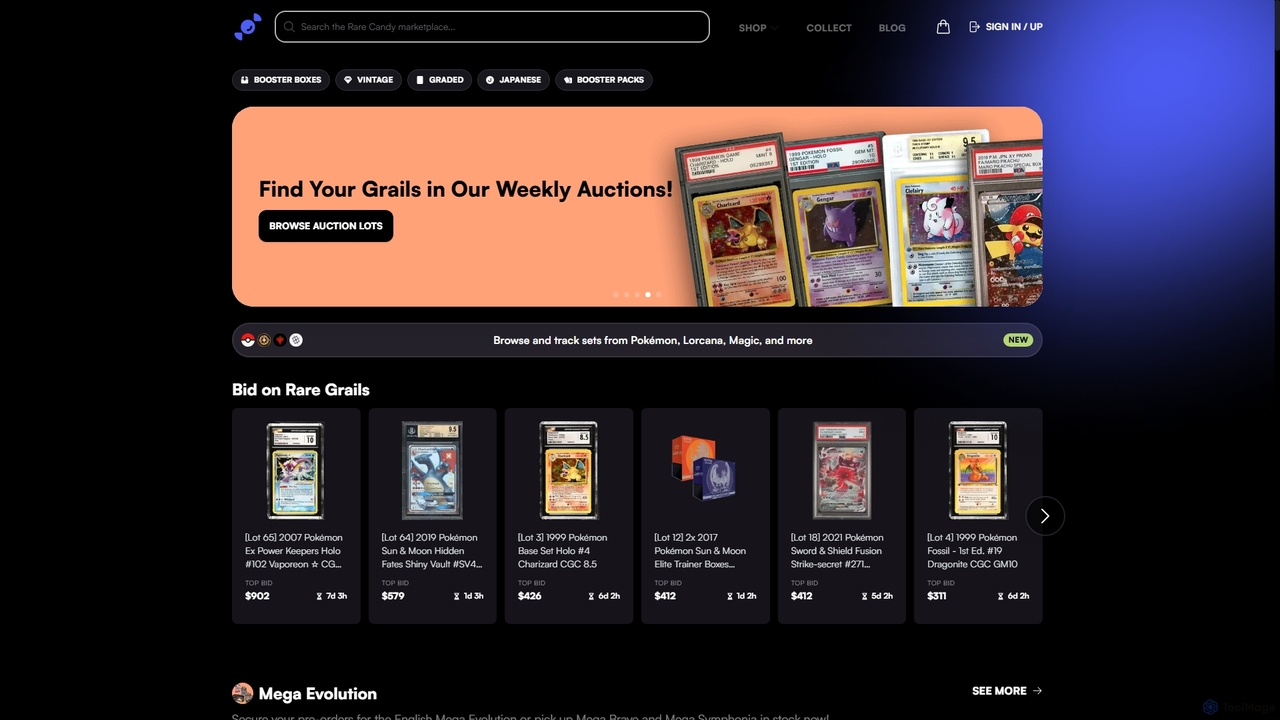
Popular Collection Management AI tools in Productivity include Rarecandy, helping you work more efficiently.

Rarecandy
Freemium

Rarecandy

An AI-powered marketplace and collection management platform for Trading Card Game (TCG) enthusiasts. Scan cards with your phone, track your portfolio's value, and buy, sell, or auction collectibles from Pokémon, MTG, Yu-Gi-Oh!, and more.

Marketplace
Visits 103.8KFavorites 151Likes 154

About Collection Management

AI Collection Management tools are applications designed to intelligently organize, search, and connect vast amounts of digital information. They leverage artificial intelligence, such as natural language processing, to automate tasks like tagging, categorization, and summarization. This enables users to build powerful personal knowledge bases or team repositories where information is not just stored, but also easily discoverable and interconnected. These tools transform scattered data from various sources into a structured and accessible asset, significantly enhancing research, learning, and creative workflows within the broader scope of productivity.

Core Features

  • AI-Powered Tagging: Automatically analyzes content to assign relevant keywords and categories, saving manual effort.
  • Semantic Search: Enables searching based on concepts and meaning, not just exact keyword matches, for more relevant results.
  • Content Summarization: Generates concise summaries of articles, documents, and web pages for quick review.
  • Knowledge Graph Visualization: Maps connections between notes, files, and ideas to reveal hidden relationships and patterns.
  • Duplicate Detection: Identifies and helps manage duplicate or similar items within the collection to maintain cleanliness.

Applicable Scenarios

These tools are invaluable for researchers, writers, students, and product managers who manage extensive information. For instance, a PhD student can collate academic papers, have them auto-tagged by theme, and use semantic search to find concepts for a thesis. A marketing team can create a shared repository of competitor analysis and market research, with AI helping to surface relevant insights for strategy development.

Selection Criteria

When selecting a Collection Management tool, evaluate its AI capabilities—does it offer robust semantic search and auto-tagging? Assess its integration with web browsers and other apps for seamless content capture. Consider the user interface for ease of organization and retrieval. Finally, review the pricing model and collaboration features if you are working with a team.

Collection Management use cases

1

Academic Research and Thesis Writing

A graduate student is managing hundreds of academic papers and articles for their thesis. Using an AI Collection Management tool, they can save PDFs and web links directly from their browser. The AI automatically reads the content, suggests relevant tags like 'machine learning', 'ethics', and 'NLP', and generates a concise summary for each document. When writing, the student uses semantic search to ask questions like 'What are the counterarguments to this theory?' and the tool surfaces relevant paragraphs from multiple papers, dramatically speeding up the literature review process and helping to form new connections between sources.

2

Market Intelligence for Business Teams

A strategy team at a tech company needs to track competitors and market trends. They create a shared collection where team members can clip articles, analyst reports, and competitor press releases. The AI tool automatically categorizes each item by company, product line, and market segment. Instead of manually searching through folders, an analyst can simply ask, 'Show me all recent news about our competitor's AI product launches.' The tool provides a summarized feed, including sentiment analysis on news articles, enabling the team to quickly build comprehensive competitive landscape reports and make informed strategic decisions.

3

Personal Knowledge Management (PKM)

A lifelong learner wants to build a 'second brain' to retain and connect ideas from books, podcasts, and online courses. They use a collection management tool to save highlights, notes, and transcripts. The tool's knowledge graph feature visually connects related concepts, for example, linking a principle from a business book to a psychological theory from a podcast. This visual map helps them see the bigger picture, generate novel ideas by combining disparate information, and solidify their learning in a way that a simple list of notes never could. Over time, this becomes a personal, searchable encyclopedia of their own knowledge.

4

Content Curation for Creators

A newsletter writer needs a constant stream of high-quality links, quotes, and ideas. They use a collection tool with a web clipper to save interesting articles and social media posts throughout the week. The AI helps by identifying recurring themes and suggesting potential topics for the next newsletter issue. When it's time to write, they can easily search their collection for 'inspiring quotes about creativity' or 'statistics on AI adoption' and instantly find all the relevant material they've saved, complete with source links. This streamlines the curation process from days to hours.

5

Design Inspiration and Mood Board Creation

A UX/UI designer is gathering inspiration for a new mobile app project. They save hundreds of screenshots of other apps, design patterns, and color palettes into their collection tool. The AI's image analysis capabilities automatically tag visual elements like 'dark mode', 'onboarding flow', 'dashboard', and 'data visualization'. When they need to design a new settings screen, they can simply search for 'settings UI inspiration' and the tool instantly pulls up dozens of relevant examples from their collection, allowing them to build a comprehensive mood board and reference library much faster than using traditional folders.

6

Legal Case File Management

A legal team is preparing for a complex case involving thousands of documents, emails, and depositions. They upload all materials into a secure AI collection tool. The tool's semantic search becomes critical. Instead of searching for a specific keyword like 'contract violation', a paralegal can search for the concept 'evidence of non-compliance with the agreement'. The AI understands the intent and finds relevant passages in documents even if they don't use the exact search terms. This uncovers crucial evidence that might have been missed with traditional search methods, providing a significant advantage in case preparation.

Collection Management FAQ

What are AI Collection Management tools?

AI Collection Management tools are advanced applications for organizing digital information like articles, notes, images, and documents. Unlike simple storage, they use artificial intelligence to automatically tag content, understand the meaning behind your searches (semantic search), and visualize connections between different pieces of information. Their primary goal is to transform a chaotic collection of data into a structured, searchable, and intelligent personal or team knowledge base, making it easier to find insights and generate ideas.

How to choose the right AI Collection Management tool?

To choose the right tool, consider these factors:

  • AI Feature Set: Does it offer powerful semantic search, accurate auto-tagging, and content summarization? The quality of its AI is a key differentiator.
  • Capture Methods: Check for robust web clippers, email forwarding, and mobile app integrations to ensure you can easily save information from anywhere.
  • Organization & UI: Does the interface suit your workflow? Some prefer folder structures, others prefer tags or visual graphs. Find one that feels intuitive to you.
  • Collaboration: If you work with a team, look for features like shared spaces, real-time editing, and permission controls.
  • Exportability: Ensure you can easily export your data in standard formats like Markdown or PDF, so you're not locked into one platform.
What's the difference between AI Collection Management and simple bookmarking tools?

The key difference lies in depth and intelligence. Simple bookmarking tools (like a browser's built-in feature or basic read-it-later apps) are designed to save links for later access. They act as a simple list. AI Collection Management tools, on the other hand, are designed for knowledge building. They don't just save the link; they often save the full content, analyze it, tag it, summarize it, and make the content itself searchable. They focus on helping you connect ideas and build a deep, interconnected library of information, rather than just a list of things to read.

Who can benefit from using AI Collection Management tools?

A wide range of individuals and teams can benefit. This includes:

  • Students & Researchers: To organize academic papers, notes, and sources for research projects and theses.
  • Writers & Content Creators: To curate inspiration, research, and references for articles, books, or newsletters.
  • Product Managers & Strategists: To build a shared knowledge base of market research, competitor analysis, and user feedback.
  • Lifelong Learners: To create a 'second brain' that connects ideas from various fields and helps retain knowledge.
  • Designers & Artists: To collect and intelligently tag visual inspiration for projects.

Essentially, anyone who deals with a high volume of information from multiple sources and wants to turn that information into usable knowledge can benefit.

How does AI specifically enhance collection management?

AI enhances collection management in several key ways that go beyond traditional folder systems:

  • Automated Organization: Instead of you manually filing every item, AI analyzes the content and automatically suggests or applies relevant tags and categories, saving significant time.
  • Deeper Search: AI enables semantic search, which understands the intent and context of your query. You can find information based on concepts, not just keywords, uncovering connections you might have missed.
  • Insight Generation: Features like automated summarization and trend identification help you quickly grasp the essence of your collected materials and spot patterns across your entire knowledge base.
  • Intelligent Discovery: Some tools use AI to proactively suggest related notes or articles from your collection as you write, fostering new connections and ideas.