ToolMage
Sign in

Best 2 Feed Reader AI tools for Productivity

Popular Feed Reader AI tools in Productivity include feedlens and RSS Filter, helping you work more efficiently.

RSS Filter
Free

RSS Filter

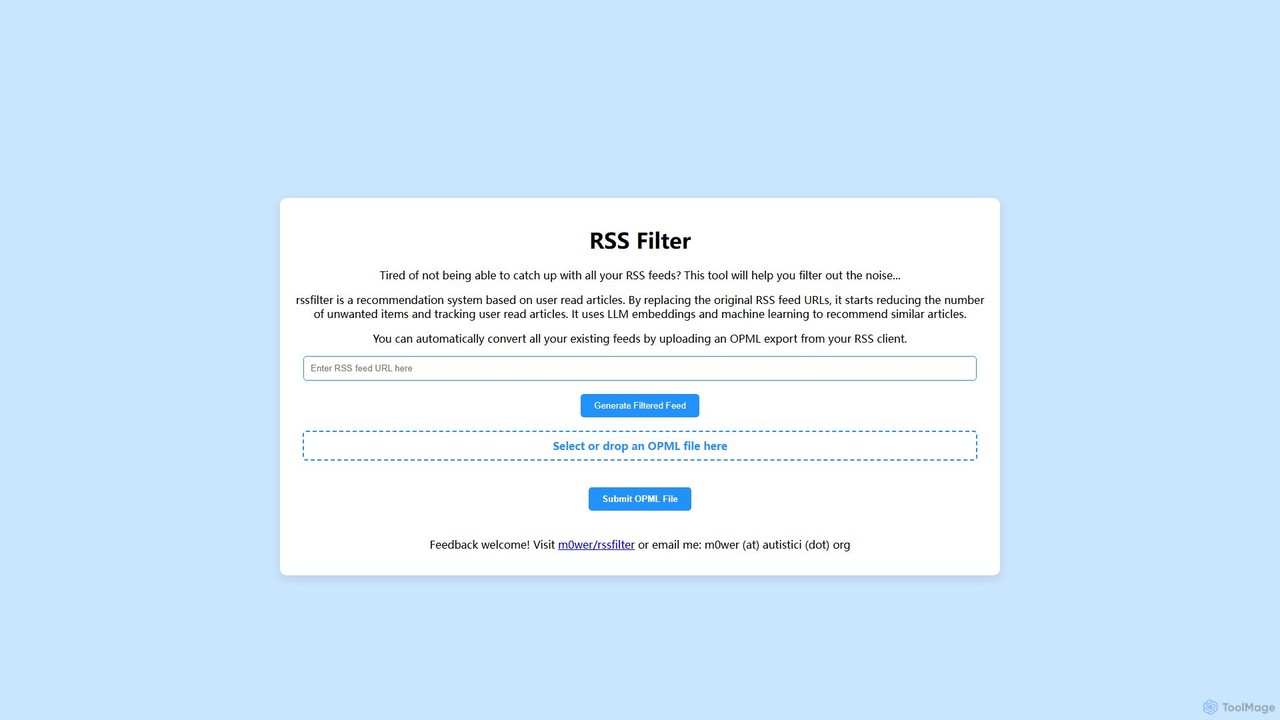
An AI-powered recommendation system that filters your RSS feeds to reduce noise. It uses LLM embeddings and machine learning to learn from your reading habits, recommending articles similar to what you've read and helping you focus on content that truly matters.

Open Source
Visits 6.4KFavorites 149Likes 150
feedlens
Freemium

feedlens

An intelligent AI-powered feed reader that transforms information overload into focused knowledge. It aggregates content from RSS, social media, and newsletters, using AI to summarize, filter, and personalize your feed.

Content Curation
Visits 6.4KFavorites 145Likes 159

About Feed Reader

Feed Readers are tools designed to aggregate and display content from various online sources, such as blogs, news sites, and podcasts, via RSS, Atom, or JSON feeds. These tools centralize information streams, allowing users to efficiently consume updates without visiting multiple websites. By providing a single, organized interface for diverse content, Feed Readers significantly enhance information management and personal productivity, ensuring users stay informed with minimal effort.

Core Features

  • Feed Aggregation: Collects and organizes content from multiple subscribed feeds into a unified interface.
  • Read/Unread Tracking: Automatically marks items as read and keeps track of new, unread content.
  • Customizable Views: Offers various display options, such as list view, magazine view, or full article view.
  • Keyword Filtering: Allows users to filter content based on specific keywords or topics of interest.
  • Cross-Device Synchronization: Syncs reading progress and subscriptions across different devices and platforms.

Use Cases

Feed Readers are invaluable for professionals and individuals who need to stay updated across numerous sources. They are commonly used by content creators for trend monitoring, researchers for tracking new publications, and anyone seeking a personalized news digest to avoid information overload and streamline their daily content consumption.

How to Choose

When selecting a Feed Reader, consider its feed management capabilities (number of feeds, organization options), the quality of its reading experience (clean UI, customization), and its integration with other tools or services. Evaluate features like keyword filtering, search functionality, and cross-device synchronization, along with the pricing model and overall user interface design to find the best fit for your workflow.

Feed Reader use cases

1

Content Curation for Marketing Professionals

Marketing professionals often need to stay abreast of industry news, competitor activities, and emerging trends across numerous blogs and news outlets. By using a Feed Reader, they can subscribe to dozens of relevant feeds, centralizing all updates into a single dashboard. This allows for efficient scanning of headlines, quick identification of key articles, and seamless sharing with team members, saving hours daily compared to manually visiting each site.

2

Academic Research and Publication Tracking

Researchers and academics need to monitor new publications, journal alerts, and specific topic feeds to stay current in their fields. A Feed Reader allows them to subscribe to RSS feeds from academic journals, research databases, and institutional repositories. This ensures they receive immediate notifications of new articles, preprints, or calls for papers, streamlining the literature review process and preventing missed opportunities for collaboration or funding.

3

Personalized News and Blog Consumption

Individuals seeking to curate their daily news intake and follow specific blogs without the noise of social media or general news sites can use a Feed Reader. By subscribing only to sources they trust and find valuable, users create a highly personalized news digest. This helps in avoiding information overload, focusing on topics of genuine interest, and consuming content in an organized, ad-free environment, leading to a more productive reading experience.

4

Monitoring Competitor and Industry Updates

Businesses and competitive intelligence analysts leverage Feed Readers to keep a close watch on competitors' press releases, product launches, and industry news. By subscribing to the RSS feeds of key players and relevant industry publications, they can quickly identify strategic moves, market shifts, and emerging threats or opportunities. This proactive monitoring enables timely decision-making and helps maintain a competitive edge in fast-evolving markets.

5

Tracking Podcasts and Video Channels

Beyond text-based content, many Feed Readers support podcast and video feeds (e.g., YouTube channels via RSS). Users can subscribe to their favorite audio and video creators, receiving instant notifications for new episodes or uploads. This centralizes multimedia consumption, ensuring they never miss new content from their preferred sources and can manage their entertainment or educational media alongside their text-based news.

6

Automating Job Search and Opportunity Discovery

Job seekers and professionals looking for new opportunities can utilize Feed Readers to automate their search. Many job boards, company career pages, and industry news sites offer RSS feeds for specific job categories or keywords. By subscribing to these feeds, users receive real-time alerts for new postings that match their criteria, significantly reducing the time spent manually browsing and increasing the chances of discovering relevant opportunities quickly.

Feed Reader FAQ

What is a Feed Reader?

A Feed Reader is a software application or web service that aggregates content from various online sources, such as blogs, news sites, and podcasts, into a single, organized interface. It uses technologies like RSS, Atom, or JSON feeds to pull updates automatically. This allows users to efficiently consume new content without manually visiting each website, centralizing their information intake and saving time.

How do Feed Readers enhance productivity?

Feed Readers significantly boost productivity by centralizing information consumption. Instead of navigating to multiple websites, users access all their subscribed content in one place. This reduces context switching, saves time, and minimizes distractions. Features like read/unread tracking, keyword filtering, and customizable views further streamline the process, allowing users to quickly identify and focus on the most relevant information, making their content consumption more efficient and targeted.

What's the difference between a Feed Reader and a News Aggregator?

While often used interchangeably, a Feed Reader primarily focuses on aggregating content from specific, user-subscribed RSS/Atom feeds, offering a personalized and often ad-free reading experience. A News Aggregator, on the other hand, typically gathers news from a broader range of sources, often using algorithms to select and categorize content, and may include original reporting or curated summaries. Feed Readers give users more direct control over their sources, while News Aggregators aim for broader coverage and discovery.

What are the key features to look for in a Feed Reader?

When choosing a Feed Reader, prioritize robust feed management (easy adding/organizing of feeds), a clean and customizable reading interface, and reliable cross-device synchronization. Look for advanced filtering options (e.g., by keyword, author), full-text search capabilities, and integration with other productivity tools like read-it-later services or note-taking apps. Offline reading support and a strong community or development team are also valuable considerations for a seamless experience.

Who benefits most from using a Feed Reader?

Individuals and professionals who consume a large volume of online content from diverse sources benefit most from Feed Readers. This includes content creators, marketers, researchers, journalists, and anyone who needs to stay updated on specific topics or industries without being overwhelmed by information. It's particularly useful for those seeking a focused, ad-free, and organized way to manage their daily information intake, enhancing their overall productivity and knowledge acquisition.