
ToolMage
Sign in

Best 1 Offline Access AI tools for Productivity

Popular Offline Access AI tools in Productivity include DW Free Video Downloader, helping you work more efficiently.

DW Free Video Downloader
Free

DW Free Video Downloader

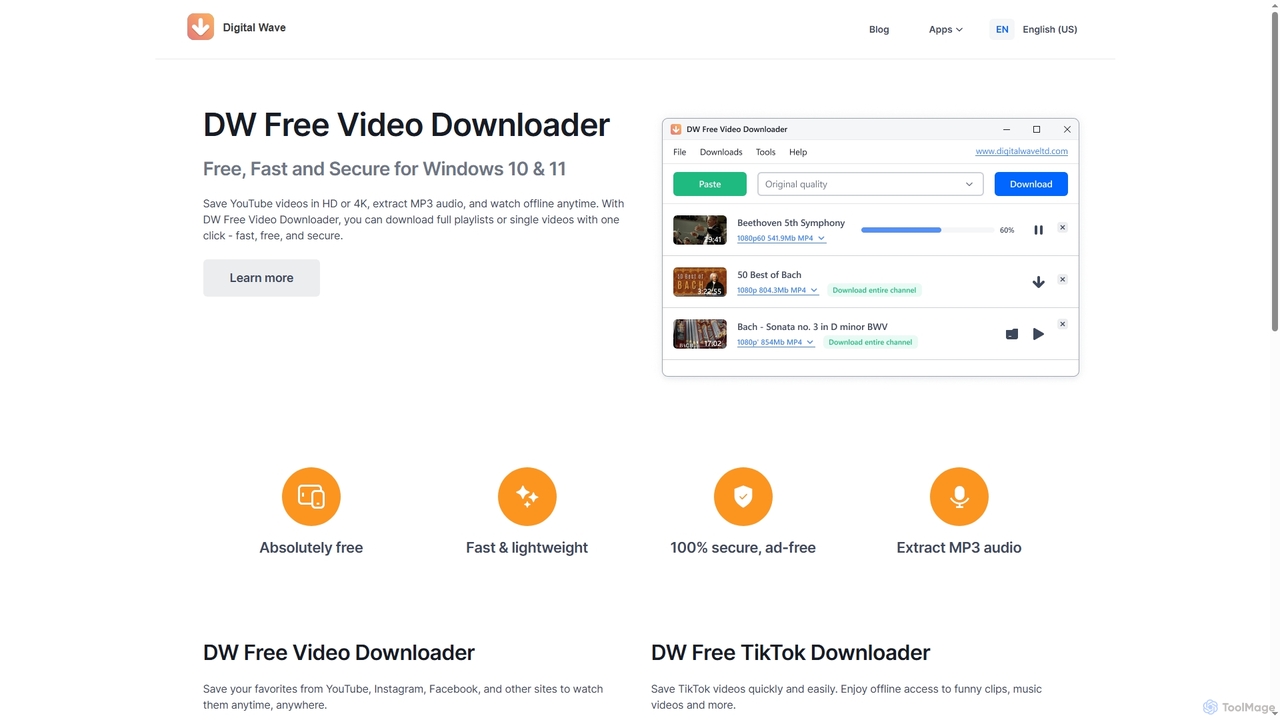
DW Free Video Downloader is a free, fast, and secure desktop application for Windows 10 & 11. It enables users to download videos in HD or 4K from sites like YouTube, Instagram, and Facebook, save entire playlists, and extract MP3 audio for offline access.

Video Downloader
Visits 31KFavorites 128Likes 140

About Offline Access

Offline Access AI tools are a category of AI-powered applications designed to operate entirely without an internet connection. These tools leverage local processing capabilities and pre-downloaded models to perform AI tasks directly on your device, ensuring data privacy and uninterrupted functionality in any environment. They are essential for enhancing productivity in secure settings, remote locations, or during travel, offering reliable performance independent of network availability.

Core Features

  • Local AI Processing: Executes AI models and algorithms directly on the device's hardware, without cloud dependency.
  • Data Privacy & Security: Keeps all processed data on the local device, preventing transmission to external servers.
  • Uninterrupted Operation: Guarantees continuous functionality even in areas with no or unreliable internet access.
  • Pre-trained Models: Utilizes pre-downloaded AI models for tasks like natural language processing, image recognition, or data analysis.

Applicable Scenarios

These tools are invaluable for professionals requiring secure, on-device AI processing. This includes field researchers collecting data in remote locations, government personnel handling classified information offline, and travelers needing productivity tools without consistent internet access. They empower users to maintain workflow continuity and data integrity regardless of connectivity.

How to Choose

When selecting Offline Access AI tools, evaluate the specific AI capabilities required (e.g., NLP, image processing), compatibility with your device's hardware, and the amount of local storage needed for models. Consider the frequency and method of model updates, as well as the tool's overall ease of use and integration with existing offline workflows.

Offline Access use cases

1

Secure Document Analysis for Sensitive Data

Government analysts or legal professionals utilize offline AI tools to process and analyze confidential documents, such as contract reviews or legal discovery, directly on secure local networks. This ensures that no sensitive information ever leaves the premises or is exposed to cloud vulnerabilities, maintaining strict compliance and data security protocols.

2

Field Research Data Collection & Processing

Environmental scientists or geologists working in remote areas with no internet connectivity use rugged laptops equipped with offline AI tools. They can immediately classify collected images, transcribe detailed field notes, or perform preliminary data analysis on-site, accelerating initial insights and decision-making without delay.

3

Real-time Language Translation During Travel

International travelers, aid workers, or business professionals on overseas trips rely on offline translation apps on their smartphones or tablets. These tools facilitate immediate communication in foreign countries without needing costly roaming data or Wi-Fi, enabling seamless interactions and navigation in unfamiliar environments.

4

Local Code Generation and Debugging

Software developers engaged in highly secure projects or working in air-gapped environments leverage offline AI coding assistants. These tools generate code snippets, suggest improvements, and assist with debugging locally, ensuring that intellectual property remains within the secure development environment and adhering to strict security policies.

5

Offline Content Creation and Editing

Content creators, writers, or designers on long flights, cruises, or in remote locations utilize offline AI writing assistants or image manipulation tools. They can generate text, refine articles, enhance photos, or create graphics without internet access, maximizing their productive time and ensuring creative flow is uninterrupted.

6

Personalized Learning and Study Aids

Students and lifelong learners benefit from offline AI tutors or flashcard applications that adapt to their individual learning styles. These tools provide personalized quizzes, explanations, and progress tracking without requiring a constant internet connection, making them perfect for focused study sessions in any location, free from online distractions.

Offline Access FAQ

What are Offline Access AI tools?

Offline Access AI tools are applications designed to perform artificial intelligence tasks directly on a user's device without requiring an active internet connection. They leverage pre-downloaded AI models and the device's local processing power, ensuring data privacy, enhanced security, and uninterrupted functionality even in environments with limited or no connectivity.

How do Offline Access AI tools maintain data privacy?

These tools maintain data privacy by ensuring all information processing occurs locally on the user's device. Unlike cloud-based AI solutions, data is never transmitted to external servers for analysis, significantly reducing the risk of data breaches, unauthorized access, or compliance issues, making them ideal for handling sensitive and confidential information.

What are the main advantages of using Offline Access AI tools?

The primary advantages of using Offline Access AI tools include superior data privacy and security, guaranteed uninterrupted operation irrespective of internet availability, reduced latency due to on-device processing, and often lower operational costs by eliminating continuous cloud resource consumption. They are particularly valuable for fieldwork, secure environments, and mobile productivity.

How do Offline Access AI tools differ from cloud-based AI tools?

Offline Access AI tools differ from cloud-based AI tools primarily in their operational dependency. Offline tools process data locally using on-device models, prioritizing privacy and availability without internet. Cloud-based tools, conversely, rely on remote servers for processing, offering greater scalability and access to larger, frequently updated models but requiring constant internet connectivity and potentially raising data privacy concerns.

Can Offline Access AI tools be updated, and how?

Yes, Offline Access AI tools can be updated. While they function offline, their underlying AI models and software typically require periodic updates to improve performance, add new features, or address security vulnerabilities. These updates are usually downloaded when the device has an active internet connection and then applied locally, ensuring the tool remains current and effective without disrupting offline usage.