ToolMage
Sign in

Best 1 Resource Finder AI tools for Productivity

Popular Resource Finder AI tools in Productivity include ZorexEye, helping you work more efficiently.

ZorexEye
Free

ZorexEye

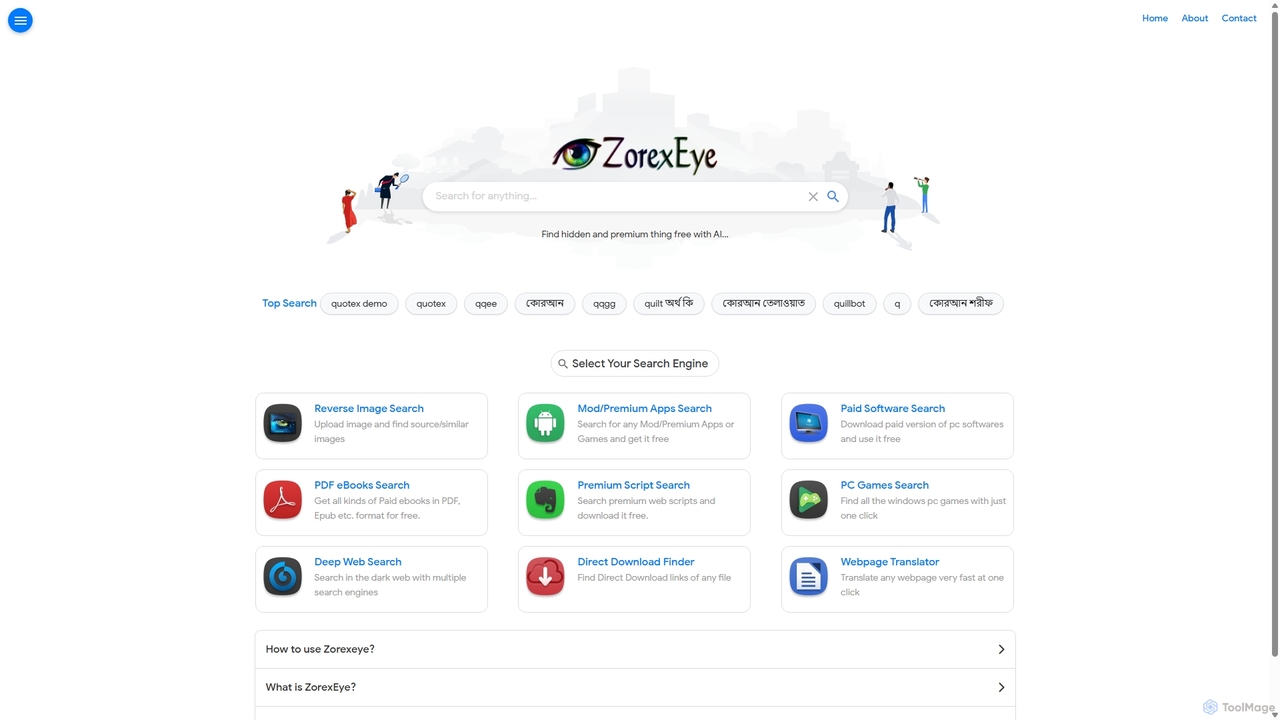
ZorexEye is an AI-powered search engine designed to find direct download links for premium apps, software, ebooks, and other digital files for free. It filters Google search results to provide clean, ad-free, and direct access, simplifying the process of finding hidden or hard-to-locate content.

Resource Finder
Visits 14.3KFavorites 120Likes 139

About Resource Finder

AI Resource Finders are specialized tools designed to locate and retrieve specific information or digital assets from vast and complex datasets. They leverage advanced technologies like natural language processing (NLP) and machine learning to understand the context and intent behind a user's query, going far beyond simple keyword matching. This enables users to discover relevant documents, code snippets, academic papers, or media files with high precision and efficiency. As a key component of the Productivity suite, these tools streamline research and data discovery, saving significant time for professionals across various fields.

Core Features

  • Semantic Search: Understands the meaning and context of queries, not just keywords, to deliver more relevant results.
  • Multi-modal Discovery: Capable of searching across different data types, including text, images, audio, and code.
  • Knowledge Synthesis: Aggregates information from multiple sources and can present summarized or connected insights.
  • Advanced Filtering: Offers sophisticated filtering options based on metadata, source, date, and other context-specific criteria.

Use Cases

These tools are invaluable for researchers, developers, legal professionals, and market analysts. For instance, a software developer can use a Resource Finder to locate a specific function in a large codebase, while a legal team can sift through thousands of documents to find precedents for a case. They are also widely used in academic institutions for literature reviews and in enterprises for managing internal knowledge bases.

How to Choose

When selecting an AI Resource Finder, consider the types of data sources it can connect to (e.g., web, internal databases, specific platforms like GitHub). Evaluate the sophistication of its search capabilities—does it support natural language queries and complex filtering? Also, assess its integration potential with your existing workflow and tools, and consider the pricing model in relation to the scale of your search needs.

Resource Finder use cases

1

Accelerating Academic Literature Reviews

A postgraduate researcher uses an AI Resource Finder to scan millions of academic papers. Instead of keyword searching, they can ask complex questions like 'What are the latest findings on CRISPR-Cas9's off-target effects in non-human primates?'. The tool identifies, ranks, and summarizes the most relevant studies from journals, pre-print servers, and conference proceedings, reducing the literature discovery phase from weeks to days.

2

Locating Specific Code in Large Repositories

A software engineer is tasked with debugging a legacy system with over a million lines of code. Using an AI Resource Finder integrated with their company's code repositories, they can search for code snippets based on functionality, such as 'database connection pooling logic written in Python'. The tool finds relevant functions and classes, even if they don't contain the exact keywords, by understanding the code's semantic purpose.

3

Streamlining Legal eDiscovery Processes

A paralegal team prepares for a major corporate lawsuit involving terabytes of emails, contracts, and internal memos. An AI Resource Finder automates the eDiscovery process by intelligently scanning all documents for concepts related to the case, such as 'discussions of a merger in Q3 2022'. This identifies crucial evidence and privileged information far more accurately and quickly than manual review.

4

Uncovering Market and Competitor Insights

A market analyst needs to compile a report on emerging trends in the renewable energy sector. They use a Resource Finder to continuously monitor and aggregate data from news articles, industry reports, patent filings, and social media. The tool identifies patterns, tracks competitor activities, and surfaces expert opinions, providing a comprehensive, real-time view of the market landscape.

5

Managing Enterprise Knowledge Bases

A new employee at a large corporation needs to find information about the company's internal security protocols. Instead of navigating a confusing intranet, they use an AI-powered internal search tool. They can simply ask, 'What is our policy for guest Wi-Fi access?'. The Resource Finder retrieves the exact section from the correct policy document, along with related procedures and contact information for the IT security team.

6

Finding Creative Assets for Marketing Campaigns

A marketing designer is looking for a specific type of image for a new campaign: 'a photo of a diverse team collaborating in a modern, sunlit office, with a feeling of optimism'. An AI Resource Finder searches the company's digital asset management (DAM) system and licensed stock photo libraries, using visual and semantic analysis to find images that match the complex, abstract description, saving hours of manual browsing.

Resource Finder FAQ

What is an AI Resource Finder?

An AI Resource Finder is a search tool that uses artificial intelligence, particularly natural language processing (NLP), to understand the intent and context of a query. Unlike traditional search engines that rely on keywords, it can find highly relevant information, documents, or digital assets from large datasets, even if the query's wording doesn't exactly match the source text. Its primary goal is to accelerate research and discovery by providing precise, context-aware results.

How do I choose the right AI Resource Finder?

To choose the right tool, evaluate these four key areas:

  • Data Connectivity: Ensure it can connect to and index the sources you need, whether they are public websites, internal databases, cloud storage, or specific platforms like GitHub or Confluence.
  • Search Capabilities: Assess the depth of its AI features. Does it support natural language questions, semantic search, and filtering by complex criteria?
  • Integration: Check if it can integrate with your existing applications and workflows, such as Slack, Microsoft Teams, or your IDE.
  • Scalability and Security: Confirm that the tool can handle the volume of your data and meets your organization's security and compliance standards.
What's the difference between an AI Resource Finder and a standard search engine?

The main difference lies in understanding context. A standard search engine like Google primarily matches keywords and ranks pages based on authority and links. An AI Resource Finder uses NLP to understand the semantic meaning of your query. For example, searching for 'impact of remote work on team collaboration' in a Resource Finder would surface documents discussing productivity, communication tools, and morale, not just pages that repeat those exact words. They are designed for deep, specific searches within defined datasets rather than general web browsing.

What kinds of resources can these tools find?

AI Resource Finders are versatile and can be configured to find a wide range of digital resources. Common examples include:

  • Textual Documents: Research papers, legal contracts, internal policy documents, articles, and reports.
  • Code: Functions, classes, and code snippets across multiple programming languages and repositories.
  • Media Assets: Images, videos, and audio files based on visual content, metadata, or transcribed text.
  • Structured Data: Specific entries or records within databases or spreadsheets.
Who benefits most from using an AI Resource Finder?

Professionals who regularly need to find specific information within large volumes of unstructured data benefit the most. This includes software developers searching for code, legal professionals conducting eDiscovery, academic researchers performing literature reviews, and employees in large organizations navigating internal knowledge bases. Essentially, anyone whose productivity is tied to the speed and accuracy of their research and information retrieval process will find significant value in these tools.