ToolMage
Sign in

Best 1 Slide Creation AI tools for Productivity

Popular Slide Creation AI tools in Productivity include Genis, helping you work more efficiently.

Genis
Free

Genis

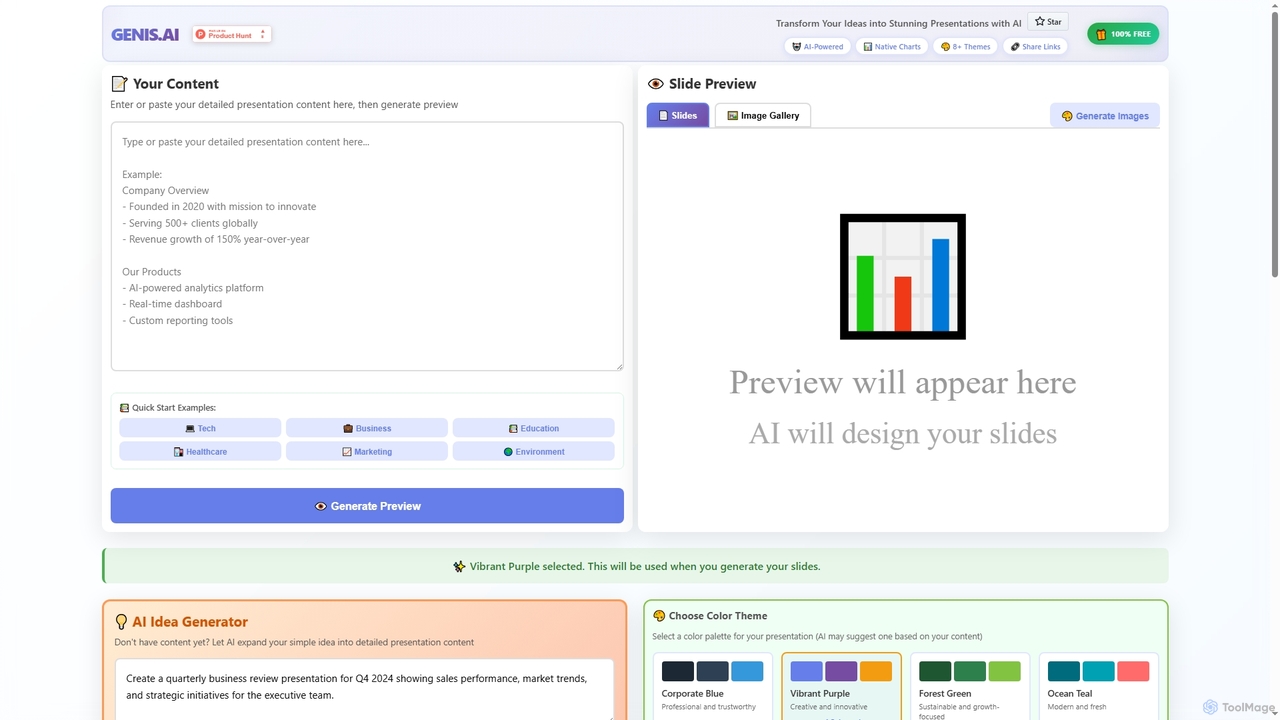
Genis is a free AI-powered presentation generator that transforms ideas and content into stunning, professional slides in seconds. It offers native charts, diverse themes, and flexible AI model integration, including free access to Amazon Bedrock, making high-quality presentation creation accessible to everyone.

Data Visualization
Visits 7.5KFavorites 126Likes 141

About Slide Creation

Slide Creation AI tools are designed to automate and enhance the process of generating professional presentations. Leveraging natural language processing and computer vision, these tools can interpret user prompts, structure content, and apply design principles. They significantly reduce the time and effort required to build compelling slides for business meetings, educational lectures, or marketing pitches. From initial outline generation to visual refinement, AI assists in every step, ensuring consistency and visual appeal.

Core Features

  • Content Generation: Automatically drafts text for slides based on topics or outlines provided by the user.
  • Layout & Design Suggestions: Proposes visually appealing slide layouts, design themes, and color palettes.
  • Image & Icon Integration: Searches and inserts relevant images, icons, and multimedia from vast libraries.
  • Data Visualization: Transforms raw data into clear, engaging charts, graphs, and infographics.
  • Text Summarization & Refinement: Condenses lengthy text into concise bullet points and improves linguistic clarity.

Applicable Scenarios

These tools are invaluable for business professionals needing to create pitch decks or quarterly reports, educators and students generating lecture materials or study guides, and marketers designing engaging product launches or campaign summaries. They streamline workflows where visual communication is critical but time is limited.

How to Choose

When selecting a Slide Creation AI tool, consider its content generation accuracy in understanding prompts and drafting relevant text. Evaluate the design customization options for flexibility in adjusting themes, fonts, and colors to match branding. Check for integration capabilities with data sources, cloud storage, or other presentation software. Finally, assess the ease of use and learning curve for quick adoption and efficient workflow.

Slide Creation use cases

1

Automate Business Pitch Deck Creation

Entrepreneurs and sales teams can input their business idea, market analysis, and financial projections. AI tools then automatically structure the content, suggest compelling visuals, and format the slides into a professional pitch deck, saving hours of manual design and content drafting, enabling faster outreach to investors or clients.

2

Rapid Development of Educational Lecture Slides

Educators can provide a lecture topic or curriculum outline. The AI tool generates comprehensive slides with key points, definitions, and relevant images. This allows teachers to focus more on content delivery and less on the tedious process of slide formatting and visual selection, enhancing learning engagement.

3

Designing Marketing Campaign Presentations

Marketing professionals can input campaign goals, target audience, and performance data. AI tools help in crafting visually appealing presentations that highlight key metrics, showcase creative assets, and outline future strategies, ensuring consistent branding and impactful storytelling across various channels.

4

Summarizing Reports into Presentation Format

Analysts and managers often need to condense lengthy reports into concise presentations. AI slide creation tools can ingest a full report, identify key findings, and automatically generate a summary presentation with data visualizations, making complex information digestible for stakeholders and decision-makers.

5

Personalizing Client Proposal Presentations

Consultants and service providers can use AI to quickly adapt a standard proposal template to specific client needs. By inputting client details and project scope, the AI can tailor content, adjust visuals, and ensure the proposal resonates directly with the prospective client, enhancing engagement and increasing conversion rates.

6

Creating Visuals for Social Media Content

Content creators and social media managers can leverage AI slide tools to quickly produce visually appealing slides for carousels or short video presentations on platforms like Instagram or TikTok. The AI assists in selecting trending layouts, fonts, and graphics that align with current social media aesthetics, boosting engagement and brand visibility.

Slide Creation FAQ

What are AI Slide Creation tools?

AI Slide Creation tools are software applications that use artificial intelligence to assist in or fully automate the process of generating presentation slides. They leverage technologies like natural language processing (NLP) for content generation and computer vision for design and layout suggestions, significantly streamlining the creation of professional presentations.

How do AI tools enhance presentation design?

AI tools enhance presentation design by offering automated layout suggestions, recommending appropriate visual elements (images, icons, charts), and ensuring design consistency across slides. They can analyze content to suggest optimal visual representations, apply brand guidelines, and even refine text for clarity and impact, making presentations more visually appealing and effective with less manual effort.

What are the main benefits of using AI for slide creation?

The main benefits include significant time savings by automating content drafting and design, improved design quality and consistency, and enhanced creativity through AI-suggested ideas. Users can focus on the core message while the AI handles the visual and structural aspects, leading to more professional and impactful presentations with less effort and a faster turnaround time.

How do AI Slide Creation tools differ from traditional presentation software?

Traditional software like PowerPoint or Google Slides provides a blank canvas and manual controls, requiring users to design everything from scratch. AI Slide Creation tools, however, actively assist by generating content, suggesting designs, and automating tasks based on user input, transforming the process from manual creation to AI-guided generation and refinement, making it faster and more efficient.

Can AI Slide Creation tools integrate with other platforms?

Many AI Slide Creation tools offer integration capabilities with popular platforms. This often includes importing data from spreadsheets (e.g., Google Sheets, Excel) for data visualization, connecting to cloud storage services (e.g., Google Drive, Dropbox) for asset management, and sometimes exporting to standard presentation formats (e.g., PPTX, PDF) for compatibility with traditional software, enhancing workflow flexibility.