ToolMage
Sign in

Best 7 Document Processing AI tools for Data

Popular Document Processing AI tools in Data include Casca, Indico Data, Nventr, Totoy, BringTable, AI4BD, and Neural Wave, helping you work more efficiently.

Nventr
Paid

Nventr

Nventr is an enterprise-ready AI platform for intelligent automation. It unifies AI agents, machine learning models, and business logic into scalable, end-to-end workflows. Specializing in Intelligent Document Processing (IDP), predictive analytics, and fraud detection, it empowers businesses to transform complex operations and drive efficiency.

Workflow Automation
Visits 8.4KFavorites 119Likes 122
Neural Wave

Neural Wave

Neural Wave is an AI-powered platform for healthcare providers that automates non-billable administrative tasks. It intelligently analyzes lab results, imaging reports, and clinical documents, extracting key insights, detecting abnormalities, and generating summaries to save clinicians time, reduce errors, and enhance patient care.

Document Processing
Visits 6.2KFavorites 157Likes 156
Casca
Paid

Casca

Casca is an AI-powered lending platform designed for banks and financial institutions to modernize their business loan origination process. It automates underwriting, document analysis, and applicant communication, significantly reducing manual effort and loan cycle times while increasing conversion rates.

Financial Services
Visits 21.8KFavorites 152Likes 131
Indico Data
Paid

Indico Data

Indico Data is an enterprise AI platform specializing in Agentic Decisioning. It automates and enhances complex decision-making processes by transforming unstructured data from documents, emails, and images into actionable, structured outcomes. Ideal for industries like insurance and finance, it streamlines workflows, reduces manual effort, and improves operational efficiency.

Data Analysis
Visits 17KFavorites 120Likes 112
Totoy
Paid

Totoy

Totoy provides custom AI solutions for businesses to automate processes and improve efficiency. Specializing in high-compliance environments, they offer services from potential analysis workshops to full implementation of AI systems for document management, customer support, quality control, and more. Their solutions are GDPR and AI-Act compliant, developed and hosted in the EU.

Ai Consulting
Visits 6.9KFavorites 132Likes 107
BringTable
Freemium

BringTable

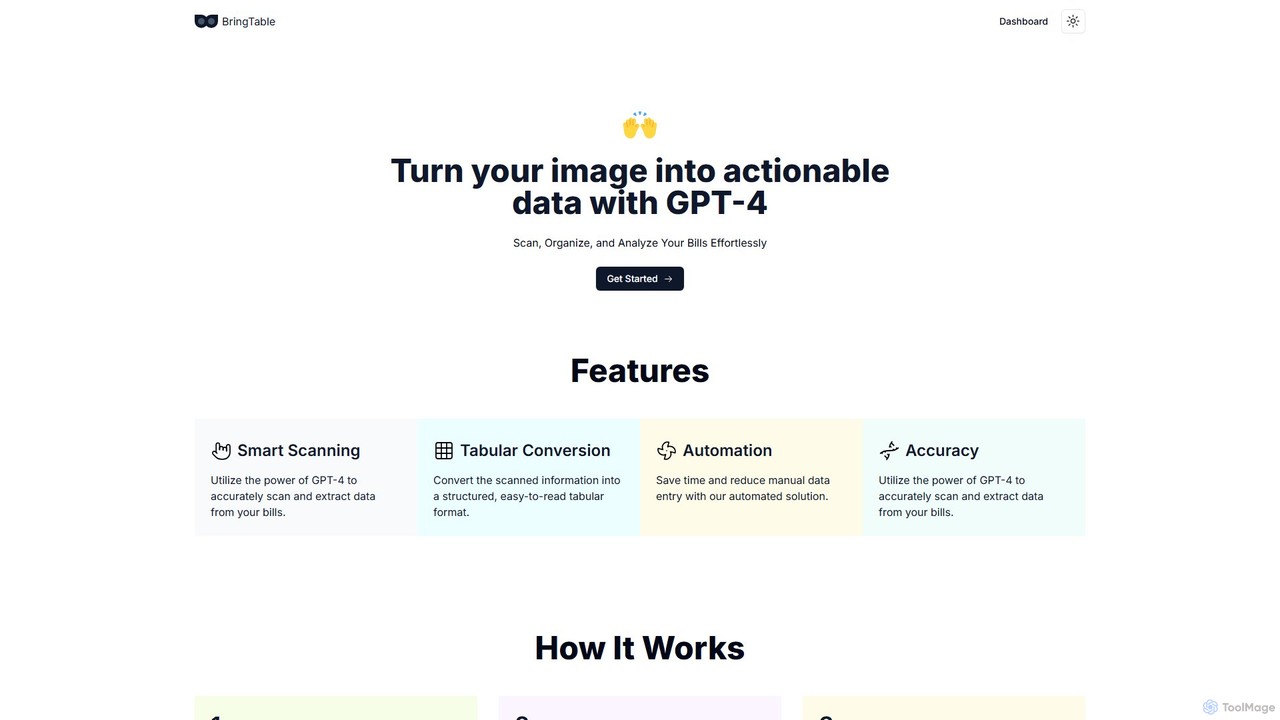
BringTable is an AI-powered tool that leverages GPT-4 to scan bills, invoices, and receipts, automatically extracting data and converting it into structured, actionable tables. Effortlessly organize and analyze your financial documents, saving time and eliminating manual data entry.

Document Processing
Visits 6.4KFavorites 154Likes 139
AI4BD
Paid

AI4BD

AI4BD provides a modular Cognitive Business Robotics (CBR) software platform for enterprises. It automates monotonous tasks through AI-powered solutions for document processing, smart maintenance, and master data management. Designed for seamless integration, it helps businesses of all sizes optimize workflows, increase efficiency, and make data-driven decisions without requiring specialized AI expertise.

Process Automation
Visits 6.4KFavorites 126Likes 142

About Document Processing

Document Processing AI tools are designed to automate the extraction, analysis, and management of information from various document formats. Leveraging advanced AI, including natural language processing (NLP) and computer vision, these tools transform unstructured data into actionable insights. They streamline workflows by intelligently categorizing, summarizing, and validating content, significantly enhancing efficiency in data handling and decision-making within the broader 'Data' category. This automation reduces manual effort and improves accuracy across diverse industries.

Core Features

  • Data Extraction: Automatically identify and pull specific information (e.g., names, dates, amounts) from documents.
  • Document Classification: Categorize documents based on content, type, or predefined rules.
  • Optical Character Recognition (OCR): Convert scanned images or PDFs into editable and searchable text.
  • Semantic Search: Enable intelligent search within document repositories, understanding context and intent.
  • Automated Summarization: Generate concise summaries of lengthy documents, highlighting key information.

Use Cases

These tools are essential for legal firms handling large case files, financial institutions processing loan applications, and healthcare providers managing patient records. They also benefit businesses in automating invoice processing, contract analysis, and compliance checks, turning vast amounts of textual data into structured, usable information.

How to Choose

When selecting a Document Processing AI tool, consider its accuracy in data extraction, support for various document formats (PDF, images, handwritten), integration capabilities with existing systems, and scalability for your data volume. Evaluate its natural language processing capabilities for nuanced understanding and ensure robust security features for sensitive information.

Document Processing use cases

1

Automating Invoice and Receipt Processing

Finance departments can utilize AI document processing tools to automatically extract key data like vendor names, amounts, dates, and line items from invoices and receipts. This eliminates manual data entry, accelerates reconciliation, and reduces errors, allowing staff to focus on strategic financial analysis rather than repetitive tasks.

2

Streamlining Legal Contract Review

Legal professionals can employ these tools to rapidly analyze large volumes of contracts, identifying specific clauses, terms, and potential risks. AI can highlight discrepancies, ensure compliance with regulations, and extract critical information for due diligence, significantly speeding up review cycles and reducing human oversight errors.

3

Enhancing Customer Onboarding with ID Verification

Financial services and online platforms can use AI document processing for automated identity verification. By scanning and extracting data from passports, driver's licenses, and other ID documents, these tools can authenticate identities, detect fraud, and streamline the customer onboarding process, ensuring compliance and security.

4

Efficient Management of Patient Medical Records

Healthcare providers can leverage AI to process and organize vast amounts of unstructured patient data from medical reports, lab results, and doctor's notes. These tools extract relevant symptoms, diagnoses, and treatment plans, enabling faster access to critical information, improving diagnostic accuracy, and supporting personalized patient care.

5

Automating Research Paper Analysis and Summarization

Researchers and academics can use document processing AI to quickly sift through extensive scientific literature, extracting key findings, methodologies, and conclusions. The tools can summarize complex papers, identify relevant citations, and help synthesize information from multiple sources, accelerating literature reviews and knowledge discovery.

6

Digitalizing and Indexing Archival Documents

Organizations with large physical archives can utilize AI document processing to convert scanned historical documents, manuscripts, or blueprints into searchable digital formats. OCR technology combined with intelligent indexing allows for easy retrieval of information, preserving valuable data and making it accessible for future reference and analysis.

Document Processing FAQ

What are AI Document Processing tools?

AI Document Processing tools are software applications that use artificial intelligence, primarily natural language processing (NLP) and computer vision, to automatically understand, extract, categorize, and manage information from various document types. Unlike traditional rule-based systems, they can handle unstructured and semi-structured data, learning from patterns to improve accuracy over time. Their core purpose is to automate manual data entry, enhance data quality, and accelerate information retrieval from documents like invoices, contracts, and reports.

How do AI Document Processing tools differ from general data extraction software?

While general data extraction software often relies on predefined templates or rules to pull information, AI Document Processing tools use intelligent algorithms to understand the context and meaning within documents, even if the layout varies. They can adapt to new document types, handle handwriting, and extract data from complex, unstructured text without explicit programming for each field, offering greater flexibility and accuracy than traditional methods.

What are the key benefits of using AI for document processing?

The primary benefits include significant time and cost savings by automating repetitive manual tasks like data entry and verification. These tools drastically reduce human error, leading to higher data accuracy and improved compliance. They also accelerate business processes, such as customer onboarding or invoice processing, and enable better decision-making by transforming vast amounts of document data into structured, actionable insights.

What types of documents can AI Document Processing tools handle?

AI Document Processing tools are highly versatile and can handle a wide range of document types. This includes structured documents like forms and surveys, semi-structured documents such as invoices, purchase orders, and receipts, and unstructured documents like contracts, legal briefs, medical reports, emails, and research papers. They can process various formats, including PDFs, scanned images, and even handwritten notes, converting them into searchable and editable data.

How can I choose the best AI Document Processing tool for my business?

To choose the best tool, first assess your specific needs: what document types do you process, what data needs extraction, and what is your volume? Look for tools with high accuracy in OCR and data extraction, robust integration capabilities with your existing systems (e.g., ERP, CRM), and strong security features for sensitive data. Consider scalability, ease of use, and the vendor's support and training options. A trial period can also help evaluate its performance with your actual documents.

What are the common challenges in document processing and how does AI help?

Common challenges include manual data entry errors, slow processing times, difficulty in handling diverse document formats, and the high cost of human labor. AI document processing addresses these by automating data extraction with high accuracy, significantly speeding up workflows, and adapting to various document layouts and types through machine learning. This reduces operational costs, minimizes human error, and frees up staff for more strategic tasks, transforming inefficient processes into streamlined, intelligent operations.