ToolMage
Sign in

Best 1 Interface Enhancement AI tools for Productivity

Popular Interface Enhancement AI tools in Productivity include ChatGPT Widescreen Mode, helping you work more efficiently.

ChatGPT Widescreen Mode
Free

ChatGPT Widescreen Mode

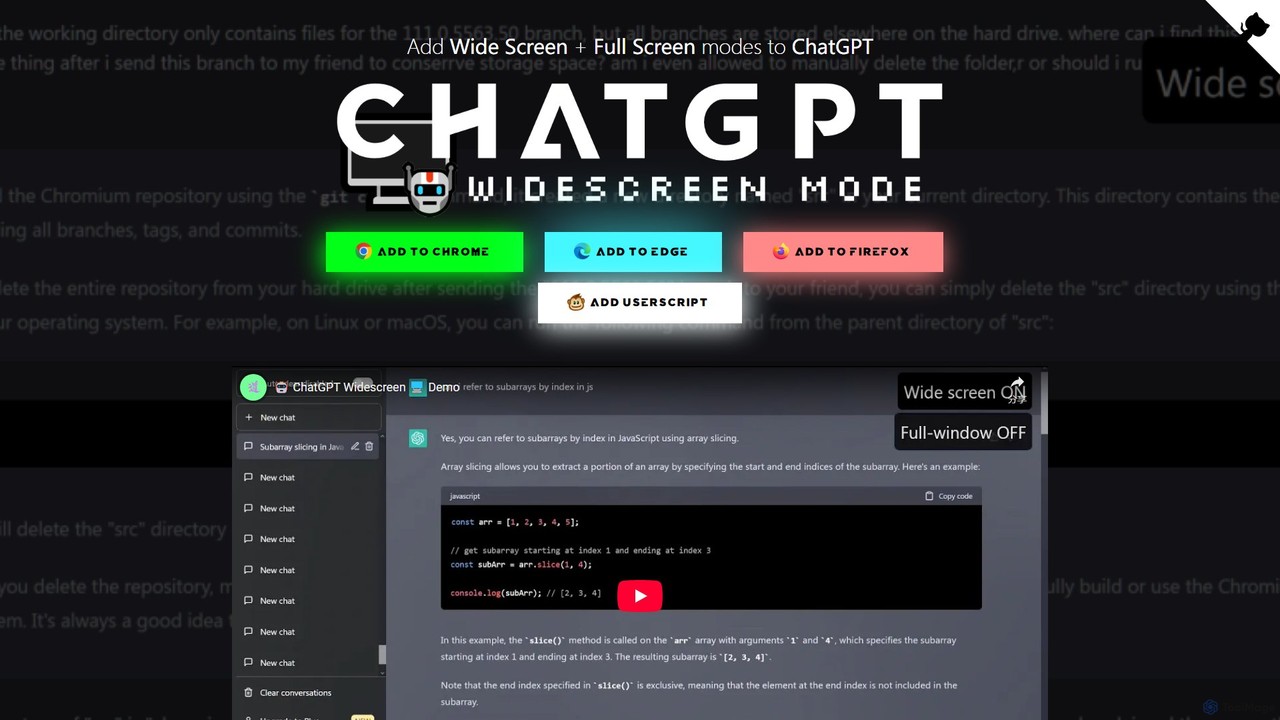
A free browser extension that adds Widescreen and Fullscreen modes to the ChatGPT interface. It enhances readability and productivity by utilizing your entire screen space, perfect for viewing code, writing long texts, and analyzing data.

Code Assistant
Visits 5.2KFavorites 113Likes 131

About Interface Enhancement

Interface Enhancement AI tools are a specialized category of AI-powered solutions designed to significantly optimize and personalize digital user interfaces (UI) and user experiences (UX). These advanced tools leverage sophisticated machine learning algorithms to analyze vast amounts of user behavior data, design patterns, and accessibility standards, enabling the creation of more intuitive, efficient, and tailored digital interactions. By automating aspects of UI/UX design, providing real-time personalization, and ensuring robust accessibility, they aim to dramatically improve user satisfaction, streamline digital workflows, and ensure digital products are accessible to a broader, more diverse audience, thereby contributing significantly to overall productivity within the digital realm.

Core Features

  • Automated UI/UX Design Suggestions: AI provides data-driven recommendations for optimal layout structures, effective color schemes, appropriate typography, and efficient component placement to enhance overall design and usability.
  • Personalized User Experiences: Tools dynamically adapt interface elements, content presentation, and navigation paths based on individual user preferences, historical interactions, and real-time behavioral patterns.
  • Accessibility Optimization: AI actively scans and identifies potential accessibility issues within digital interfaces, offering precise suggestions and automated modifications to comply with international standards like WCAG.
  • Intelligent Interaction Design: Enhances natural language processing (NLP) capabilities for conversational AI, improves predictive text input accuracy, and refines gesture recognition for more fluid and natural user interactions across devices.
  • User Behavior Analytics & Insights: Analyzes comprehensive user interaction data, including heatmaps, clickstreams, and session recordings, to pinpoint specific user pain points and suggest targeted, data-backed UI/UX improvements.

Applicable Scenarios

These sophisticated tools are invaluable for product designers, software developers, marketing professionals, and content creators who are committed to crafting highly engaging, intuitive, and user-friendly digital products. They find extensive application in diverse scenarios, ranging from dynamically optimizing e-commerce platforms to provide hyper-personalized shopping experiences for individual customers, to ensuring complex enterprise software meets the diverse needs and stringent accessibility requirements of a wide range of users. Their ability to automate iterative design processes and provide data-driven insights makes them essential for modern digital product development.

How to Choose

When selecting an Interface Enhancement AI tool, it is crucial to consider its specific core capabilities, such as its proficiency in design automation, real-time personalization, or comprehensive accessibility auditing. Evaluate its seamless integration capabilities with your existing design and development workflows, the extent of customization offered to align with your brand guidelines, and its adherence to robust data privacy and security policies. Furthermore, assess the tool's ability to provide clear, actionable insights for continuous improvement and its compatibility across your target platforms and devices.

Featured tool rankings

Interface Enhancement use cases

1

Dynamic E-commerce Product Page Personalization

An e-commerce manager uses an Interface Enhancement AI tool to dynamically adjust product page layouts, recommendation carousels, and call-to-action buttons for individual shoppers. Based on a user's browsing history, purchase patterns, and demographic data, the AI reconfigures the page in real-time, highlighting relevant products and promotions. This leads to increased engagement, higher conversion rates, and a more tailored shopping experience, significantly boosting sales efficiency.

2

Automated Accessibility Auditing for Web Applications

A web development team integrates an AI-powered interface enhancement tool into their CI/CD pipeline to automatically scan new features and updates for accessibility compliance. The AI identifies issues like insufficient color contrast, missing alt text, or improper keyboard navigation, providing specific code suggestions for remediation. This ensures that their web applications meet WCAG standards from development, reducing manual testing effort and expanding user reach.

3

AI-driven Chatbot Interface Optimization

A customer service lead employs an Interface Enhancement AI to analyze user interactions with their company's chatbot. The AI monitors conversation flows, identifies common points of confusion, and suggests improvements to the chatbot's UI elements, such as quick reply buttons, conversational prompts, and information presentation. This optimization results in more efficient customer support, reduced resolution times, and improved user satisfaction with the self-service options.

4

Personalized Dashboard Layouts for Business Intelligence

A data analyst in a large enterprise utilizes an AI interface enhancement tool to create personalized business intelligence dashboards for different departments. The AI learns each department's key performance indicators (KPIs), frequently accessed reports, and preferred data visualizations. It then automatically arranges widgets and data displays, ensuring each user sees the most relevant information immediately, thereby enhancing decision-making speed and data comprehension.

5

Adaptive Mobile App Navigation

A mobile app product manager implements an Interface Enhancement AI to make their application's navigation more intuitive. The AI observes individual user behavior within the app, such as frequently visited sections and common task flows. It then dynamically reorders menu items, highlights popular features, or even suggests shortcuts, adapting the app's navigation to each user's unique habits. This leads to a smoother user journey and increased feature adoption.

6

Automated A/B Testing for UI Elements

A marketing specialist uses an AI-driven interface enhancement platform to conduct rapid A/B tests on various UI elements of a landing page. The AI automatically generates multiple variations of headlines, button texts, image placements, and form designs. It then intelligently distributes traffic, monitors user engagement metrics, and identifies the most effective design combination without extensive manual setup, accelerating optimization cycles and improving campaign performance.

Interface Enhancement FAQ

What are Interface Enhancement AI tools?

Interface Enhancement AI tools are software solutions that use artificial intelligence to improve the design, functionality, and user experience of digital interfaces. They leverage machine learning to analyze user data, automate design processes, personalize content, and optimize accessibility. These tools aim to make digital products more intuitive, efficient, and enjoyable for users, ultimately boosting productivity and user satisfaction.

How do AI tools enhance user interfaces?

AI tools enhance user interfaces through several mechanisms. They can automate repetitive design tasks, provide data-driven design recommendations based on user behavior analytics, and dynamically personalize interfaces to individual preferences. Furthermore, AI can identify and suggest fixes for accessibility issues, optimize interaction flows (e.g., in chatbots), and predict user needs to proactively adapt the UI, making interactions more seamless and effective.

What are the key benefits of using AI for interface enhancement?

The key benefits include significantly improved user satisfaction due to more intuitive and personalized experiences, increased operational efficiency by automating design and testing processes, and enhanced accessibility for a wider user base. AI-driven insights lead to data-backed design decisions, reducing guesswork and accelerating product iteration cycles. This results in higher conversion rates, reduced support costs, and a stronger competitive advantage.

How do Interface Enhancement tools differ from traditional UI/UX design software?

Traditional UI/UX design software (like Figma or Sketch) provides manual tools for designers to create interfaces. Interface Enhancement AI tools, however, go beyond manual creation by introducing automation, intelligence, and personalization. They can generate design suggestions, analyze user data to predict optimal layouts, and adapt interfaces in real-time, capabilities that traditional software lacks. While traditional tools are for creation, AI tools are for intelligent optimization and adaptation.

What should I consider when choosing an Interface Enhancement AI tool?

When selecting an Interface Enhancement AI tool, consider its specific features, such as its ability to personalize, automate design, or audit accessibility. Evaluate its compatibility with your existing tech stack and design tools, the level of customization it offers, and its data privacy and security protocols. Also, assess the quality of its AI models, the clarity of its insights, and the scalability of its solutions to meet your evolving needs.