Productivity Best in category 3 results Music AI Tool

Popular AI tools in the Music field of Productivity include eMastered、AnthemScore、SplitJoin, etc., helping you quickly improve efficiency.

SplitJoin

SplitJoin

SplitJoin is an AI-powered audio processing tool designed for musicians, producers, and content creators. It allows users to …

3.1K
eMastered

eMastered

eMastered is an AI-powered online audio mastering platform developed by Grammy-winning engineers. It instantly enhances your tracks to …

617.5K
AnthemScore

AnthemScore

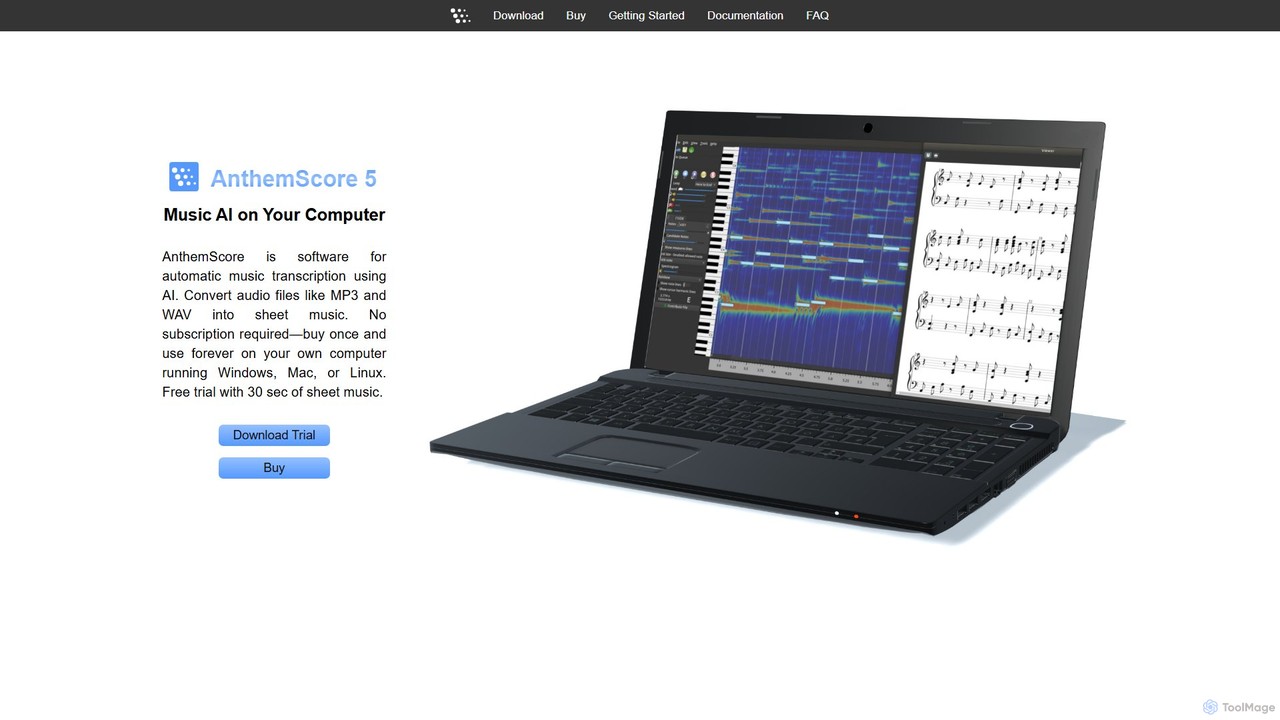
AnthemScore is an AI-powered desktop application for automatic music transcription. It converts audio files like MP3 and WAV …

86.0K

About Music

AI Music tools are a class of software that use artificial intelligence to generate, compose, master, or transform musical content. These tools leverage deep learning models to understand musical patterns and styles, enabling the creation of original melodies, harmonies, and rhythms from simple inputs. They provide powerful solutions for musicians seeking inspiration, content creators needing royalty-free tracks, and producers looking to accelerate their workflow. By automating complex tasks like stem separation or mastering, these tools significantly enhance creative productivity in music production.

Core Features

  • AI Music Generation: Create original melodies, chord progressions, and full tracks from text prompts or style inputs.
  • Stem Separation: Isolate specific instruments or vocals (stems) from a mixed audio track with high fidelity.
  • Automated Mastering: Analyze and optimize a final mix for loudness, clarity, and balance to meet commercial standards.
  • Voice Synthesis & Conversion: Generate realistic singing voices from text or transform the style of an existing vocal recording.
  • Music Transcription: Convert audio recordings of music into editable MIDI data or sheet music notation automatically.

Use Cases

These tools are widely used by content creators for generating custom, royalty-free background music for videos, podcasts, and games. Music producers and songwriters use them for rapid idea prototyping and overcoming creative blocks. DJs and remix artists leverage stem separation to create unique mashups and remixes that were previously difficult to achieve.

How to Choose

When selecting an AI Music tool, first identify your primary need, such as generation, mastering, or separation. Evaluate the quality and stylistic range of the AI's output by listening to demos. Consider its integration capabilities, like VST plugin support or API access for developers. Finally, assess the pricing model and the licensing terms for the generated music to ensure they align with your project's requirements.

MusicUse Cases

1

Generating Royalty-Free Background Music

A video creator needs unique background music for a YouTube series without risking copyright claims. They use an AI music generator, inputting a prompt like 'upbeat, corporate, electronic, no vocals' and setting the duration to two minutes. Within moments, the tool generates several high-quality, royalty-free tracks. This allows the creator to select the perfect fit, saving hours of searching stock music libraries and completely avoiding complex licensing fees, ensuring their content is monetizable and safe.

2

Rapid Songwriting and Idea Prototyping

A music producer is experiencing writer's block while working on a new track. To find inspiration, they input a simple four-chord progression into an AI music tool. The AI instantly generates multiple variations, including different basslines, drum patterns, and melodic hooks in various styles. The producer can then audition these ideas, select the most promising elements, and export them as MIDI files to their digital audio workstation. This process transforms a creative standstill into a productive session, providing a solid foundation for the new song in under an hour.

3

Creating Remixes with Stem Separation

A DJ wants to create a unique remix of a classic pop song for their live set. Traditionally, obtaining a clean acapella (isolated vocal track) would be nearly impossible. By uploading the full song into an AI stem separation tool, the DJ receives separate audio files for vocals, drums, bass, and other instruments within minutes. They can then use the isolated vocal track over a new instrumental beat they've produced, giving a well-known song a fresh, modern twist. This technology opens up creative possibilities for remixing that were previously only available to major label producers.

4

Automated Audio Mastering for Independent Artists

An independent musician has finished mixing their new single in a home studio but lacks the budget for a professional mastering engineer. They upload their final mix to an AI mastering service. The AI analyzes the track's dynamics and frequency spectrum, then applies precise equalization, compression, and limiting. The artist can choose from different mastering styles (e.g., 'Warm' or 'Punchy') and receives a polished, commercially competitive master file ready for distribution on Spotify and Apple Music. This provides access to high-quality mastering at a fraction of the traditional cost.

5

Generating Vocal Lines for Electronic Music

An electronic music producer needs a catchy vocal hook for a dance track but is not a singer and doesn't have a budget to hire one. They use an AI voice synthesis tool, type in the desired lyrics, and select a vocal style like 'female, pop, breathy'. The tool generates a sung vocal line which can be tuned and processed further. The producer can experiment with different lyrics, melodies, and vocal timbres instantly. This allows them to add a unique and professional-sounding vocal element to their track, maintaining full creative control without the logistical challenges of recording a human vocalist.

6

Transcribing Solos for Music Education

A music student wants to learn a complex jazz piano solo from a recording. Transcribing it by ear is time-consuming and difficult. The student uploads the audio file to an AI music transcription tool. The software analyzes the pitches and rhythms, converting the solo into an accurate MIDI file. The student can then import this MIDI file into notation software to see the sheet music, slow down the tempo for practice, and analyze the harmonic choices of the performer. This accelerates the learning process and provides deeper insight into the music.

MusicFrequently Asked Questions